• Photography
  • Interviews
  • Business
  • Reviews

Tiffinbox

Inspiring Photographers

  • Home
  • About
  • Blog
  • Contact

How Photogs Can Work Smarter, Not Harder

June 4, 2012 by Angela Pointon

Angela Pointon loves creative people. She studied photography, but had a love affair with business and marketing in graduate school. She decided to combine all of it together when she started Steel Toe Images. She inspires photographers and other creative people to kick major butt through her consulting sessions, blog, emails, workshops and her first book (coming soon), called “A Swift Kick In The Pants: Business Smarts For Us Creative Types.” Angela resides just outside Philadelphia. She lives with her amazing architect husband and their two small boys. All of them are vegetarian (yay!), and they rock out to fantastically awesome music from time-to-time (especially on Friday nights).

If your photography business is like most, there is seasonality to it. Meaning, when it rains it pours and when it’s dry it’s a desert.

I know many of you are in your busy season now. Clients are calling, you’re spazzing, you need sleep, you’ve got too much to do.

The great news is: you can bring sanity to every season – busy or slow. How?

You need to create three lists.

Angela Pointon | Making Lists

I don’t care if your lists are on a blackboard, a scratch pad or in a fancy color-coded excel file… but they have to be written down. This is important. Lists DON’T WORK if they’re in your head. As brilliantly creative as you are, you cannot keep an organized, separated set of three lists in that pretty little head of yours.

So once you figure out where you’re gonna store these lists, you need to create them. The good news is it’s super quick to do.

Listen up.

List #1: What I have to accomplish this week.

Every Monday morning you’re going to spend 15 minutes creating a list of what you HAVE to do that week. You’re going to write approximate time lengths next to each task so that you know how many hours of work you have ahead of you for that week. Add the hours up and make sure it isn’t going to kill you. If it is, see what makes sense to push to next week (or get some help… or a cloning machine).

List #2: What I have to accomplish today.

Each and every morning of the week you’re going to spend 5 minutes creating your list of what you HAVE to accomplish that day. In creating this daily list, you’re taking tasks off of your weekly list and you’re putting them on your to-do list for the day. Your weekly list is becoming shorter day-by-day. How delightful!

List #3: What I have to accomplish when I’m slow.

As you’re driving, in the shower, walking the aisles of the grocery store or talking to friends, you’re always coming up with “wouldn’t it be cool if” ideas of pure fabulousness. Don’t let these sparks of brilliance become dim and never see the light of day. Instead, put them on your “slow time” list so that you can refer to them as business is becoming slower. You can proactively plan to tackle these awesome ideas (using List #1 and List #2 in the same ways) when you have some spare time. Never again will you be waiting for the phone to ring, getting worried and depressed. Instead, you’ll be rocking out by creating something awesome that you thought of to improve your business, your brand, your photos, your service or whatever!

Now look at you! What an awesomely organized and well-managed person you’ve become. All with three simple little lists.

Filed Under: Business, Photography Tagged With: angela pointon, create listing, human interest, listing, management, organize, personal life, photographer, Photographers, planning, smart, stay organized, steel toe, time management, work

Keep A Work Log, Your Life Will Thank You

June 20, 2011 by Jocelyn Mathewes

Today's guest blog post is by Jocelyn Mathewes, a wedding and lifestyle photographer who works in both Boston and Baltimore. Given that it is a Monday and the start to your work-week, I figured her topic was highly appropriate. Follow her on Twitter and read her blog.

It's happened so often now, I've finally taken the time to listen: when folks look over my shoulder and see me taking notes, or have a chance to glance at my work notebook, they all say the same two things: “My, you're organized!” and “I love your handwriting!”

Handwriting and Notes

Yes, it's important to be organized (and there are several wonderful resources you should make use of below), but I'm here to tell you one thing that will be utterly amazing if you don't do it already…

Keep Track of Your Time

Much like the way financial advisers tell you to track every penny so you know where you're spending your money, track every minute of your work so you know where you're spending your time.

When I worked as a graphic designer in-house at a non-profit, I had to keep detailed records of all my activities and projects we worked on. The design department didn't really have a budget on its own; all of our work was funded by other peoples' budgets. When the end of the week came, we had to enter every increment bit of time we spent on a project to keep the engine going. My timesheet was a patchwork quilt of craziness!

This sounds daunting, scary, and annoying as hell, doesn't it? I'm going to tell you why it's SO IMPORTANT that you do this in your own business.

As it turns out, knowing where your time goes is an incredibly valuable thing, because it gives you feedback on how your business functions, and what (and how much) activity it involves.

I'm a mom with small children, and this is my part-time full-passion business. I know many others are in this very situation, or similarly restrictive ones. The moment they step away from the computer or return home from a shoot, they're flooded with the patter of feet, the dishes in the sink, or some party or practice to get to.

Having that restriction is a huge motivator to know where my time is going. Every minute I get to spend on my business is absolutely precious, because there's no guarantee I can make up work later in a day without sacrificing some part of my personal life or leisure. (I mean this literally! Have you seen the cost of childcare lately?)

Tracking your time reveals:

– inefficient processes that need to be refined.
– large chunks of work that could possibly be outsourced.
– repeated tasks that could be batched together for more efficiently.

Tracking your time also:

– shows what percentage of your effort going in to each area of your business.
– lets you estimate future task lengths based on past experience.

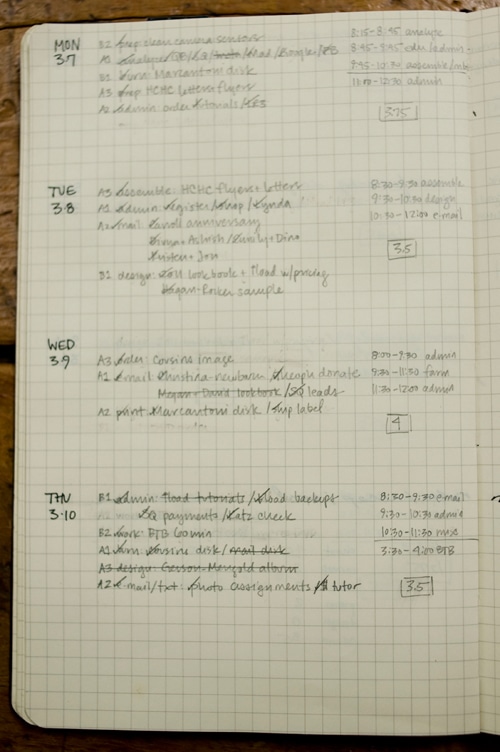
Organized Notebook Closeup

How I Do It

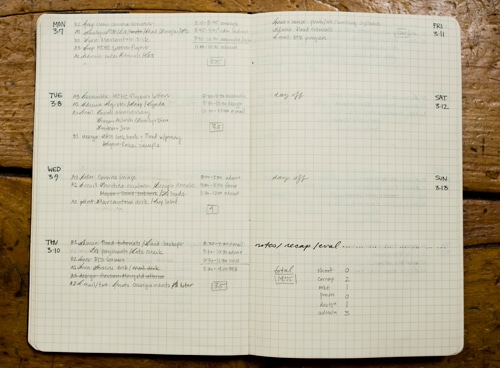
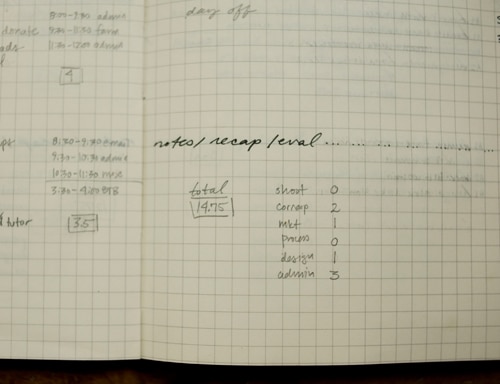
I have a notebook that I keep by my desk. Each spread is a week in my work life. Early in the week I enter in my tasks and prioritize them. As I go day by day, I write down the times I worked on certain projects, and tally the hours. I have set categories of activities that I keep track of in a separate tally.

Work Week Overview

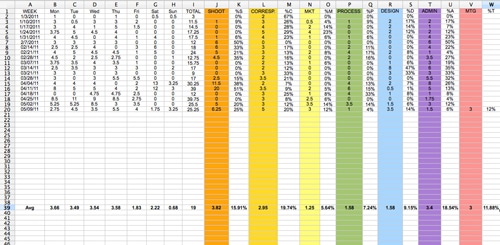
Every so often (and this isn't entirely regular), I take all these numbers and enter them into a simple Excel spreadsheet. The spreadsheet tracks number of hours worked on each of the days of the week, and the number of hours spent in particular categories I've determined are of interest to me. It then tallies the averages and spits out percentages: the heartbeat of my work.

The categories I'm interested in tracking are:

– shooting (time spent behind the camera or on my way to/from a shoot)
– editing (time spent in Lightroom or Photoshop, working on a shoot)
– correspondence (e-mail, phone calls, snail mail, and the like)
– marketing (social media time, designing marketing materials, distributing materials, and blogging)
– meetings (viewing sessions, prospective client meetings, conference calls)
– design (album designs as well as general in-house design work for my branding)
– administrative (filing, Quickbooks and accounting, analyzing my SEO, anything introspective)

Notebook Tally

Looking at all these tasks and percentages and numbers can make a person cross-eyed! But I'll tell you: it sure helps me to understand and the weeks where I worked hard and felt extra pressure, and where that pressure went (was I designing a lot, or was it a heavy shooting week?).

Also, knowing that particular kinds of activities take up a certain amount of time helps me designate days that I devote to that activity. Things that require minimal interruption (like editing and admin tasks) will happen on different days from more interruptive activities (like correspondence or social media tasks).

Worklog In Excel

If you like, feel free to download my little hackneyed spreadsheet and re-purpose it to your liking.

Of course, there are plenty of other electronic-based time tracking resources out there, but I prefer the paper version, because it forces me to take time and examine my priorities in a deliberate way. I also prefer to keep my work tasks and personal tasks in separate physical places, so that when I'm off work, I'm off work (a tough thing to do when running a business out of your home!).

Make it Yours

My system won't work for everyone, of course. The important thing I want you to take away is this: find a way to track your time. Build a system that works for you, and that gives you the insight into your activities that you need! Your life will thank you.

Productivity Resources

Making Ideas Happen
Scott Belsky of Behance.net, writes in an inspiring and clear way about what makes creative people (or teams) productive and effective.

Getting Things Done
David Allen's classic is a must-read for anyone who wants to get a little more task-oriented. Read more about it here.

43 Folders
Merlin Mann has an amazing set of articles available. Be sure to read his treatise on how to set up a “tickler file”.

Moleskine
Beautiful planners and notebooks that are just hecka fun to use.

Freckle
Time-tracking software for the iPhone and internet, also with invoicing capability (seems super useful for graphic designers).

So, tell us … do you track your time like Jocelyn? Do you have another system? What has worked for you and why?

Filed Under: Business, Photography Tagged With: notebooks, organize, own business, Photographers, Photography, profitability, profitable business, resources, spreadsheet, tracking time, work, work log

How To Organize A Portfolio Into A Hardcover Photobook

December 6, 2010 by Guest

Ingrid Spangler, AvatarThis is Ingrid Spangler's second guest blog post for Tiffinbox. She is responsible for all the social media, as well as copywriting, promotions and marketing for AdoramaPix. She has been an avid photographer from the time she was a child, and studied film at Temple University in Philadelphia, where she learned about film theory and visual aesthetics. Her first post was about finding the perfect photography printing lab.

Hardcover photo books are fast becoming the best choice to present and distribute your portfolio. It’s a more permanent way to display your images, and while that is a definite plus, it also requires much more care when organizing and designing than just slipping your prints into the plastic sleeves. There’s also something about having your images in a book that leads the viewer to believe that the images should hold together and tell a story more than a traditional portfolio.

Here’s a general portfolio tip from my buddy Joe Holmes of joe's nyc focus on one style or genre of photography that you do best, such as landscapes or street photography or portraits. You can always do separate portfolios/books for each genre.

Another tip: Don’t let the design of your book overwhelm your images. Keep it simple. This rule goes for any photo book you make, but is especially true for portfolios.

From speaking to photographers and photo editors, it seems that the general rule when organizing your images into your portfolio is “put your best images in the front and the back; make a strong first impression, then give them something to remember you by.” While you can still use this tenet to start to set up your book, what do you do with all the prints in the middle?

Here are some suggestions for how you can sequence the images to have them hold together as something cohesive.

Organize Your Images By Color

Allow the dominant color in one image to dictate what the next image will be. This is very subtle and works very well for images that are largely disparate. Take for instance these images with lots of red tones, the next images could be something with orange or deeper red as the dominant color and so on.

Keep moving through the color spectrum until you are close to the end of the book, where you’ll place your second set of strong images to leave a lasting impression on the viewer.

Red Table

Red Barn

Organize Your Images Graphically

Look for the strong, dominant lines in your images and pair them accordingly. This image with strong diagonal and horizontal lines is matched by an image with similar lines. For diagonal lines that go off the page, try as much as possible to have them point to the center of the book. This pairing also works because of the similar colors.

Boys On The Beach

Bridge

Or these circular shapes:

Guggenheim

Tunnel

*Images courtesy of Brandon Remler: Fall Trees, Boys on Beach, Bridge, Guggenheim and Tunnel. Red Table courtesy of Ingrid Spangler.

Group like with like: black and whites together, images that depict the same subject, etc.

Above all, choose a high quality lab to make your photo book portfolio! AdoramaPix photo books are printed on real photo paper, so they are the closest thing to a traditional portfolio. Unique lay-flat bindings ensure that none of your images are lost to a gutter in the center, plus you don’t have to worry about matching up halves of an image that you want to span both pages. PixPublisher, the online book creation and editing program, is easy to use and powerful, you can design your portfolio exactly the way you want, sizing and positioning your images precisely on the pages, down to the pixel!

Remember, it’s your work, don’t gamble with the presentation. You may only get one chance to impress someone, make it count!

Filed Under: Books, Photo Books, Photography Tagged With: books, digital photography, hardcover, hardcover photo book, how to organize, ingrid spangler, organize, photo books, photo editor, photobook, photograph album, Photography, physics, portfolio

Subscribe To Tiffibox Treats!

Looking for a well-curated email newsletter that will leave you inspired and motivated about your photography business? Sign up below!

About Seshu

Seshu creates relaxed portraits of families and high school seniors in Avon, Connecticut. He also leads a successful headshot photography studio in Connecticut, helping professionals from a variety of disciplines project the very best versions of themselves. He created Tiffinbox as a way of inspiring photographers, to create better images and successful businesses. [Read More]

Email Templates For Headshot Photographers

Email Templates for Headshot Photographers

Recent Posts

  • How Capture One Changed My Event Photography
  • 10 Steps To Stay Positive In Times Of Great Stress
  • Why You Need To Read “Personal Branding For Photographers” Now
  • How To Master Your Website Content Step By Step?
  • Tony Taafe’s TNT Method For Headshot Photographers

Recent Comments

  • Stephen Davison on Are You A Business Owner Who Is Smart, But Stuck?
  • Ben A. on Don Giannatti Clinches The 8th Annual Tiffinbox Award
  • Dan on Don Giannatti Clinches The 8th Annual Tiffinbox Award
  • Donald Giannatti on Don Giannatti Clinches The 8th Annual Tiffinbox Award
  • Stephen Davison on G.E. Masana’s 6 Strategies For Wedding Photography Success
  • Naveen Kumar on Weddings In India Are More Than Being At The Right Place And At The Right Time
  • kartick on Weddings In India Are More Than Being At The Right Place And At The Right Time
  • Leonid Farbman on 6 Uncommon Trends To Grow Your Photography Business
  • Willow and Finch Wedding Photography on 11 Reception Tips To Help Your Wedding Photography
  • Web Designer Malaysia on How To Optimize Your Squarespace Website For Search Engines
  • Creastan on An Interview With Photojournalist G.M.B. Akash
  • Cindy Brown | Atlanta on An Open Letter To A Local Photographer

Become a Patron!

Copyright © 2026 · Tiffinbox · Site Design by Heather Mackan Creative · Built on Genesis