• Photography
  • Interviews
  • Business
  • Reviews

Tiffinbox

Inspiring Photographers

  • Home
  • About
  • Blog
  • Contact

WordPress Plugin, NextGen Pro, Now Includes Print Fulfillment

September 11, 2019 by Seshu | Editor & Publisher

WordPress Plugins For The Win

These are truly exciting times we are living in. As professional photographer, if your website uses WordPress plugins, you are going to want to sit up and pay a little attention.

Would you like an easy and seamless way for your clients to order prints through your own website?

If you said yes, you are in the majority. With nearly 30% of all photography websites based on WordPress, the time has come to be able to fully harness the power behind the ubiquitous platform.

My friend, Scott Wyden Kivowitz, who works for Imagely just sent me an email to confirm that print fulfillment is now a reality for wedding and portrait photographers.
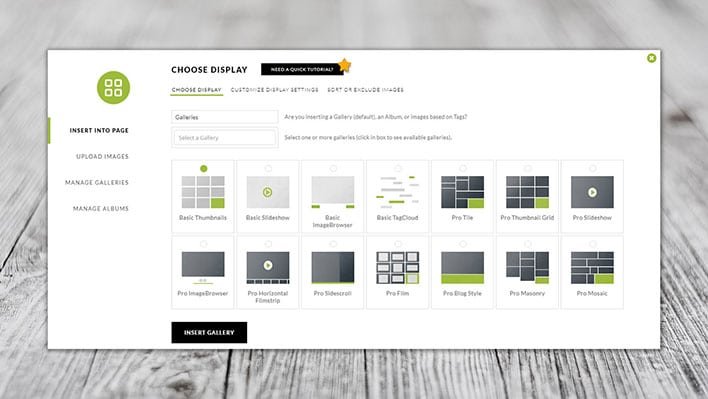
WordPress Plugin, NextGen Pro For Photographers

The Announcement

This is BIG news.

After nearly four years of development, Imagely‘s NextGen Pro WordPress plugin now will allow your clients to place print orders through your own website!

How awesome is that?

Learn more about print fulfillment via the NextGen Pro WordPress plugin.

The Interview With Scott Wyden Kivowitz

A few days before the announcement, I actually got to chat with Scott about the update to their legendary WordPress plugin. Check out that interview below:

P.S. We talk about the NextGen Pro plugin being updated “today” but it was technically launched yesterday.

More Questions

As it so happens so many times, after the interview is recorded I am reminded of some questions that forgot to ask Scott. He was very kind to respond. I'm sure site speed and plugin reliability are your concerns as well. Here is what he had to say about both of those topics:

WordPress, including themes and plugins, can have security issues. But so do Google, Apple, Squarespace and every other software company out there. You don’t hear about most of them. WordPress security issues come up so often because it’s easy to attack open-source software, used by 30% of the Internet. Even Microsoft had 529 vulnerabilities in 2019 alone which are individually listed here. Apple had 229.

With that said, my suggestion is to use themes and plugins from reputable companies. These are companies who update their products often for compatibility with constant changes in technology. But also companies who are updating their products, fast, to solve any security issues that may arise.

I’d recommend hosting with companies who keep their servers up to date and WordPress up to date. For example, hosts that use PHP version 5.2 and older are vulnerable to security holes not visible in PHP version 7.2 or above. So you can clog leaks by merely keeping the server up to date, which has nothing to do with WordPress.

In addition to updates, you can identify reputable companies by how active they are responding to social posts, how active they are in public forums, how they’re reviewed regularly, and so on.

Imagely's NextGen Pro
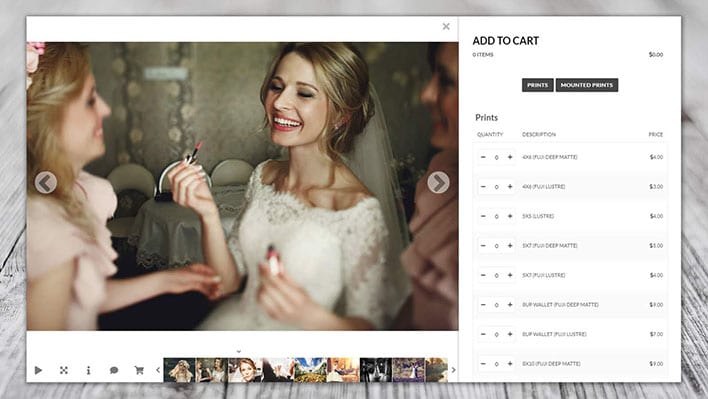
NextGen Pro, WordPress Plugin For Photographers

So, there you have it. Will you be updating your WordPress plugins to include NextGen Pro? How do you think your clients are going to react when they are able to book a session AND order their prints through your site?

While right now the only lab onboard to work with NextGen Pro is WHCC, that is likely to change as more labs are integrated in the system. Which professional labs would you like to see work with this application?

If you are handy with WordPress (and even if you are not, the folks at Imagely will help you out), I hope you will consider this WordPress plugin.

Filed Under: Home Middle Right, Photography, Web/Tech Tagged With: for clients, for photographers, Imagely, NextGen Pro, photographic printing, print fulfillment, print orders, seamless platform, wordpress plugin

A Review Of Acrylic Print Panels From Pictage

October 24, 2011 by Seshu | Editor & Publisher

Let me start with two very public disclosures – 1) I received a 24×36 Acrylic print of one of my own images from Pictage to help in this review and 2) I simply love it.

Here is the image I submitted to Pictage (I shot this at The Westin Boston Waterfront, when I worked with Nabil Kapasi):

Indian Wedding At The Westin In Boston

I am sure you are wondering why I feel so passionately about this one product. I recall hearing a photographer at Mystic Seminars say that if you want to stand out in the crowd, you've got to offer unique products to your clients. Well, let me tell you, these Acrylic prints will definitely be something I offer to my clients moving forward because the sample I received is STUNNING.

The combination of extremely clear and flawless elements and ultra smooth (transparent) finish sets these materials apart from more common Acrylic materials. The material, I am told, is extremely hard and is therefore difficult to scratch. (but not impossible). The edges are flame polished (melted if you will), to a smooth, safe, finish. It may take some knocks but why experiment, eh?

From Pictage's CEO, Jim Collins:

“The print affixed to the acrylic panel is not a silver halide photographic print. It is a giclee’ print quite similar to a fine art print. (just on different paper). As you are probably already aware, this process yields a print that carries intense colors, blacks and contrasts and this is responsible for some of the increase in detail that you can see in the print.

The acrylic serves two purposes. I guess you could say it’s not just a pretty face. The first purpose is obvious. Sex appeal. This is a very cool way to package a keepsake.  The second purpose may also be obvious to photographers, but I’m finding that this isn’t necessarily the case. In much the same fashion as a glass globe intensifies the output of a candle the acrylic actually intensifies the brightness of the print. The clear surface gathers light. This is one of the reasons why you really can’t take your eyes off of your new acrylic. That effect almost makes you want to study every detail in greater degrees.”  

Pictage Acrylic Panel Sample - Indian Wedding At The Westin Boston Waterfront

No doubt this is a premium product and it comes at what I would consider a very respectable wholesale starting price that Pictage has brokered for wedding and portrait photographers.

Acrylic pricing for photographers starts at $84.50 for a 12X18 (the smallest available size), and climbs to about $750 for a 40X60. Interestingly, due to the giclee’ process, images can be printed at significantly larger sizes than traditional photographic prints, so stunning clarity even at Wall Covering size is possible. This will be evident in the two 40X60 panels Pictage will have on display at PartnerCon. Square and panorama formats will also available.

Photographers interested in these Acrylic prints will have to become a member of Pictage.

These prints become available first to photographers via their wholesale catalogs and Direct Order Tool or DOT, and then to consumers via photographer opt in. Most photographers who have an account with Pictage would do well to offer these prints to their clients because I know they will love them.

The Acrylic panel I received has a “museum” or “gallery” mount, with aluminum studs. See the image below. The other hanging option will be a recessed standout frame. Personally, I prefer the museum mount due to its look and feel.

Acrylic Panel By Pictage - Museum Mount

I was going to post a video review of this product, including clips of me opening the box and picking my jaw off the ground when I saw how beautiful this print looks. I can't wait to install it on my home studio wall and show it off to my wedding clients. The Acrylic panel print from Pictage will complement my other product offerings like hand-made albums and museum quality canvases from the finest vendors in the world. And Pictage, I am told has other very interesting products launching soon. So, stay tuned and hopefully I'll get to review them as well!

Tell me below what marquee product or service you offer to stand out in the crowd? Has it helped your business? How?

Filed Under: Marketing, Photography Tagged With: acrylic, acrylic materials, acrylic panels, canvas, fine art prints, giclee printing, indian wedding, panels, photographic printing, pictage, print, printed panel, printing, printmaking, review, san diego, visual arts

4×6 Print, $6 Or $60, Who’s Right?

December 20, 2010 by Seshu

Fundy, AvatarThis is a guest post by Andrew “Fundy” Funderburg, the creator of the Fundy Album Builder and Fundy Album Proofer. Please check out the free trials available at http://www.fundysos.com. If you were looking to design albums yourselves, I highly recommend Fundy's products.

I've seen many forum posts on pricing prints for photographers and they usually all end badly. There are those that defend the high price points due to labor, business costs and what the market will bear. And those defending the low end price points, focus on auto-fulfillment, and what the market is willing to pay.

So who's right? Well the answer is simple, both price points are correct?

How can this be? Well, ‘correct' pricing is based only on two things.

1. What the market is willing to pay for something.
2. That a price is profitable according to retail pricing rules.

Let's take a closer look. It's pretty easy to find out if people are willing to pay a certain price for something. You simply throw it out there in the marketplace and if people pay money for it, then it is a viable price. You can move the price point up and down. When it goes down, more people buy it, when it goes up fewer people buy it. Pretty soon, you find the happy price point, quite a few buyers at a profitable price point.

What is profitable? Well, according to the Professional Photographers Association of America, you'll want to have at least a 35% cost of goods mark up to be profitable – that is, pay your bills, run a profit and grow your business. A 35% cost of goods, simply means that for every $1.00 you make, it costs you 0.35¢. If you sell ice cream on the street corner, and you buy it for 0.35¢ and sell it for $1.00, then you have a 35% cost of goods.

To get retail pricing of goods, simply take your costs and divide by the percentage (35%=0.35). So, if something costs you $10 to create for your client:

$10 ÷ 0.35 = $28.50

We'll use this simple formula to prove both arguments are correct. We did this recently in a speaking engagement we had at ProDPI headquarters. We were using our new pricing program, Prosper™ during the demonstration.

Here in our settings, we have our cost of goods set at 25%, a good COG for an established photographer. We've also estimated our hourly rate in our studio for the work we do.

Prosper Settings Window

Now, let's look at two scenarios. The first being a photographer who is selling art prints for a portrait sitting or of the bride and groom in a posed shot. This is a special order, the photographer is going to retouch the print, have it shipped to the studio and the bride or groom (probably the bride) are going to come in and pick it up.

Print Pricing Scenario 1

As you can see we've calculated that we spend 15 min. finding, opening and retouching the image. We've set aside 10 minutes contact time with the client on the phone and 10 minutes time meeting the client in the studio to chat and $5 for shipping to our studio. Prosper™ has done the math for us, and calculated all of our costs and divided by 0.25. The total is $57. I'm going to just round that off to $60. So, you can see that with this business scenario, $60 for a 4×6 is the proper amount. And if the photographer educates the client about the quality of the print, it should sell.

Print Pricing Scenario 2

As you can see, quite a bit has changed here. In this scenario, we've used numbers for an auto-fulfillment. This photographer shoots the wedding, does minimal batch retouching with an action and uploads the whole wedding for anyone to buy. After that, they are done. We've added the price of the print to the calculation and allotted 5 minutes for a quick call or email if the client asks about the delivery of the print. As you can see, Prosper™ has done the math for us and come out to $7 for a retail price on this print. I've rounded down to $6 for the purpose of this discussion.

So, as you can see, depending on how your run your business, $6 or $60 can be the right price for a 4×6 print. It all depends on how much work you are putting into the final product. The only mistake you can make is creating a fine art print and pricing it like an automated fulfillment print.

The simple matter of fact is, if you know your cost of goods then calculating your pricing is easy Junior High School math.

Prosper™ is a product of Fundy Software. You can find out more here about a free trial and the limited time pricing special happening right now.

Filed Under: Business, Photography Tagged With: andrew, Business, business costs, competition, Fundy, highest price, how to use, Marketing, photographer, photographic printing, price, price prints, Pricing, print, printing pricing, retail price, retailing

Subscribe To Tiffibox Treats!

Looking for a well-curated email newsletter that will leave you inspired and motivated about your photography business? Sign up below!

About Seshu

Seshu creates relaxed portraits of families and high school seniors in Avon, Connecticut. He also leads a successful headshot photography studio in Connecticut, helping professionals from a variety of disciplines project the very best versions of themselves. He created Tiffinbox as a way of inspiring photographers, to create better images and successful businesses. [Read More]

Email Templates For Headshot Photographers

Email Templates for Headshot Photographers

Recent Posts

  • How Capture One Changed My Event Photography
  • 10 Steps To Stay Positive In Times Of Great Stress
  • Why You Need To Read “Personal Branding For Photographers” Now
  • How To Master Your Website Content Step By Step?
  • Tony Taafe’s TNT Method For Headshot Photographers

Recent Comments

  • Stephen Davison on Are You A Business Owner Who Is Smart, But Stuck?
  • Ben A. on Don Giannatti Clinches The 8th Annual Tiffinbox Award
  • Dan on Don Giannatti Clinches The 8th Annual Tiffinbox Award
  • Donald Giannatti on Don Giannatti Clinches The 8th Annual Tiffinbox Award
  • Stephen Davison on G.E. Masana’s 6 Strategies For Wedding Photography Success
  • Naveen Kumar on Weddings In India Are More Than Being At The Right Place And At The Right Time
  • kartick on Weddings In India Are More Than Being At The Right Place And At The Right Time
  • Leonid Farbman on 6 Uncommon Trends To Grow Your Photography Business
  • Willow and Finch Wedding Photography on 11 Reception Tips To Help Your Wedding Photography
  • Web Designer Malaysia on How To Optimize Your Squarespace Website For Search Engines
  • Creastan on An Interview With Photojournalist G.M.B. Akash
  • Cindy Brown | Atlanta on An Open Letter To A Local Photographer

Become a Patron!

Copyright © 2026 · Tiffinbox · Site Design by Heather Mackan Creative · Built on Genesis