• Photography
  • Interviews
  • Business
  • Reviews

Tiffinbox

Inspiring Photographers

  • Home
  • About
  • Blog
  • Contact

The 24×24 Photo Marathon Takes Place On May 24th

May 16, 2020 by Seshu | Editor & Publisher

The 24×24 Photo Marathon will take place on May 24th. Around. The. World.

Morten Rand-Hendriksen who organized the Vancouver Photo Marathon in the past, is uppin' the ante a bit this year.

He wants to have photographers – enthusiasts and professionals and everyone in between – involved with the 24×24 Photo Marathon this year given that a lot of us are at home socially-distancing and staying safe due to the pandemic.

It's a 100% free event. It has no sponsors. No big push towards one agenda or another. Even the marketing is pretty slim, save for Facebook posts (where I first heard about this through my friend William Bay).

And no, this isn't some devious plot to grab your photographs and exploit your creativity. Rest assured, you will be sharing your photographs using the hashtag – #24x24photomarathon – when you post your images to your own social media platforms – Instagram or Twitter. This gives everyone who participates an opportunity to easily view all the photographs.

By signing up to take part, you are simply signing up to take part (nothing else). You will not be asked to relinquish any rights or privileges to your images.

I just spoke with Morten Rand-Hendriksen today about the 24×24 Photo Marathon. Play the podcast episode below to learn more about the way this event started and what Morten hopes it will end up being for all who participate.

I am told that themes will be posted on the hour every hour on the website, Twitter, and Instagram. So be sure to follow the event on those platforms right away so you don't miss any directions or announcements!

Still looking for more info? Click here. And, check out photographs from the Vancouver Photo Marathons here?

The event will challenge you into discovering a little bit more about yourself. I think that's the whole point of this exercise. A little introspection is a good thing.

Now that you know what you know about the upcoming 24×24 Photo Marathon, will you be participating? Remember, it takes place on Sunday, May 24th and runs a full 24 hours, around the world!

I look forward to seeing your work online!

Filed Under: Interviews, Photography, Web/Tech

SEO For Photographers, Corey Potter’s Effective Approach

October 27, 2019 by Seshu | Editor & Publisher

SEO for Photographers – How To Stand Out In A Crowded Field

Corey Potter is on a mission to teach photographers all about SEO.

His website, Fuel Your Photos, has gradually become the place to visit for the latest news about site analytics, keyword use, using YouTube, writing blog posts and so much more.

Now, he has just launched a course dedicated to SEO, or search engine optimization, for photographers.

That's where you come in, if you are carefully watching your Google analytics and you aren't moving the needle but want to in terms of attracting the right visitors to your website and converting them into paying clients.

3 Common SEO Myths

Photographers tend to believe three common SEO myths. Corey dispels them all in this interview.

I had the pleasure of speaking with Corey about SEO for Photographers about a week ago. Take a listen and let me know in the comments how you are paying attention to your metrics – bounce rates, site visits or your Google rank.

Corey is one of the most generous people I know. He and his friend Dylan Howell can be found on Facebook Live quite often discussing SEO topics with their followers.

Corey just told me that he was chosen to participate in a special event for web masters hosted at Google.

The Course

So, if you are considering SEO for Photographers, you are in good and secure company. I know for a fact that Corey is going to take good care of you and will not lead you astray. Search engine optimization is what he obsesses about and we are the better for it.

If you are one of the first 25 people to use the code – tiffinbox – when enrolling in SEO for Photographers, Corey has promised the following bonuses:

1. Personal 10-15 minute website review to help you figure out exactly where to start to make the most impact on rankings. $99 value.

2. Lifetime course community access. We do monthly live video chats and release other exclusive content inside the course community FB group. You get lifetime access instead of 1 year access. $99/yr value.

3. Free access to our upcoming blogging course when it is released. $200 value.

The Book

If SEO for Photographers isn't something you can invest in now, do consider Corey's book, “22 SEO Actions You Can Take Today“. Save $5 on the book when using the code – tiffinbox

So, what do you say? Do you pay attention to your search engine stats? Do you know your way around the back end of Google Analytics? Or, are you like me, a photographer who needs help figuring it all out. If you have read this far, you know where to find help. I trust you will consider SEO for Photographers.

Filed Under: Home Middle Right, Marketing, Photography, Web/Tech Tagged With: attracting clients, content marketing, Corey Potter, fining clients, Fuel Your Photos, google analytics, online marketing, search engine optimization, seo for photographers, understanding analytics

WordPress Plugin, NextGen Pro, Now Includes Print Fulfillment

September 11, 2019 by Seshu | Editor & Publisher

WordPress Plugins For The Win

These are truly exciting times we are living in. As professional photographer, if your website uses WordPress plugins, you are going to want to sit up and pay a little attention.

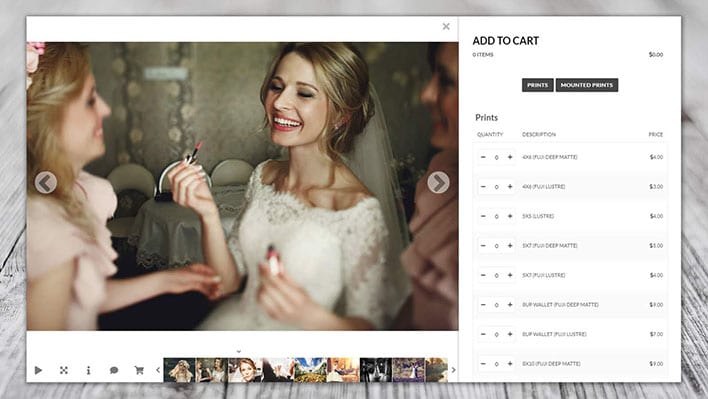
Would you like an easy and seamless way for your clients to order prints through your own website?

If you said yes, you are in the majority. With nearly 30% of all photography websites based on WordPress, the time has come to be able to fully harness the power behind the ubiquitous platform.

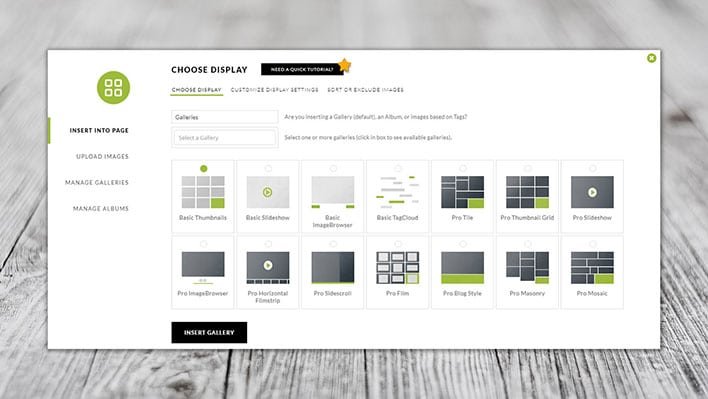
My friend, Scott Wyden Kivowitz, who works for Imagely just sent me an email to confirm that print fulfillment is now a reality for wedding and portrait photographers.

WordPress Plugin, NextGen Pro For Photographers

The Announcement

This is BIG news.

After nearly four years of development, Imagely‘s NextGen Pro WordPress plugin now will allow your clients to place print orders through your own website!

How awesome is that?

Learn more about print fulfillment via the NextGen Pro WordPress plugin.

The Interview With Scott Wyden Kivowitz

A few days before the announcement, I actually got to chat with Scott about the update to their legendary WordPress plugin. Check out that interview below:

P.S. We talk about the NextGen Pro plugin being updated “today” but it was technically launched yesterday.

More Questions

As it so happens so many times, after the interview is recorded I am reminded of some questions that forgot to ask Scott. He was very kind to respond. I'm sure site speed and plugin reliability are your concerns as well. Here is what he had to say about both of those topics:

WordPress, including themes and plugins, can have security issues. But so do Google, Apple, Squarespace and every other software company out there. You don’t hear about most of them. WordPress security issues come up so often because it’s easy to attack open-source software, used by 30% of the Internet. Even Microsoft had 529 vulnerabilities in 2019 alone which are individually listed here. Apple had 229.

With that said, my suggestion is to use themes and plugins from reputable companies. These are companies who update their products often for compatibility with constant changes in technology. But also companies who are updating their products, fast, to solve any security issues that may arise.

I’d recommend hosting with companies who keep their servers up to date and WordPress up to date. For example, hosts that use PHP version 5.2 and older are vulnerable to security holes not visible in PHP version 7.2 or above. So you can clog leaks by merely keeping the server up to date, which has nothing to do with WordPress.

In addition to updates, you can identify reputable companies by how active they are responding to social posts, how active they are in public forums, how they’re reviewed regularly, and so on.

Imagely's NextGen Pro

NextGen Pro, WordPress Plugin For Photographers

So, there you have it. Will you be updating your WordPress plugins to include NextGen Pro? How do you think your clients are going to react when they are able to book a session AND order their prints through your site?

While right now the only lab onboard to work with NextGen Pro is WHCC, that is likely to change as more labs are integrated in the system. Which professional labs would you like to see work with this application?

If you are handy with WordPress (and even if you are not, the folks at Imagely will help you out), I hope you will consider this WordPress plugin.

Filed Under: Home Middle Right, Photography, Web/Tech Tagged With: for clients, for photographers, Imagely, NextGen Pro, photographic printing, print fulfillment, print orders, seamless platform, wordpress plugin

Enrollment For “No Stress WordPress” Course Opens

February 27, 2018 by Seshu | Editor & Publisher

Why The Stress?

Let me assure you that you aren't the only photographer to have issues launching your website. Go to any photography conference or even a local gathering, and you'll hear a common refrain: “I'm working on my website.”

That's code for: “I am still trying to figure it all out.” And there is absolutely no judgment, ok? I am in the same boat as you.

Let me break it to you gently – a lot of photographers like you and I are finding it challenging to establish a presence online. Yes, WordPress is a ubiquitous platform and you may have heard that one can easily optimize WordPress websites for search engines. All true, but designing one from scratch isn't always easy or fun. And you can only watch so many YouTube videos to chase down the exact solution you are looking for.

I have to admit that WordPress templates are wonderful and they are a great way to start one's web design. But they can be limiting, if you don't know the in's and out's of WordPress. So, if you are a photographer who needs to gain back control of your domain, pay close attention to what I am about to say.

No Stress WordPress: Dave Foy's Course For Non-Coders

No Stress WordPress

Dave Foy of Design Web Build just reopened enrollment for his course, No Stress WordPress. It's open for a very limited time, until Friday of this week.

If you are even remotely interested in understanding how WordPress works but think you will need to be neck-deep in code, think again. Dave Foy has worked as a web developer for 14 years. Before that, he was a primary school teacher in the United Kingdom.

In his course, No Stress WordPress, he will teach you to design your website using WordPress and a plugin called Elementor. The instruction is comprehensive without it being overly challenging. He walks you through a “starter site” that you can then reuse again and again. He walks you through the jargon, truly making the experience stress-free. And I personally like the way he teaches. The course is very well structured and moves at a pace that is just right. While I may have used WordPress for a number of years, I discovered a lot of new and useful information. In fact, Tiffinbox (this website) will be redesigned using the steps he has outlined in his course!

Interview With Dave Foy

I spoke with Dave Foy at length about “No Stress WordPress” today:

If you have considered designing a website for your photography business, but you found yourself stuck in the process, this post provides you with a solution that you simply cannot ignore. Sign up now for No Stress WordPress. If you wish to split your payments, there is that option. However, if you are ready to make changes now, you can receive some fast-action bonuses if you commit to this course before March 1 at 5 pm EST.

On The Fence?

Still on the fence about “No Stress WordPress“? I understand the trepidation. However, do know that it is a one-time purchase and Dave Foy routinely updates the course when changes are required. Plus he is incredibly responsive to your questions in his private Facebook group. Lastly, to just get a taste of his teaching style, I implore you to check out his free mini-course. Just watch one of the four videos and then decide if his teaching style and the content is what you need to finally finish your WordPress-based website.

Full Disclosure

Yes, the links for the course, No Stress WordPress, are affiliate links. As you know I only promote the very best resources to you after diving into it myself. And in this case, I paid the full price of this course when Dave launched it back in November. I believe wholeheartedly that when you sign up and do the work, you will easily experience a five to 10 fold return on your investment. Plus, with the course being updated all the time, you don't need to worry that you have bought yet another course that has gone stale. Dave is committed to teaching and staying current with the latest advances in WordPress and the Elementor plugin.

Filed Under: Design & Illustration, Featured Post of the Day!, Marketing, Photography, Web/Tech

5 Big Reasons Using JPEGmini Pro Is A No-Brainer For You

July 26, 2016 by Seshu | Editor & Publisher

JPEGmini Pro To The Rescue

There are five splendid reasons to use JPEGmini Pro. Before we get into those, though, I wanted to introduce you to Mitch Schneider, Director of Marketing for the slick and useful application.

Mitch and I ran into each other at the Photo Plus Expo in New York City. It's an annual event, and the trade show floor is packed with vendors and photographers from all over the world.

Having heard of JPEGmini Pro from a couple of photographer friends, I was intrigued to find out more. So, I stood a the JPEGmini booth and watched Mitch and his colleague patiently describe their software and demonstrate how quickly it minimized file sizes, and also how efficiently it did it without any perceptible loss of the quality of the final images.

My ears perked up as Mitch spoke because for years Photoshop had a “save as web” option and when Adobe released Photoshop CC, that option just disappeared. I missed that because creating web versions of my 20mb files was a quick two-step process. Now with it gone, it was just too laborious – I had to set the resolution and then manually open, crop and then save the images. One by one. Blech! Perhaps I was doing it all wrong. In any case, it was eating away at my productivity.

As a hopeful alternative, I even looked at Dr. Russell Brown's scripts, panels and actions, but for whatever reason, I simply couldn't get those to work on my system. I desperately needed a way to scale down the photographs quickly and optimize them for the web.

When I first heard about JPEGmini and the JPEGmini Pro option, I was genuinely hopeful that it would speed up my workflow. And it has. Remarkably so, with a few additional benefits that I didn't expect!

The Interview

A few weeks back, Mitch agreed to be interviewed online to chat about JPEGmini and JPEGmini Pro. He was just as excited as I was with the new Photoshop extension that allows photographers to export out their photographs directly from Photoshop CC.

My “save for web” option was essentially back!

[soundcloud url=”https://api.soundcloud.com/tracks/275133383″ params=”auto_play=false&hide_related=false&show_comments=true&show_user=true&show_reposts=false&visual=true” width=”100%” height=”450″ iframe=”true” /]

A Personal Example

A few months back, I upgraded to a Nikon D750. The RAW file sizes are humongous. Try 27.5 megabytes on for size! The high resolution JPEG's are approximately 14 megabytes.

Imagine if you had to upload 500 or 800 of those to ShootProof? [Affiliate Link] It would take you forever. And frankly, juggling family and professional life, who has time to baby those files like that?

So, that's why I lean on JPEGmini Pro now. If I have a batch of five or more photographs to process, they are enhanced in Photoshop and saved to a special folder. I simply drag and drop the files into JPEGmini Pro and it does its magic.

It can either save over the original files (I recommend making a copy of your files just for safety's sake) or you can have those images sent to a new folder, directing the application to constrict the photograph's width or height in the process.

Quality & Quantity

When a couple I photographed in Connecticut ordered a 20″x30″ canvas print for their home in North Carolina, I attempted to send a 14 megabyte file to Pixel2Canvas. Their online system, however, only accepts files that are 10 megabytes in size or smaller. JPEGmini Pro to the rescue!

I dropped my file into the application and it generated a 7.5 megabyte file – essentially a 47% reduction in file size – for production. And yes, I couldn't see any loss of quality and the client was thrilled with the final results.

Still not convinced? I ran into this video that shows a graphic artist who is printing large photographs for a photographer client of his. Clearly the graphic artist is stumped by how indistinguishable the regular JPEG file and the JPEGmini files are!

5 Reasons To Use JPEGmini Pro

Ok, let's get into the five reasons JPEGmini Pro is a no-brainer for any photographer.

1) Save Space

Thousands of photographs that take up space in your hard drives right now could take up even less space if you ran them through JPEGmini or JPEGmini Pro. The larger your JPG files, the greater the need you have to shrink them down. Imagine you could reduce your hard drive needs by 47%. Space saved is money saved.

2) Save Time

Do I have to tell you that uploading a 20 megabyte file takes longer than a 5 megabyte file? The time you save is money made.

3) SEO Benefits

Search engines are assigning a higher rank to those websites that load faster. If you have photographs on your site and they are 200 kilobytes or more, they are slowing your site down. Run your photographs through this app, shrink them down in file size and then upload them to your website. You'll see the difference and so will Google!

4) Extensions For Photoshop & Lightroom

Each of us has our own workflow and style. Some of us like to save full resolution JPEGs to a folder, copy the folder and then drag the files into JPEGmini Pro. Others, would prefer to send those files directly from Photoshop or Lightroom. And now you can! The company announced easy-to-install extensions into Photoshop or Lightroom that will give you direct access to JPEGmini. This again saves time (and money) in my opinion. This option is only available if you buy JPEGmini Pro, though.

5) The $99 Price

On the heels of their announcement about the Photoshop and Lightroom extensions, Beamr, JPEGmini's parent company also announced a price reduction to $99 for JPEGmini Pro. So, the price is right, right now. But this is for a limited time only.

JPEGmini or JPEGmini Pro?

I wondered that too. If I had continued using my Nikon D700, I am sure JPEGmini would have sufficed. But with the Nikon D750, the file sizes are so much bigger that I had no choice but to lean on JPEGmini Pro. That's one factor in choosing between the two options.

JPEGmini Pro as I mentioned above is now only $99 (regularly $149), whereas JPEGmini is $19.99. So, if your budget is tight, you may have to make some hard choices between the two options.

One of the five reasons should have included – speed – because JPEGmini Pro is some eight times faster than JPEGmini. It's just the way the application uses the core engines in your computer to make that magic happen.

Ok, I know making a decision sometimes can be challenging. That's why when I started to poke around this app, I downloaded the free trial to see how it worked. I suggest you do the same. Give it a try to see how much space and time you can save. I believe there is a limit of 10 photographs you can process per day. But the free trial is limited by how large your files are to begin with, so take that into consideration.

So, are you ready to give JPEGmini or JPEGmini Pro a spin?

Filed Under: Home Middle Right, Interviews, Photo Technology, Photography, Web/Tech

  • 1
  • 2
  • 3
  • …
  • 20
  • Next Page »

Subscribe To Tiffibox Treats!

Looking for a well-curated email newsletter that will leave you inspired and motivated about your photography business? Sign up below!

About Seshu

Seshu creates relaxed portraits of families and high school seniors in Avon, Connecticut. He also leads a successful headshot photography studio in Connecticut, helping professionals from a variety of disciplines project the very best versions of themselves. He created Tiffinbox as a way of inspiring photographers, to create better images and successful businesses. [Read More]

Email Templates For Headshot Photographers

Email Templates for Headshot Photographers

Recent Posts

  • How Capture One Changed My Event Photography
  • 10 Steps To Stay Positive In Times Of Great Stress
  • Why You Need To Read “Personal Branding For Photographers” Now
  • How To Master Your Website Content Step By Step?
  • Tony Taafe’s TNT Method For Headshot Photographers

Recent Comments

  • Stephen Davison on Are You A Business Owner Who Is Smart, But Stuck?
  • Ben A. on Don Giannatti Clinches The 8th Annual Tiffinbox Award
  • Dan on Don Giannatti Clinches The 8th Annual Tiffinbox Award
  • Donald Giannatti on Don Giannatti Clinches The 8th Annual Tiffinbox Award
  • Stephen Davison on G.E. Masana’s 6 Strategies For Wedding Photography Success
  • Naveen Kumar on Weddings In India Are More Than Being At The Right Place And At The Right Time
  • kartick on Weddings In India Are More Than Being At The Right Place And At The Right Time
  • Leonid Farbman on 6 Uncommon Trends To Grow Your Photography Business
  • Willow and Finch Wedding Photography on 11 Reception Tips To Help Your Wedding Photography
  • Web Designer Malaysia on How To Optimize Your Squarespace Website For Search Engines
  • Creastan on An Interview With Photojournalist G.M.B. Akash
  • Cindy Brown | Atlanta on An Open Letter To A Local Photographer

Become a Patron!

Copyright © 2026 · Tiffinbox · Site Design by Heather Mackan Creative · Built on Genesis