• Photography
  • Interviews
  • Business
  • Reviews

Tiffinbox

Inspiring Photographers

  • Home
  • About
  • Blog
  • Contact

How Suzette Allen & Jon Yoshinaga Enhance Their Client’s Portrait Experience

May 13, 2016 by Seshu

Suzette Allen and her husband Jon Yoshinaga are busy photographers based in Sacramento, California. While the west coast is home, the duo are on the road several months out of the year photographing clients across the country and teaching photographers new techniques that enhance client's portrait experiences well beyond the session.

Thanks to Panasonic Lumix cameras and Bay Photo Lab, Suzette and Jon, are now offering something super special to their clients.

Hybrid Imaging – the use of video, still pictures and audio – isn't new. It's been attempted before. But not like how Suzette and Jon approach it. It would seem that technology had to grow up a bit first. Aren't you glad you are a photographer in 2016?

The Interview

Listen to our conversation below to find out more about Live Portraits:

[soundcloud url=”https://api.soundcloud.com/tracks/263982858″ params=”auto_play=false&hide_related=false&show_comments=true&show_user=true&show_reposts=false&visual=true” width=”100%” height=”450″ iframe=”true” /]

Learn about Talking Business Cards.

Here are the tools Suzette and Jon use to create Live Portraits.

Suzette Allen & Jon Yoshinaga Present At CTPPA

Register here for Suzette Allen's CTPPA workshop on May 17th. Scheduled from 6:00 PM – 10:00 PM, the workshop will be held at the Radisson Hotel located at 100 Berlin Road, Cromwell, Connecticut.

This event is sponsored by Bay Photo and Panasonic LumixG

Bay Photo Lab: Live Portraits

Panasonic Lumix G Cameras and Lenses

More On Hybrid Imaging & Live Portraits

Still curious to know more about hybrid imaging? Watch this quick little intro Suzette Allen has put together for you:

Examples Of Suzette Allen & Jon Yoshinaga's Work

Well, will you embrace hybrid imaging and create Live Portraits for your clients?

Comment below and again, don't forget to register for the CTPPA workshop if you are within driving distance of the venue.


Filed Under: Featured Post of the Day!, Interviews, Photography, Web/Tech

Get To Know Imagely, A WordPress Service For Photographers

March 16, 2016 by Seshu | Editor & Publisher

It's a busy time of the year for Scott Wyden Kivowitz who is always ready to talk about a new WordPress service for photographers.

What is Imagely?

As the Blogging Wrangler and Community Liaison for Imagely, Scott will tell you they have some very ambitious plans to offer WordPress hosting, themes and plugins – all under one roof.

Why WordPress? Well, did you know that nearly 25% of the websites in the world run on the WordPress platform? That's a staggering number of websites and a great many photographers lean on a self-hosted WordPress themed website or blog for their business.

But not everyone has the time or the technical skills to work on the platform. Tiffinbox, for instance, was custom designed by someone who knows her way through the theme and its back end. Now, not everyone can have a custom designed site or needs to have it specifically designed for them. That can come later when the dollars start flowing in from sales, right?

Until then, though, you are going to need a WordPress service for photographers. And that's where Imagely comes in.

The Interview

WordPress Service For Photographers

If you act quickly, you can get in on a special offer Imagely provided photographers who signed up for WPPI.

Learn more about Imagely through their top-rated podcast too.

Can you see yourself having more time to make images, serve your clients better or chill out with your family rather than tinker with your WordPress website?

So, what will you do? Will you jump in and sign up for this WordPress service for photographers now?

The Backend Of Imagely

WordPress Service For Photographers: Imagely

WordPress Service For Photographers: Imagely

WordPress Service For Photographers: Imagely

Filed Under: Home Middle Right, Interviews, Photography, Web/Tech Tagged With: blogs, hosted service, hosting, Photographers, Photography, plugins, themes, web technology, websites, wordpress

Online Proofing & Digital Delivery Thanks To Cloud Spot

January 24, 2016 by Seshu | Editor & Publisher

Gavin Wade had an idea and he ran with it.

As a photographer, he wanted to quickly and painlessly deliver his client's photographs. He wanted to upload his images once and then be able to deliver different versions to different clients. His solution: Cloud Spot.

Cloud Spot Logo

I trust you have affiliates or business partners who simply have different needs for your photographs and they don't all fit neatly into one standard dimension. Imgaine you are a wedding photographer who has just photographed a Jewish wedding and you have some photographs of the huppa. Some of your wedding vendor friends will only need a postage sized version of the images, while the wedding planner you are wooing might want the photographs with your watermark to display on her Facebook page.

Do you sit there scaling up and scaling down the same photographs as and when someone requests it? It wouldn't be very efficient use of your time, right? That's where Cloud Spot excels.

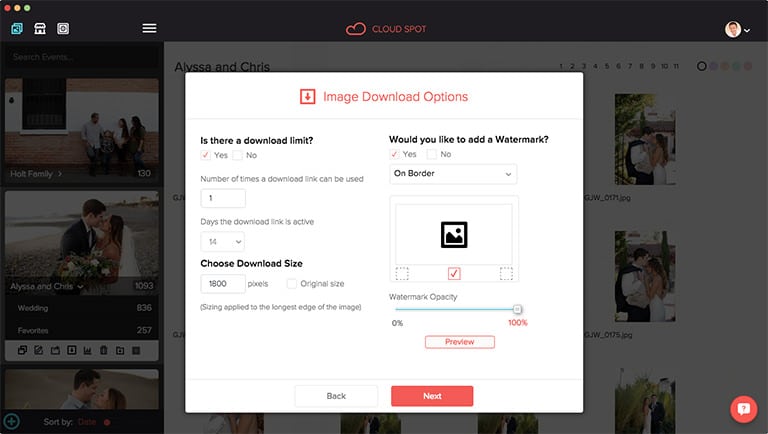
Cloud Spot: Image Download Options

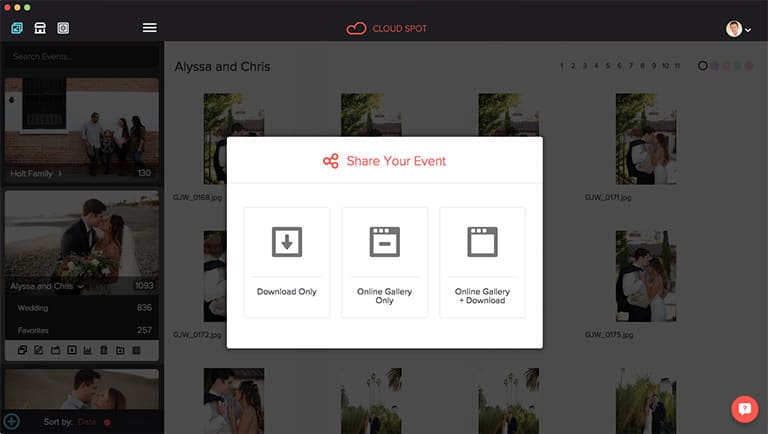
Cloud Spot: Sharing Your Event

I spoke with Gavin Wade about Cloud Spot and how it has saved his wedding photography business tons of time. Give this interview a listen and see if Cloud Spot is something you want to consider using for your photography business as well:

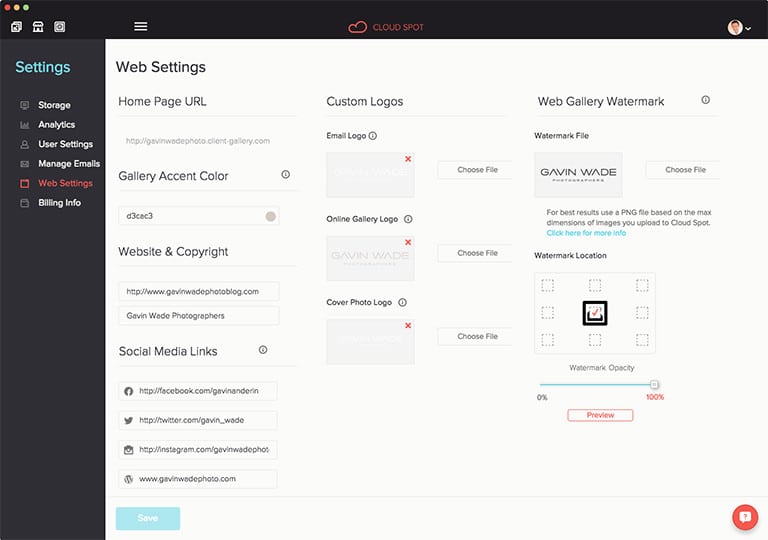
Setting up your Cloud Spot account is super easy:

Cloud Spot: Web Settings Window

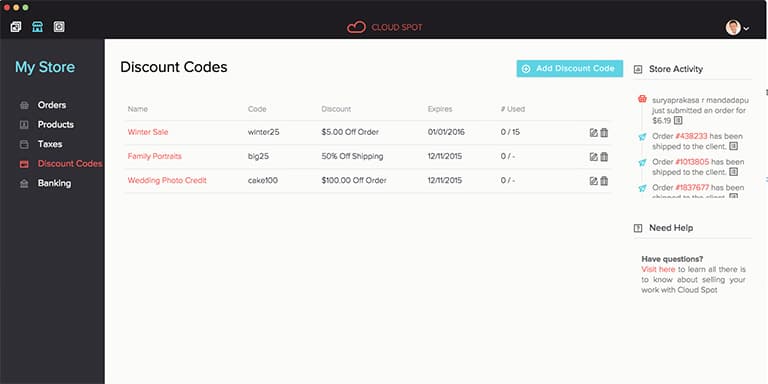
Ever wanted to send some of your special clients discount codes? Well, you can now with Cloud Spot:

Cloud Spot: Setting Up Discount Codes

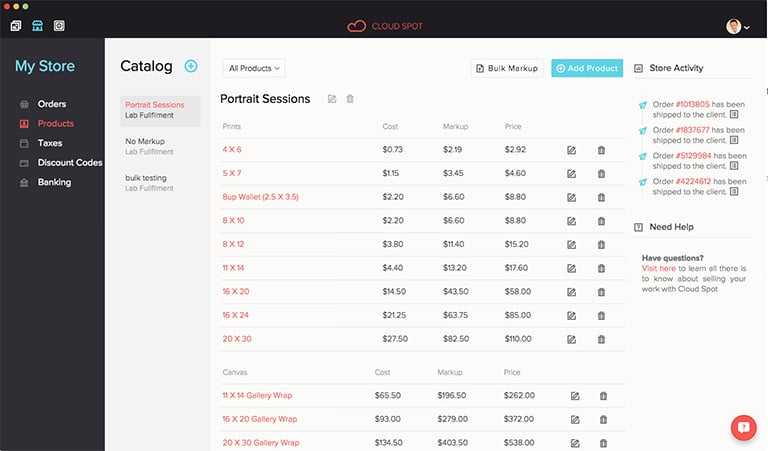
Your online store's back end should look this easy to manage:

Cloud Spot: Product Catalog Window

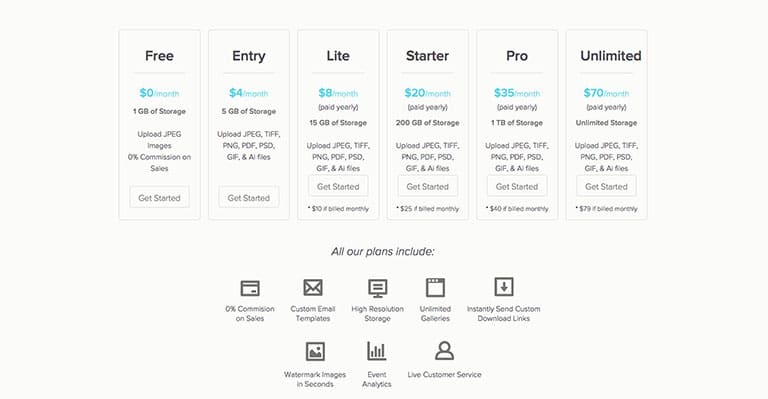
There are six pricing options, including one that is totally FREE (jpeg imaages only). The Entry option is only $4/month and allows you to store and share JPG, GIF, TIFF, PNG, PSD, AI and PDF files. Granted you only get 5gb of space, but if your photography business is just starting up, this should do really well for you for now. You can always scale up!

Cloud Spot: Pricing Options

Gavin has generously offered all Tiffinbox readers a special discount code. Use: tiffin10 – good for any monthly or annual plan when you sign up here.

Filed Under: Home Middle Left, Photography, Sales, Web/Tech Tagged With: business partners, Cloud Computing, Cloud Infrastructure, cloud storage, Digital Delivery, Gavin Wade, Online Proofing, photographer, Wedding Photography, Wedding Vendors, Weddings Photographer

Discovering Brett Jarnagin’s Lightroom Retouching Toolkit

August 31, 2015 by Seshu | Editor & Publisher

When Brett Jarnagin and I connected, it was at Photo Plus Expo some years back. The funny thing is, he didn't remember me from way back then. But the guy can be excused because he was manning a busy booth and he must have talked to thousands of other photographers on that day in New York.

Fast forward to just a few weeks back and I came to know that Brett is the brains behind Lightroom Retouching Toolkit. As someone who enjoys working quickly and efficiently on his iMac, I was naturally intrigued about what Brett was promoting.

Lightroom Retouching Toolkit

I wanted to know whether I could work on photographs like I did with Photoshop and his quick answer was, “heck yeah!” That had me 90% there but I wasn't going to be convinced until I started using his Lightroom Retouching Toolkit for my own busy business portrait business in Connecticut.

Let me tell ya, the experience is amazing. Yes, it does take a little effort in learning where some of the buttons are, but once you repeatedly use the interface, you should be all set. As always the more you practice with the presets and settings and dial them to your liking and make the program really do what you want it to do, the better your results are going to be.

I sat down with Brett to talk to him about Lightroom Retouching Toolkit; to better understand why he decided this was a good time to bring this to market and how it has helped him and other photographers in the industry to sail through the dreaded tasking of retouching skin in particular and portraits, in general.

Oh, one more thing. You want to know how generous Brett is? Even before I could say, “hey, can you hook my audience with a discount code,” he sent me a quick text to say that he would be happy to extend a 20% discount code to all of you if you wanted to buy Lightroom Retouching Toolkit today.

Here is the code – TIFFINBOX20 – remember it's 20% off the regular price of Lightroom Retouching Toolkit for fans of Tiffinbox.

And you are a fan, right?

Filed Under: Interviews, Photography, Photography Workflow, Web/Tech Tagged With: adobe photoshop, adobe photoshop lightroom, Brett Jarnagin, Business Portraits, Portrait Business, Retouch Skin, Retouched

Gerik Parmele’s Hack To Stop Photos App From Loading On Your Macintosh

June 4, 2015 by Seshu | Editor & Publisher

Raise your virtual hand if you are a photographer who uses an Apple Macintosh computer – laptop's like MacBook Pro, MacBook Air or the desktop iMac or MacPro.

So, you feel my pain then don't you? You know, when you insert a memory card from your camera into the card reader and instead of just having access to your files through the Finder, you are abruptly confronted by Apple's new Photos application.

It launches, like an unsolicited pop-up advertisement on your favorite website. The reaction is to go and shut the program down. Quickly. How many times in a day do you want to keep doing that? Imagine coming back from a wedding or a long photo session and having multiple cards and having to deal with that pesky program opening again and again.

I was quite frustrated, but clearly I wasn't the only one feeling this pain. Gerik Parmele is a photographer and videographer based in Columbia, Missouri Tweeted out that he had found a hack to stop the Photos app from loading on his Macintosh computer.

So, if you are running your photography business on a Macintosh and you want to stay super efficient and cognizant of your use of time, follow Gerik's suggestion in this short video below:

Gerik suggests buying and using Keyboard Maestro for this hack to work ($36). If you can suggest an alternative method for stopping the Photos application from launching, please share your ideas below.

Credit and kudos go to Gerik Parmele for coming up with this work around. So, please follow him on Twitter and support his projects whenever possible.

If you enjoyed this little tip and found it helpful, please share the link to the post with your friends via social media or on your own blogs. If you would like to see more such time-saving tips, please comment below and let me know.

Filed Under: Home Middle Right, Photography, Web/Tech Tagged With: Card Reader, Desktop Imac, Gerik Parmele, Imac, Mac Pro, Macbook, Macbook Family, Macintosh, Memory Card, Personal Computers, Photo Session, Photos Application, Photos Apps

  • « Previous Page
  • 1
  • 2
  • 3
  • 4
  • …
  • 20
  • Next Page »

Subscribe To Tiffibox Treats!

Looking for a well-curated email newsletter that will leave you inspired and motivated about your photography business? Sign up below!

About Seshu

Seshu creates relaxed portraits of families and high school seniors in Avon, Connecticut. He also leads a successful headshot photography studio in Connecticut, helping professionals from a variety of disciplines project the very best versions of themselves. He created Tiffinbox as a way of inspiring photographers, to create better images and successful businesses. [Read More]

Email Templates For Headshot Photographers

Email Templates for Headshot Photographers

Recent Posts

  • How Capture One Changed My Event Photography
  • 10 Steps To Stay Positive In Times Of Great Stress
  • Why You Need To Read “Personal Branding For Photographers” Now
  • How To Master Your Website Content Step By Step?
  • Tony Taafe’s TNT Method For Headshot Photographers

Recent Comments

  • Stephen Davison on Are You A Business Owner Who Is Smart, But Stuck?
  • Ben A. on Don Giannatti Clinches The 8th Annual Tiffinbox Award
  • Dan on Don Giannatti Clinches The 8th Annual Tiffinbox Award
  • Donald Giannatti on Don Giannatti Clinches The 8th Annual Tiffinbox Award
  • Stephen Davison on G.E. Masana’s 6 Strategies For Wedding Photography Success
  • Naveen Kumar on Weddings In India Are More Than Being At The Right Place And At The Right Time
  • kartick on Weddings In India Are More Than Being At The Right Place And At The Right Time
  • Leonid Farbman on 6 Uncommon Trends To Grow Your Photography Business
  • Willow and Finch Wedding Photography on 11 Reception Tips To Help Your Wedding Photography
  • Web Designer Malaysia on How To Optimize Your Squarespace Website For Search Engines
  • Creastan on An Interview With Photojournalist G.M.B. Akash
  • Cindy Brown | Atlanta on An Open Letter To A Local Photographer

Become a Patron!

Copyright © 2026 · Tiffinbox · Site Design by Heather Mackan Creative · Built on Genesis