• Photography
  • Interviews
  • Business
  • Reviews

Tiffinbox

Inspiring Photographers

  • Home
  • About
  • Blog
  • Contact

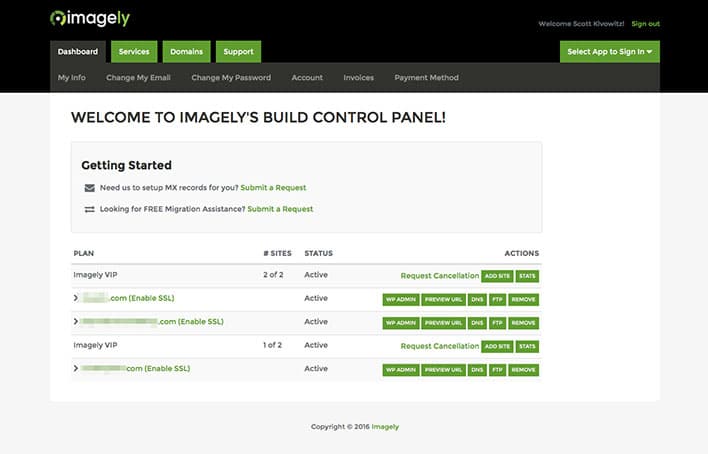
Get To Know Imagely, A WordPress Service For Photographers

March 16, 2016 by Seshu | Editor & Publisher

It's a busy time of the year for Scott Wyden Kivowitz who is always ready to talk about a new WordPress service for photographers.

What is Imagely?

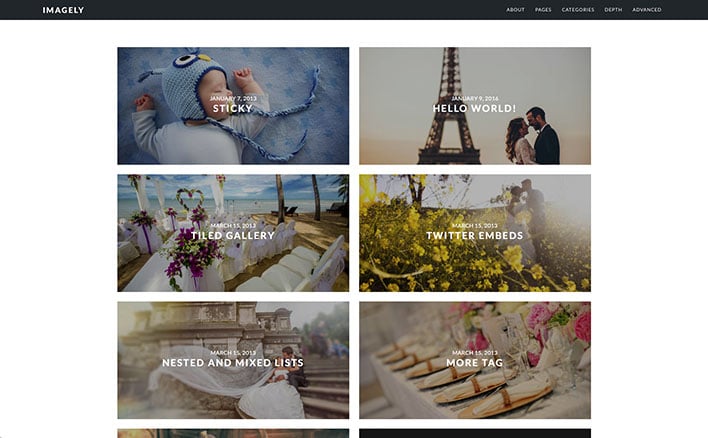
As the Blogging Wrangler and Community Liaison for Imagely, Scott will tell you they have some very ambitious plans to offer WordPress hosting, themes and plugins – all under one roof.

Why WordPress? Well, did you know that nearly 25% of the websites in the world run on the WordPress platform? That's a staggering number of websites and a great many photographers lean on a self-hosted WordPress themed website or blog for their business.

But not everyone has the time or the technical skills to work on the platform. Tiffinbox, for instance, was custom designed by someone who knows her way through the theme and its back end. Now, not everyone can have a custom designed site or needs to have it specifically designed for them. That can come later when the dollars start flowing in from sales, right?

Until then, though, you are going to need a WordPress service for photographers. And that's where Imagely comes in.

The Interview

WordPress Service For Photographers

If you act quickly, you can get in on a special offer Imagely provided photographers who signed up for WPPI.

Learn more about Imagely through their top-rated podcast too.

Can you see yourself having more time to make images, serve your clients better or chill out with your family rather than tinker with your WordPress website?

So, what will you do? Will you jump in and sign up for this WordPress service for photographers now?

The Backend Of Imagely
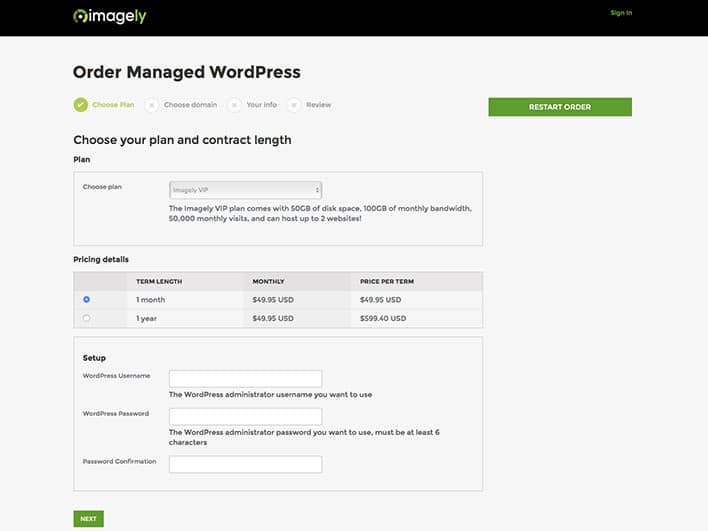
WordPress Service For Photographers: Imagely

WordPress Service For Photographers: Imagely

WordPress Service For Photographers: Imagely

Filed Under: Home Middle Right, Interviews, Photography, Web/Tech Tagged With: blogs, hosted service, hosting, Photographers, Photography, plugins, themes, web technology, websites, wordpress

Blogging Brilliantly For Your Photography Business

July 16, 2015 by Seshu | Editor & Publisher

She doesn't have much of a southern drawl, but Christine Tremoulet is a business coach based in Houston, Texas.

Christine is ideally positioned to teach you about blogging and it's not because she coined the word “WordPress.” She is intimately involved in helping business owners like you make a mark online; with well defined intentions, purpose, clarity and focus. She has been blogging for nearly 15 years now!

Blogging Brilliantly is 30 days of pro advice from blogging & business expert, Christine Tremoulet. Learn what to write, how to write it, and ways to automate your blog for better results. Say hello to more time, more clients, and less stress.

Listen to her talk about her new course, Blogging Brilliantly –

As she says, Blogging Brilliantly, is a course that you can follow along for free or buy for only $27.

This is Christine's promise to you:

“You'll also receive an ebook of the course material, a guide on creating an editorial calendar, and 4 value packed worksheets that will be integral tools in growing your business via blogging.”

Blogging Brilliantly by Christine Tremoulet

If you have ever felt nervous about starting a blog and sustaining a blog over the long haul, sign up for Christine's 30-day course just to see if it is worthwhile. I bet you will dig into it and see results right away. Of course, when you buy the whole bundle at one shot, you don't have to wait the whole 30 days plus you get a whole lot more that will level up your game.

Want to make your mark in the world? Start blogging brilliantly today.

Filed Under: Business, Interviews, Marketing, Photography Tagged With: blog, Blog Business, blog software, business coach, Business Expert, Business Owners, Christine Tremoulet, Growing Your Business, Help Business Owners, Photography Business, wordpress

What To Look For When Getting a Custom Website

June 15, 2014 by William Bay

The Web has become an infinitely complex place to bring your business to. A few years back, the WWW could have stood for Wild Wild West instead of World Wide Web. People easily put up Flash-based websites that did cool “things,” proper HTML was forsaken in the attempt to make sites pretty, but these attempts were workarounds and left the realm of solid web development.

Thankfully, albeit gradually, order came in form of thing like: Web Standards, CSS, Search Engine Optimization and Google Best Practices. And of course we can praise Steve Jobs for driving the last nail into Flash’s coffin with the creation of the iPhone and iPad.

Confusing Array Of Options For Photographers

While many of the standards and practices above have made life easier for web users, the implementation of those standards can vex common business owners that just need to get their site up. It can be analogous to herding cats, and requires a broad range of skills to manage. Because of that, I highly recommend that when you do look for someone to build a custom site, you find a Web Developer instead of just a web designer. They will be skilled in the various areas (or have a team of people skilled in those areas). Here are a number of the skills required to put together a solid, custom website:

* General hosting server operations. The knowledge to move sites, and be able to handle Redirects, 404 errors, etc. is absolutely critical.
* PHP, HTML and CSS experience. These coding languages are the building blocks of the Web.
* SEO (Search Engine Optimization). Google's algorithms are constantly changing, and then every 9 months to a year there comes a big change that turns the SEO industry on its head. A good developer will keep up with this or have a person that they work with directly to stay up to date on these changes.
*  WordPress expertise. This is of course assuming you're using the best CMS out there. A developer knows how to use template files, Custom Post Types, and advanced plugins that enhance your custom website.
* Security. Having a secure website is a big deal. There have been a number of brute force attacks on sites that have rendered them completely useless. GoDaddy's entire infrastructure was down for a full day! A developer will know where you should host and what you should do to prevent these types of attacks.
* Mobile. Responsive website design “responds” to the size of the device you're on whether that's desktop, laptop, tablet, or phone (small device). There are very important things to consider when developing and designing for the various sizes. You definitely want someone well versed in that world.
* UX/UI. User Experience / User Interface. Your website is a tool to make sales for you. How efficient it is at doing that will depend on how well your Developer understands the process that people go through when entering a site. A good developer will suggest strong CTAs (Call To Actions) on home page, and wherever else a potential customer could be enticed into reaching out to you.
* Design. Of course, you want this thing to look pretty, right?!

Who To Hire?

Different developers have different strengths. Personally, I'm rock solid when it comes to SEO, HTML, CSS, UX/UI and WordPress, fairly strong when it comes to PHP, server functions, and security. I'm OK with design, but I still want my clients to have great designs. So I hire a great designer for our custom website builds.

Finding a developer that has these areas under control, either by himself or with a team, is a must in order to get the absolute best product. I've heard a lot of stories of people not getting what they expected. I even know a photographer that had a custom site performed, but was told to never update WordPress! This is a very critical step in preventing security problems, and an example of someone not familiar enough with WordPress to make the site work properly.

I also see beautifully designed sites that will never see the light of day if searched on Google because they failed to structure the site properly, and the SEO is poor. Do yourself a favor and interview the developers you have in mind and find out what their knowledge is in each area. Thoroughly test out the sites in their portfolio. Ask yourself if they have good designs (beware of the “I don’t like the paint on the walls” thing that people say on those HGTV shows). Pay attention to the level of design. Do elements on the page stick out, do they do a good job of balancing the needs of a website with the design, do the sites look like they were designed in the 90’s, does it appear that the designs get better with each and every website?

I'm happy to help you find the right person too. Even if Flaunt Your Site isn’t the right fit, I often help people figure out what the best path is for them. And we’re not always the answer. (I'll even pose as your web developer brother that works for Qualcomm and can't work on your project, if it helps you).

Weird Options For Photographers

Who Not To Hire

* First and foremost, avoid anyone that mentions the word Flash. That should elicit the response of you hanging up the phone, or pretending you don’t speak English. Even if they say it’s mobile friendly, you should still print their email out, and then light it on fire. (Cackling like a witch is totally optional.)
* Anyone spouting anything about HTML5 or CSS3 or other technical mumbo jumbo to influence you into working with them. First, websites are about people and their businesses. The developer’s job is to use the technology to accomplish your goals, not to use buzzwords as leverage to get you to hire them. (I’ll also add that HTML5 doesn’t mean what most people think it means).
* Someone without a portfolio, or a list of previous clients and links to their site. You really want to look at the websites they’ve worked on before.
* The guy that will do an “amazing full custom website” for $500…

Do you remember the last time a $500 wedding turned out “amazing?”  … Yeah, neither do I.

What Developers Cost

Cost is, of course, a huge factor to consider. Custom websites can vary from developer to developer. It will also vary depending on what functionality you want for your site. To give you a range, Flaunt Your Site does full custom sites from $3,000 to $5,000. We can do sites beyond that price point as well, but that tends to be the averages when it comes to our clients.

You will find developers that charge less than that, and you’ll find developers that charge more than that. My suggestion would be to interview more than one person for your project. Just as your clients have no doubt interviewed more than just you to find out who the right photographer.

Whether you hire someone for $1,000 or $10,000, your aim should be to have your new website be the type of investment that actually makes you money. If this isn’t on yours or your developer’s radar, you need to make it a priority quickly. If you’re doing it just to have a pretty site, then that is narcissism or “keeping up with the Joneses” getting in the way of running your business.

The only reason to spend money on a custom site is to increase your bottom line.

I have a personal goal that each website Flaunt Your Site does is directly responsible for our clients gaining 5-10 new clients in that first year.

Be sure to read William Bay's first article in this series.

Filed Under: Home Middle Left, Photography, Web/Tech Tagged With: blog software, content management systems, custom, Custom Designs, Custom Web Design, Custom Websites, Design, Design Website, Flash Based Websites, google, Html, Markup Languages, Photographers, Photography Businesses, php programming language, Pretty Websites, Responsive Website, search engine optimization, Secure Website, Web Development, web display, Website, Website Building, Website Design, Website Launch, websites, Websites Security, William Bay, wordpress

5 Tips For Photography Website Success

September 10, 2013 by Scott Wyden Kivowitz

As you might have guessed, having a website is essential to a photography business, so it is important to take necessary steps for photography website success. In this article, you are going to read five for photographers to achieve such a goal.

Hosting

The first step to achieve success, is to seek the best possible hosting for a photography business. There are many reason why WP Engine is a great choice for any photographer. First, is the expertise from every WP Engine employee. Another is their guaranteed uptime. At Photocrati, we pride ourselves on having the best possible support and understand how valuable it is to customers. So of course, I have to mention that their support is some of the best out there. Other awesome features from WP Engine are their time machine style backups, hack recovery and free migration services if you are transferring from another host.

I was originally hosted on Dreamhost, and then Liquid Web. Both were VPS servers which means that they're already more advanced and resourceful than shared hosting. However, my site kept going down when traffic spikes. Now on WP Engine my site really hasn't been down aside from a major power outage that was out of their control. With that said, WP Engine is my WordPress host of course.

If you're using a service that hosts your website for you, reach out to the company and find our about their downtime policy, website speeds and security measures.

Platform

The next thing to consider is the platform for which the website is built on. There are many content management systems available, but with over 16% percent of all websites on the Internet using WordPress, which is over 78 million WordPress installs, it is obvious what the best choice is. Now, some photographers do not want “the hassle” of managing a website host or WordPress application. Fortunately, WP Engine specializes in WordPress and customers do not have to worry about managing anything but three things:

  1. Update your WordPress theme
  2. Update your WordPress plugins
  3. Create your content

WordPress has its many advantages like having complete control over every aspect of your website. There is a massive community of other WordPress users willing to lend a hand and answer questions. There are tons of resources on the Internet to learn WordPress and find answers. WordPress is extremely flexible and can be a blog, a marketing page, a lead capturing tool, a full website, a CRM and many other things.

Theme

There are thousands of photo specific WordPress themes out there, and while we love our theme we also know that not everyone wants the same theme. With that, we have no problem recommending potential customers (or non customers) to theme's that are more of their personal taste. There are so many websites that list photo themes, so do so Google searching to find one that you like. Use keywords like full screen or grid layout.

Some things to consider for your photography WordPress theme are:

  • Gallery management
  • eCommerce
  • Image protection
  • Mobile friendly

The Photocrati theme is each of these and responsive capability is also coming in a future update.

Plugins

NextGEN Pro Plugin By Photocrati

Just like themes, there are thousands of plugins out there for photographers to use. They cover the full gamut of options, features and so on. Whether you are looking for an appointment plugin or a gallery plugin, there are many options. At Photocrati, we develop one of the most popular plugins called NextGEN Gallery (approaching 8 million downloads). We recently launched NextGEN Pro which includes enhanced gallery styles a Pro Lightbox with individual photo social sharing and commenting. Coming in future updates are eCommerce, proofing and lab integration. All of these amazing features can be used on any WordPress site running any WordPress theme.

However, we know some people prefer other gallery styles we currently do not offer. So with that, we have no problem recommending plugins like SlideDeck or FooBox which both integrate with NextGEN Gallery.

Also like themes, do Google searching for relevant keywords and WordPress listings will usually come up first. If you're looking for SEO or contact form plugins, check out WordPress SEO by Yoast and Gravity Forms.

Content

Of course, without content anything you do is practically useless. Content can be photographs, documents like a PDF guide for customers, blog articles or podcasts. Content is what attracts visits to your website. Spend some time and brainstorm ideas to create. If you are not a great writer, then hire someone who is. Make sure it is optimized for search engines, and see the traffic start to come in.

Don't be afraid to blog. Find your voice, be creative and write write write. Spend some time with your laptop or tablet outside or in a coffee shop. Different locations inspire creative writing. See what your competition is doing and then do it better.

Closing

Of course, there is much more to website success than this basic overview. Feel free to comment or contact me and I will do my best to answer your questions.

Filed Under: Featured Post of the Day!, Web/Tech Tagged With: content management systems, Photography Business, photography website, Photography Wordpress, Tips For Photography, Website Success, wordpress, Wp Engine

Your Photography, Your Website, Your Success

December 6, 2012 by Scott Wyden Kivowitz

Scott Wyden Kivowitz is a New Jersey Photographer and the Community & Blog Wrangler at Photocrati, NextGEN Gallery and the Photographers SEO Community, teaching other photographers on how to increase business with their website.

These days, websites are so important for photography businesses. They can be used as a marketing tools, a sales tool and even an accounting tool if so desired.

WordPress is the most popular website platform among the industry, and most industries for that matter. After picking from WordPress photography themes, many photographers are looking for advice on what to do or where to go next. With WordPress being such a flexible platform for websites, it is understandable that someone can be overwhelmed at first.

photography-website-ebook

This is where a new eBook comes into the picture. (pun intended) 10 Tips To Supercharge Your Photography Website contains advice from ten photographers who have done the legwork of figuring out some secrets to website success.

For example, Jamie Swanson of The Modern Tog talks about local marketing and SEO by using a website. Justin Balog, of HOSSedia, talks about using your blog as an education resource to attract clients. Brian Matiash, of onOne Software, talks about using social media to further promote your work.

Photographers in the eBook:

  • Jamie Swanson
  • Andrew Funderburg
  • Angela Pointon
  • C.C. Chapman
  • Zach Prez
  • Brian Matiash
  • Chris Frailey
  • Justin Balog
  • Rosh Sillars
  • Jodi Friedman

Even with the three examples and the tips from seven photographers, Photocrati has added their own advice to the mix.

“Choosing a WordPress theme is very personal, even when choosing for a business. As photographers, we are visual people and tend to lean towards more visual themes, which completely makes sense. Of course, you can pick between free and premium (paid) themes, but premium themes provide a lot of advantages.”

So as you can see there is a lot to be learned in the ebook. Did I mention it's free?

Aaron Hockley is a photographer (and speaker) in Vancouver, Washington. He downloaded a copy of the photography website eBook and sent me an email saying:

“Great tips for photographers of all sorts – whether you shoot people, artwork, or landscapes, these website strategies will apply to your site.”

So with that, I urge you to visit the eBook page and download your free copy, because it's only a few clicks away.

Filed Under: Business Tagged With: 10 Tips, photographer, Photography, Photography Themes, photography website, wordpress

  • 1
  • 2
  • Next Page »

Subscribe To Tiffibox Treats!

Looking for a well-curated email newsletter that will leave you inspired and motivated about your photography business? Sign up below!

About Seshu

Seshu creates relaxed portraits of families and high school seniors in Avon, Connecticut. He also leads a successful headshot photography studio in Connecticut, helping professionals from a variety of disciplines project the very best versions of themselves. He created Tiffinbox as a way of inspiring photographers, to create better images and successful businesses. [Read More]

Email Templates For Headshot Photographers

Email Templates for Headshot Photographers

Recent Posts

  • How Capture One Changed My Event Photography
  • 10 Steps To Stay Positive In Times Of Great Stress
  • Why You Need To Read “Personal Branding For Photographers” Now
  • How To Master Your Website Content Step By Step?
  • Tony Taafe’s TNT Method For Headshot Photographers

Recent Comments

  • Stephen Davison on Are You A Business Owner Who Is Smart, But Stuck?
  • Ben A. on Don Giannatti Clinches The 8th Annual Tiffinbox Award
  • Dan on Don Giannatti Clinches The 8th Annual Tiffinbox Award
  • Donald Giannatti on Don Giannatti Clinches The 8th Annual Tiffinbox Award
  • Stephen Davison on G.E. Masana’s 6 Strategies For Wedding Photography Success
  • Naveen Kumar on Weddings In India Are More Than Being At The Right Place And At The Right Time
  • kartick on Weddings In India Are More Than Being At The Right Place And At The Right Time
  • Leonid Farbman on 6 Uncommon Trends To Grow Your Photography Business
  • Willow and Finch Wedding Photography on 11 Reception Tips To Help Your Wedding Photography
  • Web Designer Malaysia on How To Optimize Your Squarespace Website For Search Engines
  • Creastan on An Interview With Photojournalist G.M.B. Akash
  • Cindy Brown | Atlanta on An Open Letter To A Local Photographer

Become a Patron!

Copyright © 2026 · Tiffinbox · Site Design by Heather Mackan Creative · Built on Genesis