• Photography
  • Interviews
  • Business
  • Reviews

Tiffinbox

Inspiring Photographers

  • Home
  • About
  • Blog
  • Contact

SEO For Photographers, Corey Potter’s Effective Approach

October 27, 2019 by Seshu | Editor & Publisher

SEO for Photographers – How To Stand Out In A Crowded Field

Corey Potter is on a mission to teach photographers all about SEO.

His website, Fuel Your Photos, has gradually become the place to visit for the latest news about site analytics, keyword use, using YouTube, writing blog posts and so much more.

Now, he has just launched a course dedicated to SEO, or search engine optimization, for photographers.

That's where you come in, if you are carefully watching your Google analytics and you aren't moving the needle but want to in terms of attracting the right visitors to your website and converting them into paying clients.

3 Common SEO Myths

Photographers tend to believe three common SEO myths. Corey dispels them all in this interview.

I had the pleasure of speaking with Corey about SEO for Photographers about a week ago. Take a listen and let me know in the comments how you are paying attention to your metrics – bounce rates, site visits or your Google rank.

Corey is one of the most generous people I know. He and his friend Dylan Howell can be found on Facebook Live quite often discussing SEO topics with their followers.

Corey just told me that he was chosen to participate in a special event for web masters hosted at Google.

The Course

So, if you are considering SEO for Photographers, you are in good and secure company. I know for a fact that Corey is going to take good care of you and will not lead you astray. Search engine optimization is what he obsesses about and we are the better for it.

If you are one of the first 25 people to use the code – tiffinbox – when enrolling in SEO for Photographers, Corey has promised the following bonuses:

1. Personal 10-15 minute website review to help you figure out exactly where to start to make the most impact on rankings. $99 value.

2. Lifetime course community access. We do monthly live video chats and release other exclusive content inside the course community FB group. You get lifetime access instead of 1 year access. $99/yr value.

3. Free access to our upcoming blogging course when it is released. $200 value.

The Book

If SEO for Photographers isn't something you can invest in now, do consider Corey's book, “22 SEO Actions You Can Take Today“. Save $5 on the book when using the code – tiffinbox

So, what do you say? Do you pay attention to your search engine stats? Do you know your way around the back end of Google Analytics? Or, are you like me, a photographer who needs help figuring it all out. If you have read this far, you know where to find help. I trust you will consider SEO for Photographers.


Filed Under: Home Middle Right, Marketing, Photography, Web/Tech Tagged With: attracting clients, content marketing, Corey Potter, fining clients, Fuel Your Photos, google analytics, online marketing, search engine optimization, seo for photographers, understanding analytics

Why Your Photography Black Friday And Cyber Monday Shopping Spree Starts Here!

November 23, 2015 by Seshu | Editor & Publisher

Black Friday to Cyber Monday are typically the days when people in the US (and perhaps only in the US) go on a shopping spree like no other. Why? Well, because the deals are too good to pass up.

As savvy photographers, I am sure you want to do your shopping and get some of the best products, services or courses at lower than regular prices. I don't blame you. I would do the same thing.

Thankfully, some of those vendors have an even earlier start than Black Friday. So, if you are poking around this site and you hit this post, you can start your shopping spree right now.

Here are three main reasons why clicking on an affiliate link and buying the products in this post is good for you:

1) You will be supporting this site – servers space, new plugins and even a redesign is in the works but they all cost money. By buying products linked here, you aren't paying anything additional. It's just that I get a small commission that I can tuck away to pay for my annual expenses to run this website for you.

2) I curate the very best products, services and courses for photographers. I am told in person and privately how much a particular resource has helped photographers become more efficient or in this case more economical because my goal is to save you money when and wherever possible. Hey, I am Indian and it runs in my blood to cut costs as much as I can!

3) You are going to be buying one or more of these resources for your business before the end of the year anyway, right? (hey, keep that receipt as it is tax deductible if you are running a photography business)

So, if you do decide to buy anything this Black Friday (or sooner) from this website, do know that I am particularly thankful to you this Thanksgiving holiday.

Like last year, I'll do my best to keep adding to the post or editing anything out whenever the need arises. I am watching social media sites and receiving emails constantly with offers that I am happy to pass along to you!

Ready?

1. Online Proofing by ShootProof

The Deal: Save 60% on ShootProof for your first year! Act fast as the discount reduces through Cyber Monday.

ShootProof's Black Friday & Cyber Monday Deal

Here at ShootProof, we believe in the work that you do. We also believe in simple, intuitive design and freedom of choice for photographers. With beautiful client galleries, integrated professional labs for printing, and immediate digital download fulfillment, we empower photographers to upload, share, sell, and print their work. Plus, with the ability to use their own labs, create invoices and contacts, and design custom mobile apps to drive referrals, photographers can focus on what matters most and let ShootProof do the rest.

Friday 11/27 – New users get 60% their first year. Existing users will receive 30% off a plan upgrade.
Saturday 11/28 – New users get 50% their first year. Existing users will receive 30% off a plan upgrade.
Sunday 11/29 – New users get 40% their first year. Existing users will receive 30% off a plan upgrade.
Monday 11/30 – New users get 30% their first year. Existing users will receive 30% off a plan upgrade.

2. SEO, More Than Letters In Your Alphabet

Did you know Connecticut Headshots, my business portrait business is ranked #1 on Google? Go ahead and type in the words, “headshot” and “Connecticut” to check that out. That didn't happen by accident. Zach Prez of Photography Spark is one of the people I lean on for advise on SEO. Search Engine Optimization is vitally important if you want to be found online and fast. Get between 50% – 60% off his SEO resources. The ROI on this is HUGE, so don't wait around for this deal too long!

First up is Zach's SEO Cookbook for Photographers. For a limited time, get it for 50% off! It is regularly $99. You get it for $49.
Learn more about this resource by watching this video introduction by Zach:

Business Planning Cookbook is a book that Zach co-wrote with my friend Angela Pointon. If you are trying to get your business off the ground, you need this. Lots of worksheets to guide you through the process. This too is $99, but the special offer gives you 50% off!

Business Planning Cookbook by Photography Spark

3. When You Want The Law On Your Side

Nobody knows to help photographers through contracts and other legal intricacies than my lawyer/photographer friend Rachel Brenke. She runs the popular website and blog, The LawTog. If you haven't followed her work before, you will now because getting your legal ducks in a row means you are serious about your photography business.

Get 30% off all her contracts when you use the code – BF30

The LawTog, Black Friday Deal On Legal Contracts For Photographers

4. Pricing Your Photography To Perfection

Not sure how much to charge for your photography?

Do you hate math so much that you put off pricing and know you’re probably leaving money on the table?

Ready to transition away from shoot and burn and into a business model that you can keep going as you raise your family? A business model that can replace your current income from your ‘day job'?

If that’s you, know this:

Pricing is not something you need to struggle with. It can be easy, once you know what numbers to pay attention to.

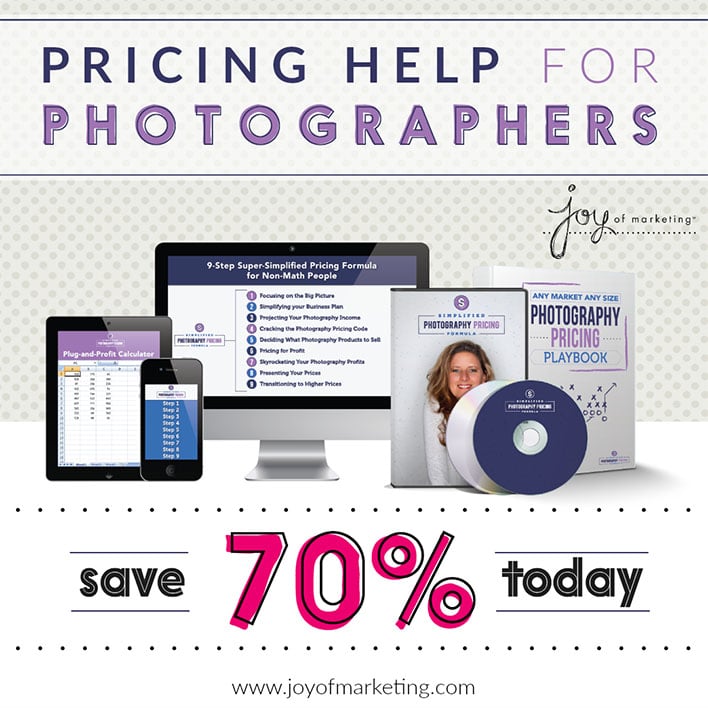
In this 9 module webinar course, you’ll learn from one of the United States most profitable photographers, Sarah Petty, how to set profitable prices so you can move on and make a living doing what you love … PHOTOGRAPHY!

Joy of Marketing, Pricing Help for Photographers

You save 70% when you buy this from November 25th through November 30th. Look, the regular price is $799, but you get this for less than $240! Save the money and put it towards marketing your business. I am sure Sarah would approve of that idea.

5. Photo Tutorials That Run The Gamut

Rob and Lauren Lim run a beautiful website called Photography Concentrate. They are photographers who simply know how to teach and they teach quite simply!

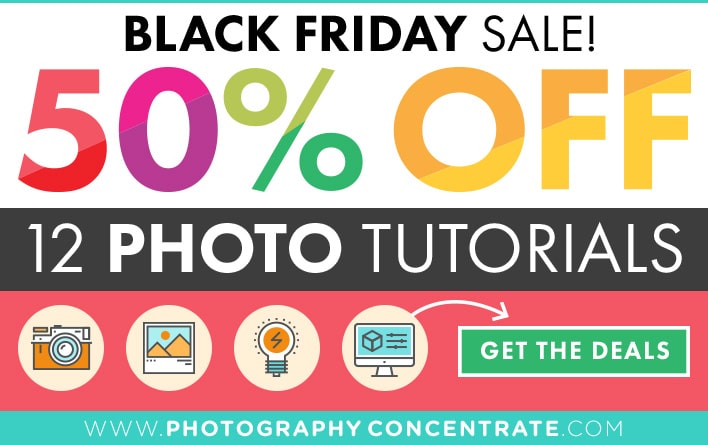
All their tutorials are 50% off from November 20th through December 4th. So, you can jump in and check out their site now. While you are there, do be sure to scroll down and enroll in their free 14 day course called, “How To Photograph Life: 14 Days To Better Photos.”

Photography Concentrate Black Friday / Cyber Monday Sale

Total bonus, you don't have to buy anything at all, but you can enter to win a $500 gift certificate that you can use on Amazon. Again, scroll all the way down on this page!

6. Pampering Your Clients

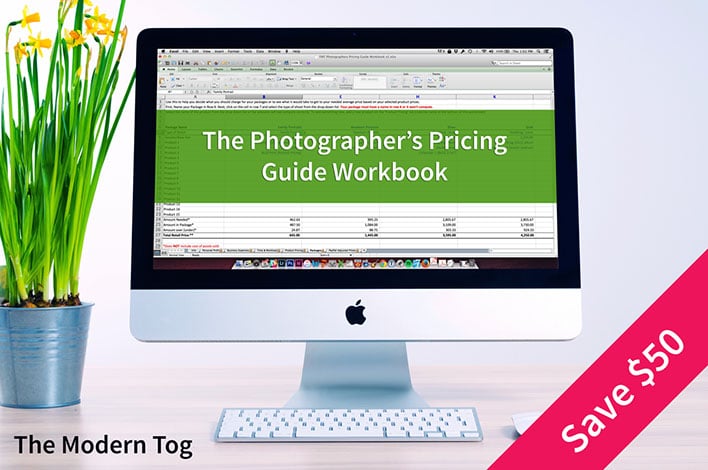
Jamie Swanson's The Moden Tog gives you all the tools to really cater to your clients. Everything is $50 off during the sale – November 26th through November 30th. Personally, I would recommend buying the bundle deal where you receive her Photography Pricing Guide and the popular Easy Client & Money Manager applications. Thinking about the benefits, or what's in it for you? You'll get organized fast and your stress level will drop, especially during the holiday season. And who doesn't want that?

The Photographer's Pricing Guide Workbook by The Modern Tog

Easy Client Manager by The Modern TogEasy Client & Money Manager by The Modern Tog

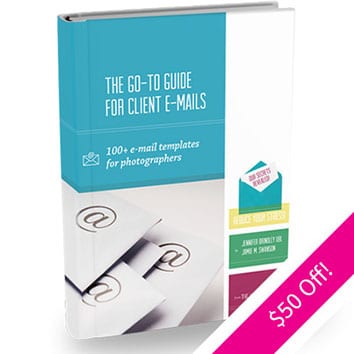
Photography Pricing Guide + Easy Client + Money Manager Bundle by The Modern TogThe Go-To Guide For Client Emails by The Modern Tog

7. When Words Matter … Go Psych!

psychology-for-photogs-bfcm14One of my favorite blogs is called Psychology for Photographers.
It's a smart, useful and timely resource and I highly recommend it. Jenika McDavitt who publishes the blog has two amazing resources – Irresistible Website (regularly $159, sale price is $109) and Irresistible Words (regularly $249, sale price is $199).

So, if my math is right, you will save $50 off of each. But if you buy them together as a bundle, instead of paying $408, you would only have to pay $299 (yes, a savings of $109).

If you have struggled to write your “about me” page or even a simple blog post that doesn't sound like all your other blog posts, I would say jump in now and get the bundle now.

Jenika's information is solid and her intent is to elevate everyone's web presence so that you are more customer oriented. I go back to my notes and the coursework often.

8. Keepin' It Real … Like Film

Mastin Labs Presets For Pro Photographers

It's time for film emulation that actually looks like real film: clean, with a beautiful color palette and perfect tones.

If a preset is made with care, you don't need a separate toolkit of tweaks to get it right. It just looks right the moment you use it, with minimal fuss and a simple workflow so you can focus on your art and not on hours of post-processing.

Mastin Labs film presets are crafted from real film scans from a Fuji Frontier SP3000. This is the same scanner sought-after all over the world for its special 3D look and clean colors and tones.

If you haven't already tried these presets now is the time to do so. With our Black Friday Sale from Nov 23 to November 30, 2015 you can save 40% on the Fuji and Portra Preset Packs, and 50% on the Ilford B&W Preset Pack.

Mastin Labs rarely has sales, so don't miss out!

9. Look Slick, When You Click

Click Gear Clothing Ltd.

Click Gear Clothing based in Carmel, Indiana is all about giving photographers like you an easy way to look great while you work your magic.

On Thanksgiving Night from 8pm-12am you get 50% off all tees and hats. Use the code: “thankyou”. On Black Friday you'll get up to 40% off everything store wide plus free US shipping and 5 different flash sales and extras during the day. So, watch for these! If you visit their site on Cyber Monday, the discount is 30% off everything store wide plus free US shipping and random 50% off flash sales.

How cool is that?

10. Twalk Like A Human Being

Do you find it tough to come up with the right words when a client emails you? Do you struggle with workflow – don't know what comes first and what comes next when working on your photo sessions or weddings?

Pencil & Lens is here to help ya! Black Friday through Cyber Monday, take 35% off all the templates you can find in the shop. Use the code – tiffinbox35 to get that special discount.

We create professionally written tools and templates for your photography business. Tools that give you a framework to create clear, courteous and prompt correspondence with clients and vendors. Tools that make you and your business look good, and provide you with a system of getting it done, done well and done on time.

Pencil & Lens Black Friday Sale

11. In Business, Or In Front Of A Camera … Confidence Is Key

Mimika Cooney's Crushing On Camera Confidence course is now available to those of us who have to get in front of the camera and not behind it. Now, if you are thinking … “I'll never be that person that needs to get in front of the camera.” You are dead wrong. Here's why – do you want to be on your local TV station talking about your business in a way that inspires clients to sign up with you? Or, have you ever been interviewed by bloggers (check out TiffinboxTV)? Or, how about when you need present in front of your clients (sure they don't have a camera pointed at you but imagine if they did). You get the picture?

Crushing On Camera Confidence by Mimika Cooney

Crushing On Camera Confidence is available now through November 27th at 50% off. Used the code: THANKX15.

12. Be Seen & Heard Online … Standing Out Has Never Been Easier (you still need the elbow grease)

Business Brilliantly by Christine Tremoulet

The truth is, you have so many things to focus on in your business, the idea of writing blog posts or planning out your social media is one of those things that goes by the wayside – and you know it is hurting you.

You believe in the power of storytelling marketing, but you just don’t know where to begin – and you’re not sure anyone is going to be reading your site anyways.

You are frustrated because it seems like everyone just cares about what you charge for your work, and they don’t understand how passionate you are about why you do what you do.

You wish that you had a plan to make marketing easy.

That plan? It's called Business Brilliantly and it is being taught by Christine Tremoulet. Read all about it here. If there is anything you need to rock 2016, it is Business Brilliantly.

13. Selling Your Photography In Person

Selling doesn't have to be scary at all. In fact, here's a quick mindset shift that I force myself to make every time I schedule a sales session. I tell myself it isn't “selling,” but “helping.”

Here are two courses that you can consider. One is definitely more in-depth than the other.

First up is called Salesographer. Chris Scott who developed the Preveal app now owns this course and so his deal is this – the sale starts on November 27th. The first 20 people to enroll will get a free copy of the Preveal app and $50 off their first year of his other product called Swift Galleries.

Salesographer: Learn In-Person Sales For Photographers

Rosie Suerdleck of Reflections by Rosie has a short ebook for sale right now for only $25 that goes over her Show & Tell Selling System. She swears it is “kindergarten-easy” to master. Give it a shot!

Show & Tell Selling System

14. Got Photographs, Now What?

Look, I'm there right with you. You have a short stack of photographs that you are proud of and feel like these might be your jam. Then you start thinking if only other people could see them. You know hobbyists do? They drop those bad boys into Flickr and call it a day. Now, if you are a hobbyist, that's a great way to go, but if you want your clients to take you seriously, you need a WordPress based blog or website to show of your wares.

Allow me to introduce you to Imagely. Imagely is the WordPress photography company. It is offering 40% off it's powerful NextGEN Pro WordPress gallery plugin and the epic Photocrati WordPress theme for photographers. To celebrate the upcoming launch of their turnkey WordPress websites for photographers, they're also offering 3 months free website hosting to anyone who signs up pre-launch. 

NextGEN Pro with Ecommerce – 40% off, Regularly $99, Now $59
NextGEN Plus – 40% Off, Regularly $49, Now $29
Photocrati WordPress Theme – 40% Off, Regularly $79, Now $47

15. Jonathan Canlas Has Portrait Photographers Covered

Quick, what comes first? Your business or your photography? My answer: your photography. Gotta learn craft first. And Jonathan Canlas, who shoots using film, is one of the best to teach you. His FIND: Ohana Family Guide is top class. If you are a family portrait photographer like me, you'll want this guide. At 50% off for the Black Friday through Small Business Saturday, this is a STEAL at only $125!

FIND: Business Guide by Jonathan Canlas

So, you have your craft figured out but your business is tanking? No fear. Canlas has a business guide that tons of photographers swear by. Canlas walks you through his successful system and gives you useful and executable tips on setting up yours. This too is 50% off. Buy it now for only $174.

FIND: Business Guide by Jonathan Canlas

Buy them both as a bundle for $290 and you will be all set.

I'll add more offers as I hear about them here, so please bookmark this post and share it with your photographer friends and family enthusiasts!

There is something here for everyone this holiday season. I am truly honored that you are supporting this website by buying what you need for your photography business from the links you see on this site.

Again, thank you for shopping here on Black Friday and Cyber Monday!

Filed Under: Featured Post of the Day!, Photography, Sales Tagged With: Black Friday, Black Friday Cyber Monday Deals, Black Friday Cyber Monday Sales, Buy Products, Cyber Monday, Cyber Monday Sale, Photography Business, Photography Pricing Guide, Photography Shops, search engine optimization, Shop Here, Shopping Spree

What To Look For When Getting a Custom Website

June 15, 2014 by William Bay

The Web has become an infinitely complex place to bring your business to. A few years back, the WWW could have stood for Wild Wild West instead of World Wide Web. People easily put up Flash-based websites that did cool “things,” proper HTML was forsaken in the attempt to make sites pretty, but these attempts were workarounds and left the realm of solid web development.

Thankfully, albeit gradually, order came in form of thing like: Web Standards, CSS, Search Engine Optimization and Google Best Practices. And of course we can praise Steve Jobs for driving the last nail into Flash’s coffin with the creation of the iPhone and iPad.

Confusing Array Of Options For Photographers

While many of the standards and practices above have made life easier for web users, the implementation of those standards can vex common business owners that just need to get their site up. It can be analogous to herding cats, and requires a broad range of skills to manage. Because of that, I highly recommend that when you do look for someone to build a custom site, you find a Web Developer instead of just a web designer. They will be skilled in the various areas (or have a team of people skilled in those areas). Here are a number of the skills required to put together a solid, custom website:

* General hosting server operations. The knowledge to move sites, and be able to handle Redirects, 404 errors, etc. is absolutely critical.
* PHP, HTML and CSS experience. These coding languages are the building blocks of the Web.
* SEO (Search Engine Optimization). Google's algorithms are constantly changing, and then every 9 months to a year there comes a big change that turns the SEO industry on its head. A good developer will keep up with this or have a person that they work with directly to stay up to date on these changes.
*  WordPress expertise. This is of course assuming you're using the best CMS out there. A developer knows how to use template files, Custom Post Types, and advanced plugins that enhance your custom website.
* Security. Having a secure website is a big deal. There have been a number of brute force attacks on sites that have rendered them completely useless. GoDaddy's entire infrastructure was down for a full day! A developer will know where you should host and what you should do to prevent these types of attacks.
* Mobile. Responsive website design “responds” to the size of the device you're on whether that's desktop, laptop, tablet, or phone (small device). There are very important things to consider when developing and designing for the various sizes. You definitely want someone well versed in that world.
* UX/UI. User Experience / User Interface. Your website is a tool to make sales for you. How efficient it is at doing that will depend on how well your Developer understands the process that people go through when entering a site. A good developer will suggest strong CTAs (Call To Actions) on home page, and wherever else a potential customer could be enticed into reaching out to you.
* Design. Of course, you want this thing to look pretty, right?!

Who To Hire?

Different developers have different strengths. Personally, I'm rock solid when it comes to SEO, HTML, CSS, UX/UI and WordPress, fairly strong when it comes to PHP, server functions, and security. I'm OK with design, but I still want my clients to have great designs. So I hire a great designer for our custom website builds.

Finding a developer that has these areas under control, either by himself or with a team, is a must in order to get the absolute best product. I've heard a lot of stories of people not getting what they expected. I even know a photographer that had a custom site performed, but was told to never update WordPress! This is a very critical step in preventing security problems, and an example of someone not familiar enough with WordPress to make the site work properly.

I also see beautifully designed sites that will never see the light of day if searched on Google because they failed to structure the site properly, and the SEO is poor. Do yourself a favor and interview the developers you have in mind and find out what their knowledge is in each area. Thoroughly test out the sites in their portfolio. Ask yourself if they have good designs (beware of the “I don’t like the paint on the walls” thing that people say on those HGTV shows). Pay attention to the level of design. Do elements on the page stick out, do they do a good job of balancing the needs of a website with the design, do the sites look like they were designed in the 90’s, does it appear that the designs get better with each and every website?

I'm happy to help you find the right person too. Even if Flaunt Your Site isn’t the right fit, I often help people figure out what the best path is for them. And we’re not always the answer. (I'll even pose as your web developer brother that works for Qualcomm and can't work on your project, if it helps you).

Weird Options For Photographers

Who Not To Hire

* First and foremost, avoid anyone that mentions the word Flash. That should elicit the response of you hanging up the phone, or pretending you don’t speak English. Even if they say it’s mobile friendly, you should still print their email out, and then light it on fire. (Cackling like a witch is totally optional.)
* Anyone spouting anything about HTML5 or CSS3 or other technical mumbo jumbo to influence you into working with them. First, websites are about people and their businesses. The developer’s job is to use the technology to accomplish your goals, not to use buzzwords as leverage to get you to hire them. (I’ll also add that HTML5 doesn’t mean what most people think it means).
* Someone without a portfolio, or a list of previous clients and links to their site. You really want to look at the websites they’ve worked on before.
* The guy that will do an “amazing full custom website” for $500…

Do you remember the last time a $500 wedding turned out “amazing?”  … Yeah, neither do I.

What Developers Cost

Cost is, of course, a huge factor to consider. Custom websites can vary from developer to developer. It will also vary depending on what functionality you want for your site. To give you a range, Flaunt Your Site does full custom sites from $3,000 to $5,000. We can do sites beyond that price point as well, but that tends to be the averages when it comes to our clients.

You will find developers that charge less than that, and you’ll find developers that charge more than that. My suggestion would be to interview more than one person for your project. Just as your clients have no doubt interviewed more than just you to find out who the right photographer.

Whether you hire someone for $1,000 or $10,000, your aim should be to have your new website be the type of investment that actually makes you money. If this isn’t on yours or your developer’s radar, you need to make it a priority quickly. If you’re doing it just to have a pretty site, then that is narcissism or “keeping up with the Joneses” getting in the way of running your business.

The only reason to spend money on a custom site is to increase your bottom line.

I have a personal goal that each website Flaunt Your Site does is directly responsible for our clients gaining 5-10 new clients in that first year.

Be sure to read William Bay's first article in this series.

Filed Under: Home Middle Left, Photography, Web/Tech Tagged With: blog software, content management systems, custom, Custom Designs, Custom Web Design, Custom Websites, Design, Design Website, Flash Based Websites, google, Html, Markup Languages, Photographers, Photography Businesses, php programming language, Pretty Websites, Responsive Website, search engine optimization, Secure Website, Web Development, web display, Website, Website Building, Website Design, Website Launch, websites, Websites Security, William Bay, wordpress

What is Bounce Rate, And Should Photographers Care?

November 12, 2013 by Zach Prez

If you have been using Google Analytics for any length of time to measure your photography website’s performance, then first of all, congratulations. Google Analytics is a free metrics tool and the industry standard for measuring how visitors use your website including how many people come, how often, and to what pages. You may have noticed a data point called bounce rate, and gently ignored it (no offense bounce rate).

Bounce Rate

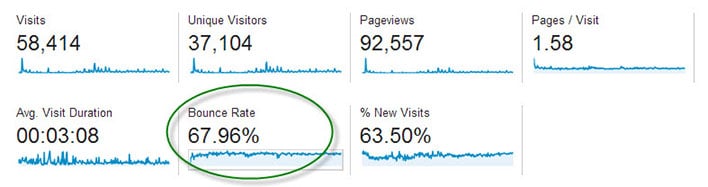
The main dashboard of Google Analytics shows the average bounce rate for your whole site.

Bounce Rate is the percentage of single-page visits (i.e. visits in which the person left your site from the entrance page without interacting with the page).

Should Bounce Rate Be High or Low?

Bounce rate should be as low as possible, indicating potential customers are viewing multiple pages of your site and therefore more likely to hire you.

It’s hard to quantify what is a high bounce rate since that depends on many factors including the type of page, how users came to that page, and what is on the page. If you’re only sharing your page with family and friends, you may have a low 25% bounce rate but are not really growing your business. You may have a high 90% bounce rate, but are getting nationwide press and converting a lot of sales from those visitors. Thus, it boils down to relative bounce rate. How does the bounce rate of your homepage compare to that of your pricing page or an individual blog post? What actions can you take to improve one page to increase the click through that your other pages are getting?

Bounce Rate for Individual Pages

Google Analytics displays bounce rate data for every page of your site. Find this report in the left navigation under Behavior > Site Content > All Pages.

Bounce Rate Pages

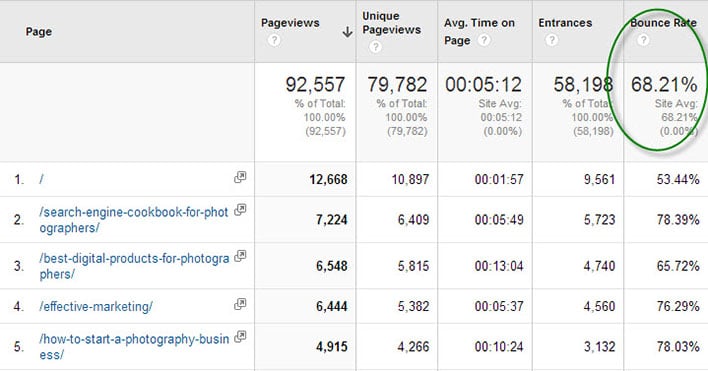
The Pages report in Google Analytics shows bounce rate data.

In the above report for my business articles blog we see that the homepage has a 53.44% bounce rate. That means over half of my audience reaches my homepage but does not click on an article. This bounce rate is lower that the site average of 68.21% bounce.

Item #2 in the above list is a product page and has a higher bounce rate than Item #3, an article containing lots of links. I may conclude that adding more links to my product page can help retain customers.

What Influences Bounce Rate?

Traffic comes to your website in three ways:

• Direct – 99% of direct traffic is from email, 1% is from bookmarks
• Referral – links from other sites on the Internet including social media
• Search Engines

Each of these ways can influence how visitors use your site, and if they will view multiple pages. If you have a large percentage of traffic from an email newsletter, then your bounce rate may be high. This is because people click on a link in your email, they see what they expected (like a recent photo session), then leave the page without clicking anything. This is not necessarily a bad thing.

Sites with a lot of traffic from Pinterest may have a high bounce rate since the user is simply browsing (perhaps for newborn poses) and might not even be in your target market or geographic location. I would not expect those people to click around to other pages of your site. Sites with a lot of blog posts ranking in search engines, the average visitor may check out the article they were searching for (like backyard wedding photo ideas) and then leave right away. Again, your webpage served its purpose.

How to Reduce Bounce Rate

Here’s the key to getting people to stick around your website, and click across multiple pages without bouncing off your site:

Give visitors additional links to click on every webpage

Here’s a little experiment to help you figure out what links to place across your site. Write down the top 3 pages of your site you want users to visit most. It may be a blog post you wrote exceptionally well, perhaps an important photo gallery that showcases your work wonderfully, and certainly it will be your contact and/or pricing page.

Now pick a random page from your website. How easy is it for users to get from that random page to one of your top 3 pages? Place links to these hot spots from the top, middle and bottom of the page.

Homepage – Many photography homepages have almost no text, and a single link to a gallery site or a blog site. That simply dumps users into a bunch of content, often times your most recent work and not necessarily your best work. Instead, display individual links to your most important blog posts right on the homepage. With this approach, users have a clear path to the best pages and are more likely to click.

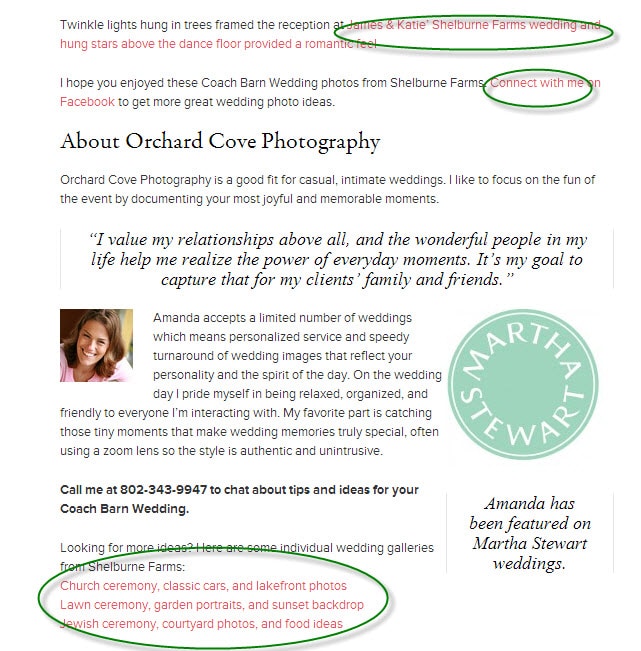
Blog Post – Visitors find blog posts through many sources, especially search engines and social media. Since these potential clients didn’t navigate through the homepage, photographers need to reiterate important information like contact information and links to relevant pages. Orchard Cove Photography hired me to create a SEO-friendly blog post and you’ll see how I included tons of links at the end (and at the beginning) in order to keep interested customers from bouncing.

Sample Post

Does Bounce Rate Matter?

The very important question that comes out of all this is whether or not photographers should measure, monitor, and care about reducing bounce rate. I don’t ever look at my bounce rate.

The goal is to define clear customer paths from each and every page of your site. Start with your five top traffic pages. Pretend each page is the starting point for your potential customer because they came from Google or Facebook. Figure out what you want them to do next and make that a clear navigation point on the page. If you want them to hire you then add a big graphic that says “Book a Session Now” and link it to your contact page.

After making changes to your five top traffic pages, wait a week and see if the bounce rate declined. I hope you will be pleasantly surprised.

Filed Under: Home Middle Right, Photography, Web/Tech Tagged With: bounce rate, Business, google, google analytics, photography websites, search engine optimization, seo, web visitors

Supercharge Workshops For Photographers

May 27, 2013 by Seshu | Editor & Publisher

It's funny how things just seem to come together when one decides to pivot. I spoke about scuttling two of my websites and changing course. Part of my new adventure involves being absolutely sure what my future photography clients want and what they are looking for.

As I have stated before, just because you can photograph and publish images on the web does not guarantee you a following or more importantly a business. You have to define who want to do business with in the first place. Most people, including me, get stuck in the “how” – I don't know, for instance, how to use Google Analytics in a way that will give me a good idea of what information my clients are looking for online.

Who has helped me through this process, from time to time, is my friend Scott Wyden Kivovitz. He is a phone call or a Tweet away. If he has time and he is one very active guy, he helps me out. If he doesn't, he usually has a resource online that I can check out on my own. I can't tell you the number of times Scott has come to my rescue. He is incredibly web savvy and it came as no surprise when he was asked to join the Photocrati Media team.

Supercharge Workshops | Photocrati MediaScott asked me to let you all know about two web marketing workshops directed solely towards photographers. He is joined by Erick Danzer and Vanessa Joy. Erick owns Photocrati Media, a highly regarded company that produces among other things WordPress themes for photographers. Vanessa is a well-known teacher, author and photographer.

The workshops are in Denver, Colorado and Hamilton, New Jersey. Sign up before May 31st and save $100.

Specific topics include SEO, keyword selection, site optimization, link building, image SEO, social media and social signals, blogging, content marketing, email marketing and follow up, paid advertising, conversion rate optimization, social proof, and more.

Plus, you get a ton of bonuses:

– Free Access to the Sculpture Gardens & Red Rocks
– Lunch is Included
– Free Copy of the Photographer’s SEO eBook – $39 value
– One Year Membership for the Photographer’s SEO Community – $99 value
– Photocrati WordPress Theme + One Year of Support/Updates – $89 value
– The Laundry List eBook by Rachel Brenke – $9.99 value
– Chic Magazine for phone/iPad – $12 value

Get all the details here and register for either the Colorado or New Jersey Supercharge Workshops, before the prices get bumped up.

[Yes, I am an affiliate partner of Photocrati Media because they provide quality WordPress themes and great value through their various educational resources. I wholly support vendors who help photographers elevate their game!]

Filed Under: Marketing, Photography, Web/Tech Tagged With: Improve Traffic, Photocrati Media, Photographers, search engine optimization, traffic, Workshops

  • 1
  • 2
  • 3
  • Next Page »

Subscribe To Tiffibox Treats!

Looking for a well-curated email newsletter that will leave you inspired and motivated about your photography business? Sign up below!

About Seshu

Seshu creates relaxed portraits of families and high school seniors in Avon, Connecticut. He also leads a successful headshot photography studio in Connecticut, helping professionals from a variety of disciplines project the very best versions of themselves. He created Tiffinbox as a way of inspiring photographers, to create better images and successful businesses. [Read More]

Email Templates For Headshot Photographers

Email Templates for Headshot Photographers

Recent Posts

  • How Capture One Changed My Event Photography
  • 10 Steps To Stay Positive In Times Of Great Stress
  • Why You Need To Read “Personal Branding For Photographers” Now
  • How To Master Your Website Content Step By Step?
  • Tony Taafe’s TNT Method For Headshot Photographers

Recent Comments

  • Stephen Davison on Are You A Business Owner Who Is Smart, But Stuck?
  • Ben A. on Don Giannatti Clinches The 8th Annual Tiffinbox Award
  • Dan on Don Giannatti Clinches The 8th Annual Tiffinbox Award
  • Donald Giannatti on Don Giannatti Clinches The 8th Annual Tiffinbox Award
  • Stephen Davison on G.E. Masana’s 6 Strategies For Wedding Photography Success
  • Naveen Kumar on Weddings In India Are More Than Being At The Right Place And At The Right Time
  • kartick on Weddings In India Are More Than Being At The Right Place And At The Right Time
  • Leonid Farbman on 6 Uncommon Trends To Grow Your Photography Business
  • Willow and Finch Wedding Photography on 11 Reception Tips To Help Your Wedding Photography
  • Web Designer Malaysia on How To Optimize Your Squarespace Website For Search Engines
  • Creastan on An Interview With Photojournalist G.M.B. Akash
  • Cindy Brown | Atlanta on An Open Letter To A Local Photographer

Become a Patron!

Copyright © 2026 · Tiffinbox · Site Design by Heather Mackan Creative · Built on Genesis