• Photography
  • Interviews
  • Business
  • Reviews

Tiffinbox

Inspiring Photographers

  • Home
  • About
  • Blog
  • Contact

Zach Prez

Zach Prez is an Internet Marketing specialist with 10+ years of experience. His expertise in SEO, social media, email marketing, and web design has been shared in dozens of top photography sites and magazines. He's a husband and father of three, ninja at Ms Pac Man, and loves books on art crime. Get more business advice at Photography Spark or on Google+ and Facebook.

What is Bounce Rate, And Should Photographers Care?

November 12, 2013 by Zach Prez

If you have been using Google Analytics for any length of time to measure your photography website’s performance, then first of all, congratulations. Google Analytics is a free metrics tool and the industry standard for measuring how visitors use your website including how many people come, how often, and to what pages. You may have noticed a data point called bounce rate, and gently ignored it (no offense bounce rate).
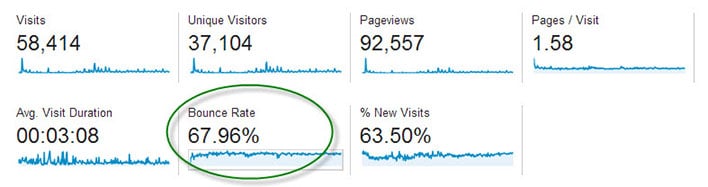
Bounce Rate

The main dashboard of Google Analytics shows the average bounce rate for your whole site.

Bounce Rate is the percentage of single-page visits (i.e. visits in which the person left your site from the entrance page without interacting with the page).

Should Bounce Rate Be High or Low?

Bounce rate should be as low as possible, indicating potential customers are viewing multiple pages of your site and therefore more likely to hire you.

It’s hard to quantify what is a high bounce rate since that depends on many factors including the type of page, how users came to that page, and what is on the page. If you’re only sharing your page with family and friends, you may have a low 25% bounce rate but are not really growing your business. You may have a high 90% bounce rate, but are getting nationwide press and converting a lot of sales from those visitors. Thus, it boils down to relative bounce rate. How does the bounce rate of your homepage compare to that of your pricing page or an individual blog post? What actions can you take to improve one page to increase the click through that your other pages are getting?

Bounce Rate for Individual Pages

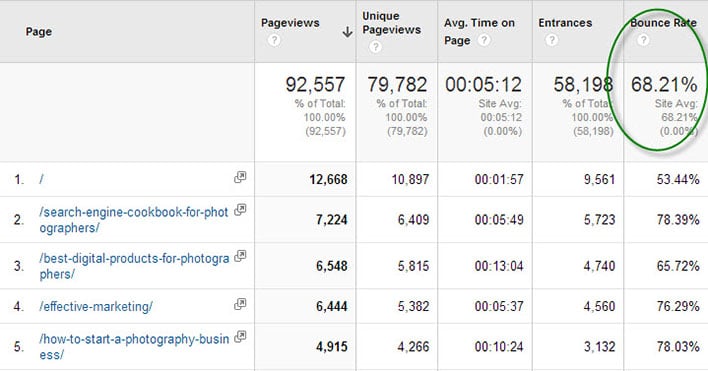
Google Analytics displays bounce rate data for every page of your site. Find this report in the left navigation under Behavior > Site Content > All Pages.
Bounce Rate Pages

The Pages report in Google Analytics shows bounce rate data.

In the above report for my business articles blog we see that the homepage has a 53.44% bounce rate. That means over half of my audience reaches my homepage but does not click on an article. This bounce rate is lower that the site average of 68.21% bounce.

Item #2 in the above list is a product page and has a higher bounce rate than Item #3, an article containing lots of links. I may conclude that adding more links to my product page can help retain customers.

What Influences Bounce Rate?

Traffic comes to your website in three ways:

• Direct – 99% of direct traffic is from email, 1% is from bookmarks
• Referral – links from other sites on the Internet including social media
• Search Engines

Each of these ways can influence how visitors use your site, and if they will view multiple pages. If you have a large percentage of traffic from an email newsletter, then your bounce rate may be high. This is because people click on a link in your email, they see what they expected (like a recent photo session), then leave the page without clicking anything. This is not necessarily a bad thing.

Sites with a lot of traffic from Pinterest may have a high bounce rate since the user is simply browsing (perhaps for newborn poses) and might not even be in your target market or geographic location. I would not expect those people to click around to other pages of your site. Sites with a lot of blog posts ranking in search engines, the average visitor may check out the article they were searching for (like backyard wedding photo ideas) and then leave right away. Again, your webpage served its purpose.

How to Reduce Bounce Rate

Here’s the key to getting people to stick around your website, and click across multiple pages without bouncing off your site:

Give visitors additional links to click on every webpage

Here’s a little experiment to help you figure out what links to place across your site. Write down the top 3 pages of your site you want users to visit most. It may be a blog post you wrote exceptionally well, perhaps an important photo gallery that showcases your work wonderfully, and certainly it will be your contact and/or pricing page.

Now pick a random page from your website. How easy is it for users to get from that random page to one of your top 3 pages? Place links to these hot spots from the top, middle and bottom of the page.

Homepage – Many photography homepages have almost no text, and a single link to a gallery site or a blog site. That simply dumps users into a bunch of content, often times your most recent work and not necessarily your best work. Instead, display individual links to your most important blog posts right on the homepage. With this approach, users have a clear path to the best pages and are more likely to click.

Blog Post – Visitors find blog posts through many sources, especially search engines and social media. Since these potential clients didn’t navigate through the homepage, photographers need to reiterate important information like contact information and links to relevant pages. Orchard Cove Photography hired me to create a SEO-friendly blog post and you’ll see how I included tons of links at the end (and at the beginning) in order to keep interested customers from bouncing.
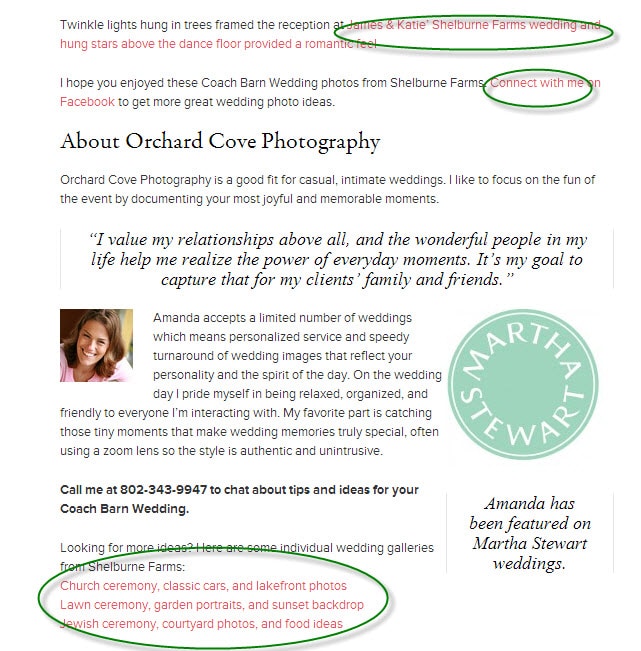
Sample Post

Does Bounce Rate Matter?

The very important question that comes out of all this is whether or not photographers should measure, monitor, and care about reducing bounce rate. I don’t ever look at my bounce rate.

The goal is to define clear customer paths from each and every page of your site. Start with your five top traffic pages. Pretend each page is the starting point for your potential customer because they came from Google or Facebook. Figure out what you want them to do next and make that a clear navigation point on the page. If you want them to hire you then add a big graphic that says “Book a Session Now” and link it to your contact page.

After making changes to your five top traffic pages, wait a week and see if the bounce rate declined. I hope you will be pleasantly surprised.

Filed Under: Home Middle Right, Photography, Web/Tech Tagged With: bounce rate, Business, google, google analytics, photography websites, search engine optimization, seo, web visitors

Web Design & Usability Essentials For Photographers

January 11, 2011 by Zach Prez

Today's guest blog post is by Zach Prez. He says: “I'm a dad and social cyclist who loves to talk marketing over a cup of Lipton tea. I write about SEO, email marketing, social media, and web design for photographers over at http://photographywebmarketing.com”

Last week I was walking through the dreaded mall with my family. As I browsed the storefronts and window displays I realized marketing at play. I’m carrying what feels like 200 pounds of shopping bags, pushing a stroller and am in no mood to browse. I take about 5 seconds to glance at each store’s design and promotions and decide with my subliminal consciousness if I skip it or take a closer look. I peek through the window as I shove some more goldfish crackers into my toddlers’ mouths. Do I have time to go in? Anything in there I need to buy?

I often think about the amount of marketing that goes into those windows; hooks and promotions used to get me in the door. Then there’s the marketing inside the store to turn me from a person browsing to a new customer. Many things at play move me toward a purchase: clear navigation, lack of clutter, style, social proof, no wait time, product placement, and marketing messages. The same 7 concepts apply to your website and become critical in converting the window shoppers to paying customers. The first item, clear navigation, is discussed below and you can pick up details on the other 6 in my Photography Web Marketing Guide.

Create Clear Navigation

Start with navigation because edits are fast, easy, and you need to move your customers toward a decision as quickly as possible without losing their interest.

A homepage is the most visited and most important page of the site. Many new visitors (potential clients) begin here. In looking at your homepage, is it clear what you want them to do?

If I were to offer you a potential client right now and send them to your homepage, what do you want them to do? Think about exactly what you want them to read or click. My guess is you want them to contact you and book an appointment immediately more than you want them to read your blog or mobile website.

Plan out specific goals for the page and the importance of each goal on a scale of 1 to 5. For example:

  • Contact me to schedule an appointment – 5
  • View my photo gallery – 5
  • Subscribe to something (Email, Facebook, Twitter, RSS) – 3
  • View my photography blog – 1
  • View informational text or other important pages (About me, Pricing, etc) – 1

In this case, your homepage should look like this

View My Photo Gallery Contact Me to Schedule an Appointment
Subscribe for great information: Email | Facebook | Twitter | RSS
View my blog
Text about me
Links to important pages

Notice how each section has clear text that tells the user what to do (View… Contact… Subscribe…) and the least important information is smallest and at the bottom of the page. The same can be said for top navigation on a site or blog.

As a new user to your website I want:

  • examples of photos (Galleries)
  • information about the photographer (About)
  • pricing information (Pricing)
  • contact information (Contact)

Those should be the first links in your navigation. Don’t confuse people with clever names like Investment. Does that mean pricing? As a user I’m not sure and might not click it. Remove any unnecessary links like Client Proofing since that has no relevance to new customers.

Effective navigation can be easily obtained by reducing the amount of choices given to a user. If you have kids you know what I mean. Offer them 10 different candy bars and you’ll be in a decision stalemate for eternity. Offer 1 or 2 and they’ll choose quickly. Focus your user’s attention on the most important actions by removing clutter.

Want to learn more from Zach Prez? Buy his new e-book, “Photography Web Marketing Guide” that takes on a whole lot of topics that will be of interest to working photographers who want to excel in their online marketing efforts.

If you liked the post, or have a perspective you think might help us understand this topic better, please post your comments below.

Filed Under: Business, Photo Biz, Photography, Web/Tech

Subscribe To Tiffibox Treats!

Looking for a well-curated email newsletter that will leave you inspired and motivated about your photography business? Sign up below!

About Seshu

Seshu creates relaxed portraits of families and high school seniors in Avon, Connecticut. He also leads a successful headshot photography studio in Connecticut, helping professionals from a variety of disciplines project the very best versions of themselves. He created Tiffinbox as a way of inspiring photographers, to create better images and successful businesses. [Read More]

Email Templates For Headshot Photographers

Email Templates for Headshot Photographers

Recent Posts

  • How Capture One Changed My Event Photography
  • 10 Steps To Stay Positive In Times Of Great Stress
  • Why You Need To Read “Personal Branding For Photographers” Now
  • How To Master Your Website Content Step By Step?
  • Tony Taafe’s TNT Method For Headshot Photographers

Recent Comments

  • Stephen Davison on Are You A Business Owner Who Is Smart, But Stuck?
  • Ben A. on Don Giannatti Clinches The 8th Annual Tiffinbox Award
  • Dan on Don Giannatti Clinches The 8th Annual Tiffinbox Award
  • Donald Giannatti on Don Giannatti Clinches The 8th Annual Tiffinbox Award
  • Stephen Davison on G.E. Masana’s 6 Strategies For Wedding Photography Success
  • Naveen Kumar on Weddings In India Are More Than Being At The Right Place And At The Right Time
  • kartick on Weddings In India Are More Than Being At The Right Place And At The Right Time
  • Leonid Farbman on 6 Uncommon Trends To Grow Your Photography Business
  • Willow and Finch Wedding Photography on 11 Reception Tips To Help Your Wedding Photography
  • Web Designer Malaysia on How To Optimize Your Squarespace Website For Search Engines
  • Creastan on An Interview With Photojournalist G.M.B. Akash
  • Cindy Brown | Atlanta on An Open Letter To A Local Photographer

Become a Patron!

Copyright © 2026 · Tiffinbox · Site Design by Heather Mackan Creative · Built on Genesis