• Photography
  • Interviews
  • Business
  • Reviews

Tiffinbox

Inspiring Photographers

  • Home
  • About
  • Blog
  • Contact

What To Look For When Getting a Custom Website

June 15, 2014 by William Bay

The Web has become an infinitely complex place to bring your business to. A few years back, the WWW could have stood for Wild Wild West instead of World Wide Web. People easily put up Flash-based websites that did cool “things,” proper HTML was forsaken in the attempt to make sites pretty, but these attempts were workarounds and left the realm of solid web development.

Thankfully, albeit gradually, order came in form of thing like: Web Standards, CSS, Search Engine Optimization and Google Best Practices. And of course we can praise Steve Jobs for driving the last nail into Flash’s coffin with the creation of the iPhone and iPad.

Confusing Array Of Options For Photographers

While many of the standards and practices above have made life easier for web users, the implementation of those standards can vex common business owners that just need to get their site up. It can be analogous to herding cats, and requires a broad range of skills to manage. Because of that, I highly recommend that when you do look for someone to build a custom site, you find a Web Developer instead of just a web designer. They will be skilled in the various areas (or have a team of people skilled in those areas). Here are a number of the skills required to put together a solid, custom website:

* General hosting server operations. The knowledge to move sites, and be able to handle Redirects, 404 errors, etc. is absolutely critical.
* PHP, HTML and CSS experience. These coding languages are the building blocks of the Web.
* SEO (Search Engine Optimization). Google's algorithms are constantly changing, and then every 9 months to a year there comes a big change that turns the SEO industry on its head. A good developer will keep up with this or have a person that they work with directly to stay up to date on these changes.
*  WordPress expertise. This is of course assuming you're using the best CMS out there. A developer knows how to use template files, Custom Post Types, and advanced plugins that enhance your custom website.
* Security. Having a secure website is a big deal. There have been a number of brute force attacks on sites that have rendered them completely useless. GoDaddy's entire infrastructure was down for a full day! A developer will know where you should host and what you should do to prevent these types of attacks.
* Mobile. Responsive website design “responds” to the size of the device you're on whether that's desktop, laptop, tablet, or phone (small device). There are very important things to consider when developing and designing for the various sizes. You definitely want someone well versed in that world.
* UX/UI. User Experience / User Interface. Your website is a tool to make sales for you. How efficient it is at doing that will depend on how well your Developer understands the process that people go through when entering a site. A good developer will suggest strong CTAs (Call To Actions) on home page, and wherever else a potential customer could be enticed into reaching out to you.
* Design. Of course, you want this thing to look pretty, right?!

Who To Hire?

Different developers have different strengths. Personally, I'm rock solid when it comes to SEO, HTML, CSS, UX/UI and WordPress, fairly strong when it comes to PHP, server functions, and security. I'm OK with design, but I still want my clients to have great designs. So I hire a great designer for our custom website builds.

Finding a developer that has these areas under control, either by himself or with a team, is a must in order to get the absolute best product. I've heard a lot of stories of people not getting what they expected. I even know a photographer that had a custom site performed, but was told to never update WordPress! This is a very critical step in preventing security problems, and an example of someone not familiar enough with WordPress to make the site work properly.

I also see beautifully designed sites that will never see the light of day if searched on Google because they failed to structure the site properly, and the SEO is poor. Do yourself a favor and interview the developers you have in mind and find out what their knowledge is in each area. Thoroughly test out the sites in their portfolio. Ask yourself if they have good designs (beware of the “I don’t like the paint on the walls” thing that people say on those HGTV shows). Pay attention to the level of design. Do elements on the page stick out, do they do a good job of balancing the needs of a website with the design, do the sites look like they were designed in the 90’s, does it appear that the designs get better with each and every website?

I'm happy to help you find the right person too. Even if Flaunt Your Site isn’t the right fit, I often help people figure out what the best path is for them. And we’re not always the answer. (I'll even pose as your web developer brother that works for Qualcomm and can't work on your project, if it helps you).

Weird Options For Photographers

Who Not To Hire

* First and foremost, avoid anyone that mentions the word Flash. That should elicit the response of you hanging up the phone, or pretending you don’t speak English. Even if they say it’s mobile friendly, you should still print their email out, and then light it on fire. (Cackling like a witch is totally optional.)
* Anyone spouting anything about HTML5 or CSS3 or other technical mumbo jumbo to influence you into working with them. First, websites are about people and their businesses. The developer’s job is to use the technology to accomplish your goals, not to use buzzwords as leverage to get you to hire them. (I’ll also add that HTML5 doesn’t mean what most people think it means).
* Someone without a portfolio, or a list of previous clients and links to their site. You really want to look at the websites they’ve worked on before.
* The guy that will do an “amazing full custom website” for $500…

Do you remember the last time a $500 wedding turned out “amazing?”  … Yeah, neither do I.

What Developers Cost

Cost is, of course, a huge factor to consider. Custom websites can vary from developer to developer. It will also vary depending on what functionality you want for your site. To give you a range, Flaunt Your Site does full custom sites from $3,000 to $5,000. We can do sites beyond that price point as well, but that tends to be the averages when it comes to our clients.

You will find developers that charge less than that, and you’ll find developers that charge more than that. My suggestion would be to interview more than one person for your project. Just as your clients have no doubt interviewed more than just you to find out who the right photographer.

Whether you hire someone for $1,000 or $10,000, your aim should be to have your new website be the type of investment that actually makes you money. If this isn’t on yours or your developer’s radar, you need to make it a priority quickly. If you’re doing it just to have a pretty site, then that is narcissism or “keeping up with the Joneses” getting in the way of running your business.

The only reason to spend money on a custom site is to increase your bottom line.

I have a personal goal that each website Flaunt Your Site does is directly responsible for our clients gaining 5-10 new clients in that first year.

Be sure to read William Bay's first article in this series.
Filed Under: Home Middle Left, Photography, Web/Tech Tagged With: blog software, content management systems, custom, Custom Designs, Custom Web Design, Custom Websites, Design, Design Website, Flash Based Websites, google, Html, Markup Languages, Photographers, Photography Businesses, php programming language, Pretty Websites, Responsive Website, search engine optimization, Secure Website, Web Development, web display, Website, Website Building, Website Design, Website Launch, websites, Websites Security, William Bay, wordpress

What is Bounce Rate, And Should Photographers Care?

November 12, 2013 by Zach Prez

If you have been using Google Analytics for any length of time to measure your photography website’s performance, then first of all, congratulations. Google Analytics is a free metrics tool and the industry standard for measuring how visitors use your website including how many people come, how often, and to what pages. You may have noticed a data point called bounce rate, and gently ignored it (no offense bounce rate).

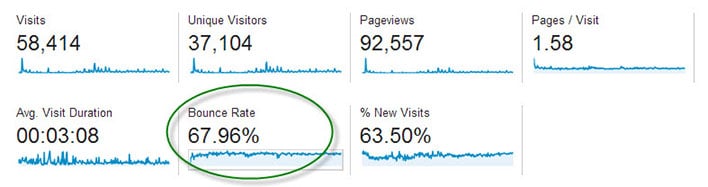
Bounce Rate

The main dashboard of Google Analytics shows the average bounce rate for your whole site.

Bounce Rate is the percentage of single-page visits (i.e. visits in which the person left your site from the entrance page without interacting with the page).

Should Bounce Rate Be High or Low?

Bounce rate should be as low as possible, indicating potential customers are viewing multiple pages of your site and therefore more likely to hire you.

It’s hard to quantify what is a high bounce rate since that depends on many factors including the type of page, how users came to that page, and what is on the page. If you’re only sharing your page with family and friends, you may have a low 25% bounce rate but are not really growing your business. You may have a high 90% bounce rate, but are getting nationwide press and converting a lot of sales from those visitors. Thus, it boils down to relative bounce rate. How does the bounce rate of your homepage compare to that of your pricing page or an individual blog post? What actions can you take to improve one page to increase the click through that your other pages are getting?

Bounce Rate for Individual Pages

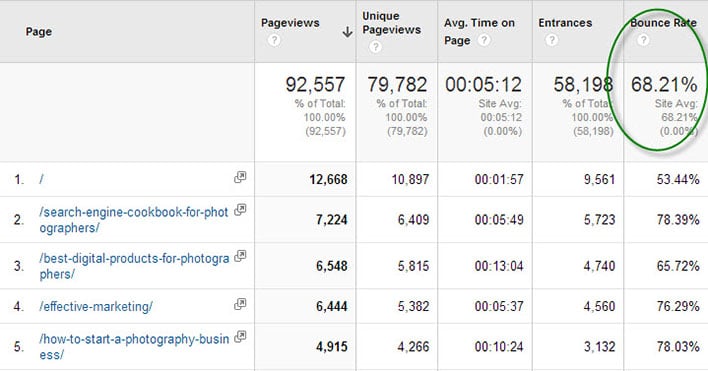
Google Analytics displays bounce rate data for every page of your site. Find this report in the left navigation under Behavior > Site Content > All Pages.

Bounce Rate Pages

The Pages report in Google Analytics shows bounce rate data.

In the above report for my business articles blog we see that the homepage has a 53.44% bounce rate. That means over half of my audience reaches my homepage but does not click on an article. This bounce rate is lower that the site average of 68.21% bounce.

Item #2 in the above list is a product page and has a higher bounce rate than Item #3, an article containing lots of links. I may conclude that adding more links to my product page can help retain customers.

What Influences Bounce Rate?

Traffic comes to your website in three ways:

• Direct – 99% of direct traffic is from email, 1% is from bookmarks
• Referral – links from other sites on the Internet including social media
• Search Engines

Each of these ways can influence how visitors use your site, and if they will view multiple pages. If you have a large percentage of traffic from an email newsletter, then your bounce rate may be high. This is because people click on a link in your email, they see what they expected (like a recent photo session), then leave the page without clicking anything. This is not necessarily a bad thing.

Sites with a lot of traffic from Pinterest may have a high bounce rate since the user is simply browsing (perhaps for newborn poses) and might not even be in your target market or geographic location. I would not expect those people to click around to other pages of your site. Sites with a lot of blog posts ranking in search engines, the average visitor may check out the article they were searching for (like backyard wedding photo ideas) and then leave right away. Again, your webpage served its purpose.

How to Reduce Bounce Rate

Here’s the key to getting people to stick around your website, and click across multiple pages without bouncing off your site:

Give visitors additional links to click on every webpage

Here’s a little experiment to help you figure out what links to place across your site. Write down the top 3 pages of your site you want users to visit most. It may be a blog post you wrote exceptionally well, perhaps an important photo gallery that showcases your work wonderfully, and certainly it will be your contact and/or pricing page.

Now pick a random page from your website. How easy is it for users to get from that random page to one of your top 3 pages? Place links to these hot spots from the top, middle and bottom of the page.

Homepage – Many photography homepages have almost no text, and a single link to a gallery site or a blog site. That simply dumps users into a bunch of content, often times your most recent work and not necessarily your best work. Instead, display individual links to your most important blog posts right on the homepage. With this approach, users have a clear path to the best pages and are more likely to click.

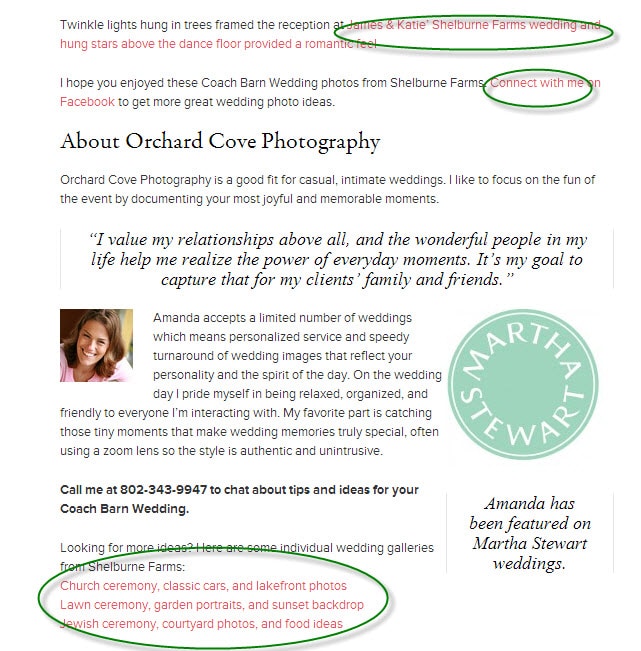
Blog Post – Visitors find blog posts through many sources, especially search engines and social media. Since these potential clients didn’t navigate through the homepage, photographers need to reiterate important information like contact information and links to relevant pages. Orchard Cove Photography hired me to create a SEO-friendly blog post and you’ll see how I included tons of links at the end (and at the beginning) in order to keep interested customers from bouncing.

Sample Post

Does Bounce Rate Matter?

The very important question that comes out of all this is whether or not photographers should measure, monitor, and care about reducing bounce rate. I don’t ever look at my bounce rate.

The goal is to define clear customer paths from each and every page of your site. Start with your five top traffic pages. Pretend each page is the starting point for your potential customer because they came from Google or Facebook. Figure out what you want them to do next and make that a clear navigation point on the page. If you want them to hire you then add a big graphic that says “Book a Session Now” and link it to your contact page.

After making changes to your five top traffic pages, wait a week and see if the bounce rate declined. I hope you will be pleasantly surprised.

Filed Under: Home Middle Right, Photography, Web/Tech Tagged With: bounce rate, Business, google, google analytics, photography websites, search engine optimization, seo, web visitors

5 SEO Myths Photographers Should Debunk

May 7, 2013 by Feuza Reis

Feuza Reis is a wedding photographer, blogger and founder of SEO for Photographer’s Bootcamp “Get Found With Fuse”. This is Feuza's second guest blog post. Read her first one as well. Follow Feuza on Twitter.

In the last few weeks, some photographers in the community have imparted SEO advice that has made me want to cringe and hide. Not only were there some major mistakes taught, some things mentioned were irresponsible and can get photographers in trouble with Google.

Here are 5 SEO myths photographers should consider reviewing:

1) Wanting To Only Rank (meaning to be on the first page of Google) For A City and/or Kind Of Photography Service You Offer

For example: NY Wedding Photographer, Los Angeles Newborn photographer, Chicago kids Photographer and so forth.

You should be including the town you live in and the towns you serve in your SEO efforts but it should not be your main SEO or only SEO goal.

Why?

Number one is, I call this the gladiator arena, everyone is bidding on adwords for this term and paying big bucks for it, this in turn will make it harder to rank. This also indicates a high competition in the organic results realm because business owners don’t understand how people actually search or how Google works.

Google is smart enough to know where the person searching is actually located and it knows how to filter it’s results accordingly. Do brides who get married in NY, Chicago or LA really live in that town? Or, do they live in surrounding towns but want to get married in the big city? I don’t have an exact answer for this but I know you can use Google’s Keyword Tool to discover the search traffic results to find out. What I do know is that Google is wise and knows what it is doing so when I hear photographers say they don’t or should not list surrounding towns, it's comical and sad.

You are missing out on organic traffic because you are underestimating Google’s algorithms. Why fight where everyone is fighting instead of going after alternative keywords, venues, wedding types, surrounding cities, and actually words and phrases clients really use like pictures of engagement photos, kids, children and not words like lifestyle, portrait, and industry related words?

Competitive keywords don’t always mean more traffic so be very careful.

2) Use The Same 2-3 Keyword Phrase On Every Single Blog Post And On All Pages Of Your Website

Although SEO is all about text and yes you should have as much text as possible and even be repetitive, variety matters.

For an engagement photo session gallery page, your page titles and description should be related to engagement photography and variations of that and not have words like Family or San Diego Wedding Photographer.

Yes Google knows that those when two things are relatable like wedding and engagement but making the page as concise and specific as possible will help the search engines navigate better and know where to go within your website. This also matters when choosing what to name your links within your pages in your category dropdowns and sub categories. Don’t use cute names for sessions but use more day to day words clients will know.

The other problem with using the same keyword all over is that it will be considered duplicate content and your pages will compete with each other and you sure don’t want that because the Google bots will leave. Remember its not your over all domain url that gets ranked per say but it is your pages and one page can be much stronger than the other and get better results. So if a search engine comes into your website and all the pages are “Seattle Wedding Photographer” it will get stuck and not know how to navigate and this will cause higher bounce rates so change your page titles, change your descriptions. Being too repetitive is also called keyword stuffing which Google has been frowning upon over and over. It can get you short term results but the long term can get you banned from Google and most of us can’t risk grey hat practices because lets face it we don’t have the bucks to pay some technician to go fix the problem if we magically disappear from google one day.

How to know if you are keyword stuffing? Optimize for humans! Make it sound natural and if it looks odd then take it out. We can optimize for the search engines all day long but at the end of the day it is humans that book us so keep your clients in mind.

3) Clients Don’t Type More Than Two or Three Keyword Phrases In Their Search

(insert jaw drop)

Longer phrase words are called “long tail” and yes there may be less traffic but if you nail a long tail keyword, Google will love you and give you priority with ranking!

As Photographer's SEO put it:

“A great thing about knowing how to choose long tail keywords is that even though the search volume for that particular keyword phrase may be lower you’ll find that there is less competition for it there for you’ll have a much better chance of breaking higher for them very quickly.”

Statics state that 20% of what has been searched in Google in the last 90 days has NEVER which indicates we humans have a lot to say and alot has not been said yet. SEO MOZ’s long term graph shows:

“It's wonderful to deal with keywords that have 5,000 searches a day, or even 500 searches a day, but in reality, these “popular” search terms actually make up less than 30% of the searches performed on the web. The remaining 70% lie in what's called the “long tail” of search. The long tail contains hundreds of millions of unique searches that might be conducted a few times in any given day, but, when taken together, they comprise the majority of the world's demand for information through search engines.”

Long Tail GraphAnother point I want to state in regards to using long tail phrases is that for the most types of photography services offered, it is more women than men doing the actual search: think of brides, moms, secretaries, teens etc. Of course men search too. In fact, I have a lot of grooms calling me but I believe men do more the paying and showing up and women do more the searching online. So if it's women mostly searching for my service (of course this is my opinion and there are many exceptions) and women speak on average 10,000 words a day vs men who generally speak 3,000 words a day, do you really think women while searching will want to save on vocabulary? Is is true that we live in a fast paced society and people can save some words because they are in a rush but the words saved based on what you see on Google keyword tool result are prepositions. When searching for something new and an unfamiliar topic like hiring a photographer for an event, wedding, portrait session, we will use more words to describe what we are looking for because for most of our clients this is something new to them completely.
I had to recently search about pulling teeth since my eight year son’s teeth are growing in before falling out and they were very loose too. Do you think I searched 2 word phrases like tooth pulling or a full sentence? I actually searched something like: “how do you when to pull a child’s tooth? How to safely pull a tooth? Is it safe to pull your child’s teeth and so forth?”

Brides, moms and people for the most part when searching online for a topic they are not used to will elaborate using their words. Things like “where to find? what is? who is the best?,” and so forth.

So, don’t ignore longer keyword phrases especially when blogging.

4) Creating Dummy Pages

Cringe and cringe. How could I call creating content pages for my clients, the ones who book me, pay for my services dummy pages? Or worse, create fake urls to link back to my website? This can be done if you are an expert but you have to know what you are doing so just be aware of possible consequences in doing so.

So you ask: “Feuza, you have never purchased an url with keywords?” Of course I have and will in a heartbeat if a keyword is available. But I am a huge fan of creating content pages on your actual website and even blog because it can be huge for SEO. Perhaps do a redirect or forward the URL once but not a dozen times and create fake websites. And please don’t purchase any backlinks on fiverr!

At the end of the day, I don’t care if you are getting business from referrals only, from Facebook only or from online only the number one tip to book new clients is BE A RESOURCE. One of the things I teach for blogging is think of every customer service question you have ever had and do a blog post to answer it for present clients and future clients.

When you help someone find a place to buy something, to photograph at a venue, they will remember you and be your fan. That is the power of social media sometimes. You will get your return-on-investment, or ROI, later and it can be hard to tell the true source of that booking. But by providing valuable information to your end user, you will see results.

Be genuine about your content pages and optimize for humans especially since Google has been coming down on these kinds of methods more and more. You should try and have variety in content you do provide. You can also break down your frequently asked questions and have a page for each question. However, remember not to write the exact same thing on blog content page that you do on your website content page because it can be viewed as duplicate content.

5) “I Can’t Be In Google Places Because I Work From Home”

Some of you don’t want strangers to have your home address. I get that. But, as service providers many of us do work from home and some of our work, like boudoir photography, is more of a private service.

While you do indeed need to provide your real address, you can mask the address in your Google Places listing by providing many cities you do serve. Yelp does something similar.

As per Google’s guidelines:

“Address (required): The address should look exactly the way you'd write it on a standard mailing envelope. If you are a service-area business, you'll be able to hide your address in a few steps. We recommend listing suite numbers in Address Line 2.”

To view the rest of the guidelines visit HERE!

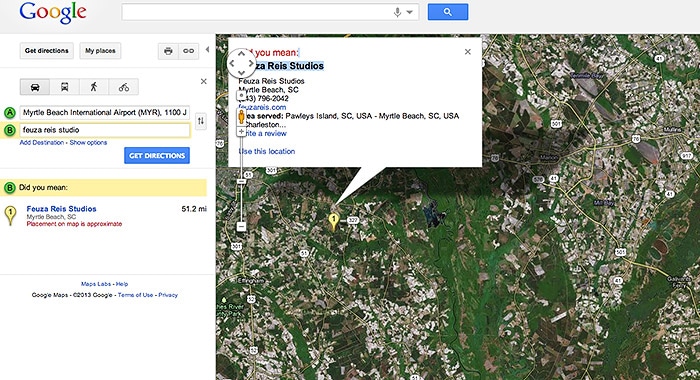
So don’t hesitate in getting your Google listings as local SEO gets more and more powerful. Another good tip is to Google yourself under Google Maps to see what comes up and to see if you are listed or Google has wrong information about your business.

As you can see my listing does not have my actual address but just the town I live in:

Google Map | Feuza Reis | South Carolina

In summary it is up to each business to do due diligence and be compliant. Some may disagree with my views on some things but there are some facts that can not be ignored. I suggest white hat practices especially if you don’t know what you are doing and don’t have an SEO support team to get found!

Filed Under: Marketing, Photography Business, Web/Tech Tagged With: google, Photographers, Photography Business, Search Engine Marketing, seo, Seo Myths

How To Make SEO Part of Your Everyday Workflow

January 15, 2013 by Feuza Reis

This guest post is by Feuza Reis, a NJ Wedding Photographer, founder of the Un-Jersey Bride Blog and helps photographers and artists Get Found Online. You can follow Feuza on Twitter.

For many photographers January is the month to take care of business. We have to worry about doing our taxes, updating website images, blogging previous posts we missed, and strategizing for the new year. I think January is the perfect time to work on optimizing websites and blogs for SEO. The biggest hurdle to overcome with putting SEO into practice is lack of information, time and its complexity. SEO for some is a strange buzz word, and for others it is this painful complicated process full of difficult words and terms.

I prefer to view SEO as a practical method I can put into my workflow so that it does not control me. With that being said, it will be hard to make it part of one’s workflow if he/she does not lay out the basic principles for getting found online. Before covering how a photographer can make SEO part of their daily routine, here are 3 tips on laying the foundation to get optimized.

Follow These 4 Steps To Lay The Foundation

1) Add Text To Your Website Pages.

The easiest thing one can do right now is add a text on every page of your website with the city you city and state you live in and also which areas you are willing to service. If one visits 10 photographer’s websites, more than half leave out where their location. This makes the hunt for a photographer nearby to be rather difficult, much like finding a needle in a haystack.

Google is crazy about the local search and will give results based on where the person searching is located while they search for a photographer. Google wants to show the searcher who is available to work near their area.

So how will they know if you match that query? TEXT. Text is the main component of SEO, so be sure to add your town, state or region on your website. The actual text to add will depend on how local folks might search in that state or area: examples are the greater Atlanta area, South Jersey, NYC, Manhattan, and so forth.

Since I don’t have a studio I don’t put an actual address but for photographers who have a retail commercial space, then add your full address.

My example is as follows:

Feuza Reis New Jersey Wedding Photographer

Adding a text like this may not be so appealing, but it is vital if you want to get found online. Make it small enough but not transparent. You can get black listed by Google if you do things like transparent text. If you have a fear of committing to one particular location, just add the main city you serve and that you also do destination weddings. Since Google loves text and local search, it is extremely important you add where you provide your services on your website. You can also do this on
your blog as much as possible.

2) Install The All In One Plugin Pack

Many photographers I speak to already know about this plugin BUT many have not updated their settings nor are they updating the All in One SEO box at end of their blog posts. Here are steps to install and use this great SEO wordpress plugin.

A) Install Plugin All In One SEO Pack And Enable It

All In One SEO Pack

B) Next Go to: All In One SEO (Options Configuration Panel)

All In One SEO Pack

C) Fill Out The Title, Description and Tag Words.

All In One SEO Pack Options

Be sure to update the options at the end of the page and save.

D) Many photographers think this is the last step, but it is not. At the end of every blog post, there is a section named ‘ALL IN ONE SEO.’ This section can be found all the way at the bottom past the text and photo box. Here, you can also add a title, description and some key words and you definitely should. (You should continue reading the article for more information).

All In One SEO Pack Custom Fields

3) Create A Keyword list.

Start a keyword list and save it as an excel file on google drive, or your desktop. This list will help you organize ideas for blog posts and pages on your website that you may want to add for SEO purposes. The biggest mistake photographers make is that they think like a photographer and not in the perspective of the client. Avoid trying to rank for words like session, e-session, and your studio name. The purpose of SEO is to get found by new clients and get booked. Most clients are new to hiring photographers and won’t know what any of these photography key terms even mean. Think more in generic terms like photos, pictures, pics, professional.

4) Set Up Google Alerts.

Google Alerts is a free tool by google and it helps you find out if anyone is talking about you and your business on the web. I set up a Google Alert for my name, my studio name and once in awhile a keyword name so that I can see who is being ranked for that keyword.

Google Alerts

For more information on Google Alerts, go HERE.

SEO Every Day.

Now that you have laid the foundation for your SEO work, it is time to automate it as much as possible. SEO is ALL about text, and the best thing you can do is blog. However, you don’t need to blog as much as you may think. You do on the other hand need to optimize your blog post and promote it well.

Here is my SEO workflow:

1) Create a sample folder on my desktop which will be used to copy and paste for every shoot.

Feuza Reis' Workflow

This folder has 6 subfolders: (I have changed it to include blog and slideshow together now)

2) Copy and paste the main folder for every shoot, rename it by date and name of client.
3) Backup photos onto external hard drives.
4) Import photos into Lightroom.
5) Cull the photos, choosing the keepers etc
6) Edit the images as desired.
7) Star rate #5 the images that may be used for blog post and slideshow (I clump these together because I usually choose too many and only decide which ones I am using while I am actually blogging.)
8) Filter the 5 star rated photos, which for me is usually between 60-80.
9) Rename the photos with the one main keyword I want to blog about.

Lightroom Renaming Files

Here are some examples for different keywords you can do for other types of photography:

Weddings – I like to pick the name of the venue: plaza-hotel-wedding-photos

Engagement Sessions – Either choose a state, city or name of place where you took the photos for your main keyword.

NJ-engagement-photos
NJ-engagement-photographer
Engagement-photo-ideas or pictures-of-engagement-photos (remember to think like a client and not like a photographer!)

Portraits – You can use the type of session or your city/location:

Newborn-photographer-in-NJ
NJ-newborn-photos
kids-photographer
kids-professional-photos
maternity-photographer-in-nj

Boudoir – Use more common words clients who have never had a boudoir session would use.

Sexy-pictures-NJ
NJ-boudoir photographer

Now onto Blogging:

1) Upload all the photos you want to use for your blog post.

WordPress Image Uploader

2) Rename Title (Since we have done this in LR already skip this step)

If you use Blogstomp to watermark your photos make sure in settings, you change it to leave name of photo as is instead of the date which is default.

3) If you copy the title and paste in alt-text and or add a variation like by your photography name or town/state.

WordPress Image Uploader Options

Many times, I leave this as is due to lack of time and it still works. Remember I like to keep it simple and practical. The ideal would be to be more specific and have more variation.

4) Copy this in description, but add nj photographer or add something like “photos by Feuza Reis.” as seen in example above.

5) Add a few tags, not that many because they don’t have as much weight as you think.

6) Don’t mix keywords. For example, if it’s a family shoot don’t put that you are also a wedding photographer.

7) Blog 2-3 times a month, optimizing and promoting it well. Promoting is a different topic in itself to address.

8) Last but not least, track your results. What is the poingt of doing the work if you are not measuring your efforts? Start a document and state which page of Google you are appearing for some keywords you want for yourself. Also have a tab for how many blog visitors you are having a week or month.

Track your results with statcounter.com or Google analytics. I prefer using the plugin, Google analyticator, which shows me a summary of which keywords are gettings hits on my blog right in my WordPress Dashboard.

Overall the most difficult work of SEO is laying down the foundation and installing what you need to install, but then it is done! Yes, it may be annoying to do and to keep up with, but if you are tired of not getting found online and Google not recognizing you as a photographer, taking these actions is extremely important, so don’t postpone it!

Tell us if you make content marketing and search engine optimization a natural part of your everyday workflow. If so, how?

Filed Under: Photography, Web/Tech Tagged With: being found, blog, blogging, Blogging For Seo, content marketing, Feuza Reis, google, Marketing, online, Photographers, search engine optimization, seo, web analytics, Workflow

6 Free Or Low Cost Tools to Help You Make Your Photography Website Better

April 25, 2012 by Chris Cummins

Today's guest post is by Chris Cummins, a Kansas City photographer and owner of Glow Imagery. His passion is creating images that reveal the personalities, expressions and character of his subjects in beautiful images that become family heirlooms for his clients.

We can all accept that a better website means a better business. But what is a better website?

As a professional photographer specializing in weddings and portraits my definition of a better website is how well it answers a simple two-part question: Are the right people finding my website? Also, is the website doing its best to persuade as many of the right people as possible to contact me?

The website’s job is not to be the prettiest, get the design awards or get me the most compliments. Nor is its job to make the sale, that’s my job. I just want it to appeal to and persuade a specific kind of person enough to make them want to raise their hand and ask for more information. It’s a conversation starter, that’s all.

What works best to do that? The ideas are virtually unlimited and the questions are even more. For example. Is it best to put a short bio on your splash page? Does an automatically starting video of you talking about your art appeal to your visitors more than a beautiful slideshow gallery of images? Do written testimonials encourage your visitors to email or call you more? Do you want to require them to give you their phone number in your contact forms or is it better not to ask for that information? The challenges and unknowns are endless.

The trouble is what we want people to do on our website and what they actually are doing when visiting our website are so often two different things. So many of our assumptions are often wrong and we don’t even know it when it comes to our websites.

Whether you accept it or not, a business website has the task of herding cats. People get distracted, they don't think like us, they don't respond the same as us, their values are different, their means of experiencing your website can be very different (smartphones, some old version of Internet Explorer or the latest Chrome browser), simply put they are not us.

Accurate thinking is so critical to your success. Gut feelings, hunches and the simple desire to chase the herd are not good substitutes for making a better photography website. But how do you know the answer to these ongoing questions? Fortunately we can eliminate a lot of guesswork by using a variety of free and low-cost tools.

Many of the tools listed here track visitors and visitor behavior to your website, one even allows you to hear the opinions of visitors to your website. How cool is that?

Warning: This article assumes some working knowledge of how to get to the guts of your website code. Most of the tools described here require some basic familiarity with your website code in order to drop in chunks of special code that will install the ability to track your visitors.

1) Google analytics

Chris Cummins | Google Analytics

Most people know about Google Analytics, but most photographers don't have a clue how to use the information. What the heck is bounce rate anyway? If you aren't using Google Analytics or some other equivalent form of tracking code then you haven't put any serious thought into your photography's web presence. Period. It’s time to change that.

To get started all you need to do is sign up for a GA account through google. Usually your gmail account information is sufficient. From there, google has tutorials that will walk you through how to set things up. Most portfolio website designs have some manner of copying and pasting the code into your web pages. Setting up a new checking account is harder.

With this information you can find out which parts of your website are performing well and which are performing poorly (i.e. lots of exits, poor time on page.) You can also track what online and offline marketing efforts are building your visit numbers through the traffic sources

Don't be thrown by the depth of information and complexity GA provides. It can be overwhelming the amount data it shows you so keep it simple at first. Get it set up and start tinkering with the data reports after a few weeks. Start off my just tracking basic visitors stats. Look at the “Traffic Sources” information to determine where most of your visitors are coming from. From there, just start tinkering a little bit at a time. Since its introduction in the mid 2000's Google Analytics has grown into an application just as complex as Photoshop but you don’t need all that to use it to help your web marketing.

It is a richly layered ocean of data about your website and what visitors are doing on it. Do you what to know how much time Android users are spending on your web page devoted to sleeping beagles? Google analytics will tell you. But don't let that complexity scare you.

Ratings: scale of 1 to 10

Cost: 10 (it’s free, what more do you want?)
Ease of set up: 7 (Google has a neat little verification function which will check to see if you have it set up properly)
Ease of use: 6 (The information is very detailed and little overwhelming, focus on basics and tinker with all those extra data points when you have the time and inclination.)

What do you do with this tool’s information? It tells you who, what, when, where and how of your website visitors. Track the overall visits and dig into the data to see what kind of affect your marketing efforts, both offline and online, are having on the web traffic to your site. Check and see what pages are experiencing high number of exits or a short time on page. Set up goals to track what pages contributed to the most completed goals (hint: those pages are doing their job) and see which ones are losing your visitors (time to fix those.)

2) Crazy Egg Web Analytics

Chris Cummins | Crazy Egg Web Analytics

We just started using this one. But we like it… a lot. Crazy Egg seems to know where Google Analytics struggles. Crazy Egg is made for photographers and other visual thinkers. Rather than pile on tons of data into your lap it shows a visual representation of what visitors are doing. It takes your visitor data and tells you where people are clicking on your site and which areas on a site page could use improvement through a series of visual tools. These visual tools show a copy of your web pages with a map overlay of where people clicked. It shows scrollmaps that have heated zones over the page to see where people's eyes have spent the most time on.

For visual people like us photographers, it is a very pleasant experience to look at a photograph of our website’s pages with blurbs of color representing hot zones where people are clicking. It just makes sense!

The set up is remarkably simple. Copy and paste the code into the page's code you want to track. If you can do Google Analytics you'll see that Crazy Egg is as easy. (If you are using a WordPress set-up, even better. There's a plug-in which allows you to enter the code once and every page on your wordpress platform has the code. Easy.)

I am not aware if most portfolio websites are equipped to take such a code, I know my Clickbooq site does not.

The only downside to this software is that it isn't free. But it is very affordable and includes a free 30-day trial. Their basic plan is nine bucks per month (billed annually at $108.) This gives you up to 10 pages to track and 10,000 visitors per month.

Why do you need this? The burden of expertise is a big risk and you are the expert. As someone who eats, breathes and sleeps photography portfolios, very often what you think looks great and makes perfect sense to you website presentations of photography makes no sense to the average person. Crazy Egg is among my faves because it is like sitting in a focus group of hundreds of users and observing what they do with your website. It can be humbling.

Ratings: scale of 1 to 10

Cost: 6 (it is free for 30 days, nine bucks a month afterwards for a basic plan but it is an excellent investment.)
Ease of Setup: 8 (may have some issues with the website portfolio template places that are popular out there.)
East of Use: 10 (it's fun and very simple to learn how to use)

What do you do with this information? Look at several important pages on your website and ask yourself, “what is it I want my visitors to do on this page?” and Crazy Egg will show you in a really visual way what your visitors actually are doing. This will help you to quickly identify any distractions or poorly designed features that may be interfering with that goal.

3) All-in-One SEO Pack (wordpress users only)

Chris Cummins | All In One SEO WordPress Plugin

This is a champion of a little plug-in you can download for free. Activate this guy and give your on-page search engine optimization efforts a major boost in the arm. If you are not familiar with the virtues of search engine optimization, that subject is a huge discussion unto itself. But for now you can start here.

I'll just say this, SEO has been the single closest thing to a marketing magic bullet for my photography business. It beats the holy moly out of just about everything else I have tried. As a photographer, SEO can't be your only marketing effort but it is an essential piece in this day and age.

A well known trait to winning SEO is using the right titles and descriptions for pages and blog posts. You can do this through the regular title feature on WordPress but also through the plug-in’s interface. This helps you optimize for keywords and phrases you know your target market may be searching for.

The only downside is it for the WordPress platform and can only be used with wordpress content.

Ratings: scale of 1 to 10

Cost: 10 (it's free)
Ease of Set up: 8 (your basic WordPress plugin installation procedure will do.)
Ease of Use: 10 (every time you publish a page or blog post it is there for you to enhance the search-engine presence of your content.)

What do you do with this tool? Your blog is a tremendous opportunity to create attractive and interesting content that will earn you links and points with the search engines. This plug-in adds a little extra power to all those posts by helping you mix up some of the big items search engines use to evaluate where to rank your website when someone types in a search.

4) WordPress SEO by Yoast (wordpress users only)

Chris Cummins | WordPress Seo By Yoast

It's not often you have a plug-in that educates its users as well as it provides an actual immediate benefit. I've begun to prefer this plug-in over the All-in-One SEO pack simply because it makes the dark science of SEO easier for just about everyone. Using both is a good plan.

Once you download and activate this plug-in, each post and page you write will have a handy snippet preview in the plug-in’s window that shows what your post will look like as a Google listing. It also helps you identify a focused keyword for your content and keeps a checklist of where your keyword is in the most SEO-smart places (i.e. Page URL, Content, title, etc.)

You can also click on a tab that does a page analysis which features lots of excellent helpful tips, warnings and kudos about your post. Absorb this information while working on your blog or website and you are way ahead of your competition in a short period of time.

Ratings: scale of 1 to 10

Cost: 10 (it's free)
Ease of Set up: 8
Ease of Use: 10

What do you do with this tool? This tool helps analyze your posts and page content to see what you can do to improve its potential to be ranked highly by search engines. More importantly, it educates you about the important set of habits you need to be forming when using the web to help your business grow. Kick ass SEO is about good habits repeated over and over.

5) Feedback Army

Chris Cummins | Feedback Army

Rather than all kinds of code, data and scrollmaps, sometimes you just need to have real people use your website and provide you real feedback. I'm not talking about a group of photographers on some forum, either (don’t do that… please.) Photographers deal with photography on the web all the time and have that burden of expertise. What does a mom with three kids think when she sees your website? If your website's intended audience is the general public it really helps to get a reality check on a regular basis, enter Feedback Army.

For 20 bucks you can submit your website to a group of reviewers in which you can receive 10 responses. You will have the opportunity ask specific questions about your page and what it does, Feedback Army provides some useful tips for what to ask. Ask both general questions and specific questions.

Unlike Crazy Egg or Google Analytics you are hearing the impressions of real people about your website. A word of caution: they can be brutally honest so submit your site prepared for a frank list of what you haven't quite done right. While they can be tough they are almost always helpful.

Once in a while a reviewer doesn't seem to care and isn't helpful with their review, you can reject their review in favor of someone who seems to have taken some time to offer genuine help. All reviewers are from English speaking countries, too.

The surprising part of this services how fast the reviews are. I had ten reviews completed for me in just two hours. That's instant feedback.

The web gurus call it a usability test. I call it a reality check.

Ratings: scale of 1 to 10

Cost: 5 (It's $20 for 10 reviews of your website,the most expensive option on here, but still worth the occasional investment)
Ease of Set up: 9 (it took two minutes to submit my site)
Ease of Use: 9 (simple, simple, simple and the feedback is very fast)

What can you do with this tool’s information? Hear from real people their impressions and thoughts about the experience of viewing your website. This takes the guesswork out of what may be wrong or not helping you on your website. A word of caution: have a thick skin because the reviewers can be tough.

6) Google Website Optimizer

Chris Cummins | Google Website Optimizer

The very top performing websites out there like Amazon, Apple and Zappos are aggressive and constant testers of their web pages. They are always putting new ideas out there and testing them versus the old methods to determine which is better. Little guys like us can do it too. This is where Google Website Optimizer comes into play.

With GWO you can improve the effectiveness of your website by testing if changes to your website content are more effective in getting conversions. You choose what to test and which pages you want to examine.

Which is better? To have a large video autostart on your homepage or have a small video that visitors can click on if they want to watch? Is it better to have a contact form that requires visitors to submit their phone number or not? Use Google Website Optimizer to create two versions of the same page and it will send a portion of your site traffic to each version to help you determine which one your users respond to best. GWO provides reports and recommendations on which version you should use.

You can do A/B tests or multivariate testing. For photographers, I recommend sticking to an A/B test which is a classic marketing testing strategy. An A/B test means you have two versions of a specific page that have the same goal. To determine which version is better, you subject both versions to experimentation simultaneously. In the end, you measure which version was more successful and select that version for real-world use.

The GWO reports are straightforward and not overloaded with information like Google Analytics sometimes is. Installing the code on your website is no more or less difficult than a lot of the other tools listed here. Google has a very easy to use verification test for the pages you are looking at testing with GWO.

The only downside is the tests do take time. You do need to get a wealth of visits to be able to make reliable conclusions from the data in a short period of time.

Ratings: scale of 1 to 10

Cost: 10 (it’s free)
Ease of set up: 8
Ease of use: 9 (straightforward reports, no extra bells or whistles needed)

What can you do with this tool’s information? Test the crap out of your ideas, designs, galleries, images and quickly discover what is getting the job done and what may need tweaking and what needs to be put in the recycle bin.

How do these tools benefit you as a photographer? One big reason is virtually no other photographers are using them. In this business, if you aren’t doing what everyone else is doing, you’re doing something right.

The other big reason: you're working your tail off to get people to visit your site but you are very likely losing prospective clients and buyers after they go to your website because something isn't pulling them towards the specific thing you want them to do. Sometimes it is a big issue across the whole site that is hemorrhaging away your hard won visitors, it may be a very small issue that can be fixed in seconds.

You don’t know until you can get useful data to make informed decisions. Otherwise … it’s just a guess and your assumptions.

Which of these tools do you already use? Which ones were new to you? Discuss below!

Filed Under: Photography, Web/Tech Tagged With: business website, chris cummins, google, google analytics, kansas city photographers, low cost tool, photography website, photography websites, portfolio website, search engine optimization, tools, usability, web analytics, web design, Website, website visitors, wordpress

  • 1
  • 2
  • Next Page »

Subscribe To Tiffibox Treats!

Looking for a well-curated email newsletter that will leave you inspired and motivated about your photography business? Sign up below!

About Seshu

Seshu creates relaxed portraits of families and high school seniors in Avon, Connecticut. He also leads a successful headshot photography studio in Connecticut, helping professionals from a variety of disciplines project the very best versions of themselves. He created Tiffinbox as a way of inspiring photographers, to create better images and successful businesses. [Read More]

Email Templates For Headshot Photographers

Email Templates for Headshot Photographers

Recent Posts

  • How Capture One Changed My Event Photography
  • 10 Steps To Stay Positive In Times Of Great Stress
  • Why You Need To Read “Personal Branding For Photographers” Now
  • How To Master Your Website Content Step By Step?
  • Tony Taafe’s TNT Method For Headshot Photographers

Recent Comments

  • Stephen Davison on Are You A Business Owner Who Is Smart, But Stuck?
  • Ben A. on Don Giannatti Clinches The 8th Annual Tiffinbox Award
  • Dan on Don Giannatti Clinches The 8th Annual Tiffinbox Award
  • Donald Giannatti on Don Giannatti Clinches The 8th Annual Tiffinbox Award
  • Stephen Davison on G.E. Masana’s 6 Strategies For Wedding Photography Success
  • Naveen Kumar on Weddings In India Are More Than Being At The Right Place And At The Right Time
  • kartick on Weddings In India Are More Than Being At The Right Place And At The Right Time
  • Leonid Farbman on 6 Uncommon Trends To Grow Your Photography Business
  • Willow and Finch Wedding Photography on 11 Reception Tips To Help Your Wedding Photography
  • Web Designer Malaysia on How To Optimize Your Squarespace Website For Search Engines
  • Creastan on An Interview With Photojournalist G.M.B. Akash
  • Cindy Brown | Atlanta on An Open Letter To A Local Photographer

Become a Patron!

Copyright © 2026 · Tiffinbox · Site Design by Heather Mackan Creative · Built on Genesis