• Photography
  • Interviews
  • Business
  • Reviews

Tiffinbox

Inspiring Photographers

  • Home
  • About
  • Blog
  • Contact

How To Use Facebook More Efficiently For Your Business

October 27, 2015 by Seshu | Editor & Publisher

Facebook LIKE Button

Facebook is a beast. Right? One month you are getting tons of traffic from it, and the next it's a trickle. I know I've been there right with you. But beyond being frustrated, which is an easy reaction to have, there are some amazing resources to help you use Facebook more efficiently.

I've been paying close attention to Jared Bauman, president and co-founder of ShootDotEdit. While he is of course keen on serving his clients from the company's Facebook account, he is also acutely aware of how his clients are using and seeing results from their Facebook accounts.

With a large sample size – hundreds of photographers – Jared has managed to extrapolate a ton of data about using Facebook more efficiently. And he is eager to share this information with you via a free webinar on October 28th. Sign up right now!

If you are seeing this post after that date, don't worry; you can still watch the webinar after you enter your name and email address. After making a few changes in the content I post and in the way I engage my audience, I've seen some exciting results for this blog. I can only imagine what would happen to your sites if you deploy the suggestions Jared will make during his hour-long webinar.

I caught up with Jared and asked him a few questions about the webinar and what we can expect to learn from him. Give this short interview a listen. If you have any questions for Jared or me, please use the comments section below. We are here to help!

Do you use Facebook? Do you have a business page for your photography business? If you forego your morning latte and spent that money instead on targeting clients who are waiting to hear from you on Facebook, would you do it? What has stopped you from using Facebook advertising? Is it the expense? Or is it the technology? Let us know below!

By the way, ShootDotEdit, is rocking it with their webinars. Check them all out!
Filed Under: Business, Home Middle Left, Interviews, Marketing, Photography Tagged With: facebook, jared bauman, Photography Business, Shootdotedit

3 Big Reasons To Use CoSchedule For Your Social Media Marketing

August 14, 2014 by Seshu | Editor & Publisher

Google+, Twitter, Tumblr, YouTube, Facebook, LinkedIn, Instagram, Pinterest, Orkut … oh, forget about Orkut, that doesn't exist anymore. Phew!

But still, can you imagine posting to every single social media platform out there? When do you find time to photograph? Or, spend time with your family? You can drive yourself batty trying to be everywhere all the time. (Here is Gary Vaynerchuk's advice to master the four big platforms)

It's true, my wife thinks I am also married to my iMac and I am always sitting in front of it posting to these social media platforms at all hours of the day and night. At some point I experienced burn out. And you will too. It's a sense that all of this “work” you are doing online is really a huge waste of time.

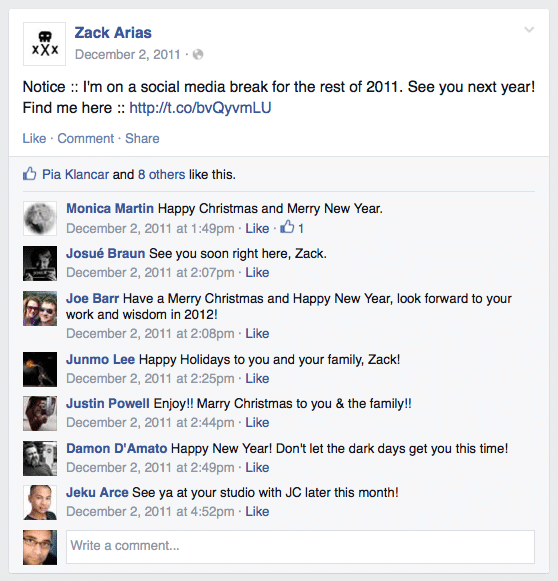
That's just your tired brain aching for a break. And you should step away from it all. Heck Zack Arias gives himself a whole month each year (I believe it is December) when he opts out of all social media circles. And good for him. As the new year approaches, he is ready to give it a big push and has the energy for it too.

Zack Arias Announces His Annual Social Media Break

As I said, whenever I have done it, it has always felt great. But is it always necessary to give yourself a time-out? While I really haven't missed any of the platforms, there is still a very tiny portion of me that wonders if I could still be engaging with my audience and driving traffic to my site, while I am on that well-deserved break.

The easy way out when it comes to blogging, and several other well-known bloggers have already suggested it, is to simply schedule your new posts in WordPress ahead of time. This very post you are reading was written several days ago.

But that only takes care of the blogging side of the equation. What about social media? I use an application called Buffer with some success, but it requires you to load your articles and links up ahead of time and then have them appear at different times of the day on different platforms.

However, I really wanted a tool that would be in sync with my blog – posting blog posts to different platforms, at different times from the very same WordPress dashboard I was using to write and edit my content.

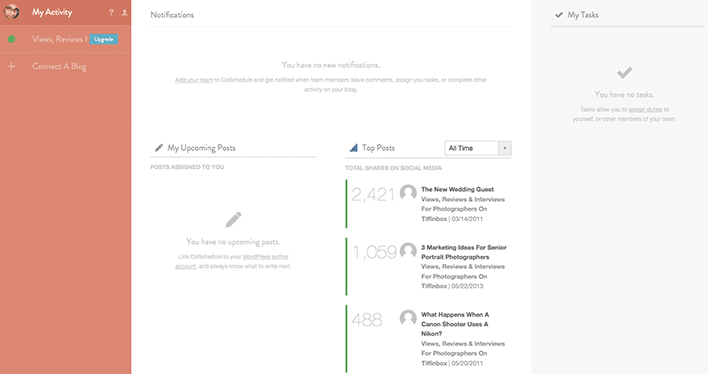
Thanks to Kim Doyal, I discovered that tool to be CoSchedule. I've now used it for over four weeks now and I can tell you the very reason I am posting this review is because I couldn't do without it. It's a plugin that sits below your content editing area (see screenshot below) and out of the way. It springs into action the minute you want to “Create Your First Message”. The tool is smart enough to pull in your blog post's url and set it up in a way that all you have to do is simply add your own out-going message. Interestingly, when I wrote a message that was longer than 140 characters, the system smartly told me that it couldn't send it to my Twitter feed because it was longer than Twitter allowed.

CoSchedule connects to Facebook, Twitter, LinkedIn, Pinterest and Tumblr. Once you register your account, you are able to create as many messages as you want and thereby schedule the same post to appear a day, three days, seven days or even a month after it publishes, so that your audience will always see it front-and-center.

So, what are the three big reasons why you should use CoSchedule for your social media marketing?

1) Being Consistent

In any business, appearing consistent adds to your credibility and speaks of your reliability. When your posts consistently and frequently appears on all the platforms, your audience (aka. your potential clients) are going to be reassured that doing business with you is going to be a-ok. In CoSchedule, you set it up once and you just move on to the next blog post. You really don't have to do much more than that.

2) Drive Traffic

I don't have to tell you how traffic from Facebook has dropped significantly. The only way more number of people are going to see your blog posts on Facebook is if you make it a point to share your links at different times of the day, allowing for a greater number of people to visit your site. CoSchedule makes this happen very easily.

3) Encourage Engagement

Whether is Twitter, Facebook or even Google+, if your audience only retweets, likes or 1+'s your posts, you aren't going to go very far. What you need is for your audience to engage with your content and in the end, engage directly with you. CoSchedule‘s interface allows you to add your own flavor to the posts, making it possible for you to ask questions or displaying a call-to-action that will help you see results.

Want to know more? Check out this two-minute video overview:

CoSchedule

CoSchedule Activity Screen

So, do you believe you will use an editorial calendar like CoSchedule for your blogging and social media marketing efforts? Sound-off below to share your opinions with me. I trust CoSchedule will save you time and make you more efficient. It does for me. That's a win-win in my book!

Filed Under: Blogging, Home Middle Right, Marketing Tagged With: blog, facebook, Kim Doyal, Marketing Efforts, Media Marketing, Media Platform, Photographers Blog, pinterest, social media, Twitter, Zack Arias

Why You Should Master Your Digital Channel

March 20, 2013 by Seshu | Editor & Publisher

Couple of days back, I published a guest post by Aaron Hockley about how photographers can or should choose their social media channels carefully.

Days after that post went live, I heard Jonathan Canlas (in a conversation with Todd Reichman of A Man To Fish fame and podcast) say rather bluntly that while it's all well and good to be on Facebook, Facebook “LIKES” don't pay bills. It made me think more about how I've been using social media, be it Twitter (nearly 8,300 followers) or Facebook.

The discussion in that podcast inspired me to also look at “why” I was using social media. Was it a source of real information? Or, was it entertainment? With a Twitter or Facebook presence, was I truly “marketing” to my target audience? I wanted to know how my posts measured. Ultimately, the question is: Am I able to convert visitors to actual paying photography clients.

Now, as a photographer, I am committed to doing one thing well – making images. Marketing, while exciting, comes in at a distant second, at the utter chagrin of both my accountant and my wife.

I know, as probably you have figured out for your own business, that being “out there online” is a vital part of your day. If you don't exist online these days, it's very difficult to sustain yourself as a business. Your clients are online, and so should you. But how to parse your day into useful chunks of time – time spent that can be measured and will bring in the results you want for your bottom line?

I didn't have an answer for that question until I ran into Chris Brogan‘s new offering called Mastering The Digital Channel [affiliate]. While I haven't taken this self-paced course yet, what I really like about Mastering The Digital Channel is that one has direct access to Chris Brogan!

As a photographer you may or may not have heard of Chris Brogan. He is the CEO of Human Business Works, a company that is dedicated to helping professionals understand and run relationship-based businesses. I've enjoyed his presence on Twitter and follow him there, but despite a large number of followers, he has always responded to my questions directly and promptly.

Chris, with Julien Smith, have written two books – Trust Agents: Using the Web to Build Influence, Improve Reputation and Earn Trust and The Impact Equation. Independently, Chris has also written Google+ for Business: How Google's Social Network Changes Everything and Social Media 101: Tactics and Tips to Develop Your Business Online. If you own a Kindle or an iPad with the Kindle application, consider buying It's Not About the Tights: An Owners Manual on Bravery.

Am I fan of Chris Brogan? You, betcha! I've always enjoyed his no-nonsense, fluff-free delivery of his blog posts, or when his podcasts. He comes across a genuine guy who loves to teach.

Right about now you are probably wondering why you should consider Mastering The Digital Channel by Chris Brogan. I hear you loud and clear.

It's only natural, easy and convenient to reach among those you already know in the photography industry. But I truly believe that if you want to shake things up, you should also be looking outside your bubble.

Now, let me be clear: Mastering The Digital Channel, isn't for everyone. However, if you've been spending your time online and seeing absolutely no return, right about now you probably think social media is a joke or you don't even try to dip your toes into it for long stretches of time. I hear it from a ton of people I meet at photography gatherings. But before you dismiss it completely, shouldn't you have the right frame of mind, the right tools and the right guidance to make a truly informed decision? That's where Mastering The Digital Channel comes in.

This course is just about to launch and yes, there is a launch special. In fact, if you use the code “special”, you save $200 off.

Being online isn't “the IN thing,” it's the “right thing” to do for your business.

Learn to master your digital channel from an attentive and qualified teacher. I know you won't go wrong if you follow the steps Chris Brogan outlines in his course.

Sign up for this course now and save $200.

Full Disclosure: Like all other programs or products I mention or promote here, I do make a small commission from each signup to support the running of this website.

Filed Under: Marketing, Photography Tagged With: Channel, Chris Brogan, Digital, facebook, Photographers, The Social Network

How You Can Optimize Facebook Marketing

June 11, 2012 by Craig Robinson

Today's guest post is by Craig Robinson. He works as Editor for a Facebook Ad manager tool called Qwaya. Besides writing about topcis like this one, Craig covers other trends within Social Media for Qwaya and he has studied Social Context and Media-Communication Science.

Facebook is a great marketing channel for small businesses. If you put some effort into creating and tweaking your campaigns, you may outperform bigger competitors who won’t spend as much time on a single niche. But it takes a lot of testing and result analysis to succeed. You can’t just put up an ad and wait for it to convert.

Before we go any further, let’s quickly look at the advertising options available on Facebook.

Social or Antisocial Ads

You could say that Facebook ads range from classic, banner-like online ads to social recommendations.

The first category consists of the ads you see to the right of your news feed. When you click them you’re usually directed to a company’s webpage where you’re supposed to sign up or make a purchase.

Remember, though, that you can still be quite creative when you make these ads even though there are rather strict rules regarding text length and image size etc. Here’s a short list with great tips on how to change things up.

Just keep in mind that you need to have material in the ad that is followed up when the person clicks through to wherever the ad is pointing. Forget “smiling ladies” and generic “persons standing around having fun together.” Use pictures and texts that really represent what you are about instead.

On the other hand of the spectrum we have sponsored stories, which is a mix between an ad and a recommendation from a friend to a friend. This could be that someone comments on your fan page and the comment is converted into an ad shown to his friends. It could also be a check-in at your studio, an RSVP to an exhibition or that someone likes or tags an image you’ve posted.

Basically anything can be turned into an ad/recommendation, and for people working in creative industries, social Facebook ads are often the best option. You highlight when someone does something on your fan page and this action is then spread to this person’s friends. People see that you are “liked”.

Facebook Ads Optimization

Facebook is packed with people. Everybody is there. So your problem as an advertiser is not how to reach out to as many as possible but rather how to reach out to the right people – people who will like you, visit your website or fan page, and in the end become a customer.

Because of this you have to use demographic features when you’re creating your ads, such as age, interests, geographic locations etc.

My biggest advice for aspiring Facebook advertisers is to test everything – different type of ads and different targeting. This is the only way to really find out what which your best target groups are and what kind of ads they respond to.

One such group could be women in Seattle who like photography and are between ages 25-35. If you approach them with both traditional Facebook marketplace ads as well as sponsored stories you’ll soon find out what ad type matches your business goals and then you carry on using the best-performing ads.

You can of course organize the ads yourself through Facebook, but it’s a bit of a hassle. You will have to keep track on your own which ads are running, when they are running, how much impressions they get and so on. After a while this can cause some problems as you are probably spending money on stuff you don’t want.

When you’ve started to run several campaigns simultaneously you might benefit from using a tool to help you keep track of where you are in the advertising process, and perhaps even more important, which ads that actually made profit or met your business goal in terms of number of likes etc.

The only tool on the market today that provides a full self-serviced solution is Qwaya. The tool is completely browser based so that you can access it anywhere. Qwaya has direct access to Facebook’s API which means that it’s always updated with the latest segmentation features and demographic options.

Qwaya Campaign Interface

Most Important Thing When Making Ads

When realizing that Facebook is full of people with different interests and demographics it’s easier to create ads with them in mind. One key thing to remember is to always A/B test ads for the same demographic group and follow up on the result.

Don’t just run ads and hope for the best. You might improve the results if you tweak them a bit. Use the statistics that you get from Facebook, perhaps Google Analytics or some other tracking source. In doing so you will be able to quickly move your advertising budget to ads that perform well and cancel ads that just cost you money.

Again, the key is to start advertising to different people in different ways and then let the results dictate the future.

These are just some short tips on Ads for Facebook. If you are interested in learning more you can check out this page for more Facebook marketing strategy tips.

Would you like to win a month-long access to Qwaya's Premium Plan (valued at $149)?

Here is what you need to do to win:

1) Comment below, telling us how you would use your Qwaya account
2) “LIKE” Tiffinbox on Facebook – https://www.facebook.com/tiffinboxmedia
3) Tweet “I just LIKED #Tiffinbox on Facebook – http://seshu.me/JSOBYk – for a chance to win a month of Qwaya for my photography business. Please RT!”

I'll randomly pick one person who has commented below, LIKED Tiffinbox on Facebook and posted the Tweet as it appears above. Winner will be notified via Facebook on June 15th.

Filed Under: Marketing, Photography Tagged With: ad manager, advertising, blog software, facebook, facebook ads, facebook features, facebook marketing, facebook marketplace, facebook social, Marketing, marketing channel, marketplace ads, online social networking, social facebook, social information processing

9 Tips For Clear, Consistent Client Communication

February 2, 2012 by Shuva Rahim

Today's guest post is by Shuva Rahim of Accent Photographics. Shuva specializes in photographing couples and families in Eastern Iowa, splitting her time between Iowa City and Davenport. You can read her blog, friend her on Facebook or follow Shuva on Twitter.

Put yourself in a prospective client's mind. This person loves your photography and wants to know more. What impression do you present of yourself?

Good client communication is not about taking great photos, but about trust and follow-through. Even after the job is done your client should leave without lingering questions. So here are 9 tips – things I do and recommend – to help enhance your client relationships.

1. Introduction.

On first contact ask what this person wants photographed, the time frame in which he or she wants the session done by and then clearly explain your process. Even if the info is on your website, don't assume it's been looked at by the individual.

2. First Date.

Get to know your prospective client in person with a pre-session consultation. Pre-session meetings can help decide if you and the individual are the right fit for each other, further establishing the kind of client you want. If there is a good fit, the pre-session ideally should be used as a scheduling meeting and to talk specifics about the session. Best case is to meet with all the parties who will be photographed.

3. Ask Questions.

Keep the conversation focused on them, not you. Get to know who they are, the relationship among everyone who will be photographed and what makes them tick. Then talk about you.

4. Social Media.

It's easy for photographers to promote our work on Facebook, Twitter and blogs. So much so that we can take it for granted. Not everyone is equally active online. If you use Facebook to promote your business, make sure ahead of time that posting photos and tagging them is OK with your clients.

5. Expectations.

Give general information in advance on how long the session will likely take, how soon photos can be ready to view and when an order is expected to be completed. Repeat this information before and after a session. Be realistic, but always under-promise and over-deliver.

6. Highlights.

After the pre-consult, send a letter or email highlighting the main points of your client meeting. That way everyone is on the same page with expectations.

7. Show Thanks.

Send a thank-you note after a session. I use SendOutCards, which allows you to electronically deliver a card that the client will receive in the mail. Sending a card immediately after a session shows how much you appreciated photographing that client and CARE about them.

8. Extras.

Include one or a few additional prints, candy, a gift card or whatever you deem appropriate as something a little extra in the order as a token of appreciation.

9. Become friends.

If a client enjoyed their experience with you, he or she is likely to want to develop a relationship beyond that of a client and service provider. Whether that means being Facebook friends or getting together for coffee once a month will depend on the person. Regardless, if you have a good vibe with a client be real with that individual, and be willing to show who you are as a person.

What other tips would you add to this list? Let us know below in the comments section.

Filed Under: Business, Photography Tagged With: client, client communication, client relationship, communication, consistent, facebook, online social networking, Photography Business, shuva rahim, Tips, Twitter

  • 1
  • 2
  • Next Page »

Subscribe To Tiffibox Treats!

Looking for a well-curated email newsletter that will leave you inspired and motivated about your photography business? Sign up below!

About Seshu

Seshu creates relaxed portraits of families and high school seniors in Avon, Connecticut. He also leads a successful headshot photography studio in Connecticut, helping professionals from a variety of disciplines project the very best versions of themselves. He created Tiffinbox as a way of inspiring photographers, to create better images and successful businesses. [Read More]

Email Templates For Headshot Photographers

Email Templates for Headshot Photographers

Recent Posts

  • How Capture One Changed My Event Photography
  • 10 Steps To Stay Positive In Times Of Great Stress
  • Why You Need To Read “Personal Branding For Photographers” Now
  • How To Master Your Website Content Step By Step?
  • Tony Taafe’s TNT Method For Headshot Photographers

Recent Comments

  • Stephen Davison on Are You A Business Owner Who Is Smart, But Stuck?
  • Ben A. on Don Giannatti Clinches The 8th Annual Tiffinbox Award
  • Dan on Don Giannatti Clinches The 8th Annual Tiffinbox Award
  • Donald Giannatti on Don Giannatti Clinches The 8th Annual Tiffinbox Award
  • Stephen Davison on G.E. Masana’s 6 Strategies For Wedding Photography Success
  • Naveen Kumar on Weddings In India Are More Than Being At The Right Place And At The Right Time
  • kartick on Weddings In India Are More Than Being At The Right Place And At The Right Time
  • Leonid Farbman on 6 Uncommon Trends To Grow Your Photography Business
  • Willow and Finch Wedding Photography on 11 Reception Tips To Help Your Wedding Photography
  • Web Designer Malaysia on How To Optimize Your Squarespace Website For Search Engines
  • Creastan on An Interview With Photojournalist G.M.B. Akash
  • Cindy Brown | Atlanta on An Open Letter To A Local Photographer

Become a Patron!

Copyright © 2026 · Tiffinbox · Site Design by Heather Mackan Creative · Built on Genesis