• Photography
  • Interviews
  • Business
  • Reviews

Tiffinbox

Inspiring Photographers

  • Home
  • About
  • Blog
  • Contact

Fundy’s Tips For Designing Stress-Free Wedding Albums

November 1, 2015 by Seshu | Editor & Publisher

How many of you don't offer portrait or wedding albums because you either don't know how to design them or you believe they are too cumbersome to lay out?

This is what I believe: You aren't truly serving your clients if you simply photograph their event and hand them their digital files (don't do that, do this instead)

You can easily overcome your fear of designing and printing your album because there are new tools today, like Fundy Album Designer, that make it super simple to do so. Yes, design and send the files to your favorite album manufacturer.

Look, years ago, I stumbled upon a free option. I was new. I like the sound of free like the next guy and so I dove in. I created a 56 page wedding album from scratch. The software was buggy, the support was spotty at best and my client was PISSED.

To top it off, some alignment had shifted and a bunch of images were somehow sent off-kilter on a bunch of pages. Yikes! Green behind my years, I was panicked and frustrated of course. I didn't want to lose the confidence of the client even though the emails back from the groom (the bride had given up on me) sounded angrier and angrier.

So, the album arrived and yes, it was full of errors and mistakes – some caused by me but some also caused by software that simply did not work. As I held the errant album in hand, I learned a lesson that day. Trusting a free app to do your work is extremely dangerous. While the buck stops with you, the photographer, seeking out an album design company that will stand by its product was paramount.

Andrew Funderburg - ShootDotEdit Webinar - Lightning Fast Album Design Techniques

This was about the time that I heard Andrew Funderburg was going to launch a new product that would solve the very problem I was having. That product was of course version 1.0 of Fundy Album Designer. Since then, the app has morphed into something truly fantastic. In addition to designing albums, it is now closely integrated with a bunch of labs and album manufacturing companies. Anytime something is “off” and I am notified right there on the screen.

For a portrait or wedding photographer, this is truly a wonderful time to get into quickly designing and printing your client's family heirloom. Let that sink in a bit. You are responsible for creating a piece of art that will remain with your clients for ages and will likely get passed on from generation to generation. Wow! Doesn't that create the warm and fuzzies inside of you? I think of my clients as grandparents showing off their albums to their grandchildren. An awesome responsibility but the work it takes to put those albums together should not stress you out.

I spoke with Fundy (as he is known to his friends) about this and other topics dear to our hearts:

Now, I didn't speak with Fundy about stress-free album designing because our connections run deep or because I am being compensated (I am not, except for receiving a copy of his program to review).

I spoke with him because I believe Fundy Designer can radically change your business, giving you more free time to spend with your family and making your clients genuinely happy with your service.

Want to learn more about easy-as-apple-pie album designing? Check out this free webinar on November 4th, thanks to ShootDotEdit. Register for it now. Even if you can't make the live call, the recording will be made available to you.

Be sure to bookmark ShootDotEdit‘s free content page where you can find guides, webinars and case-studies that are extremely useful for photographers just like you.

Filed Under: Album Design, Design & Illustration, Home Middle Right, Interviews, Photography Tagged With: Albums Design, Design Album, Design Company, Design Wedding Album, wedding albums, Wedding Photography, Weddings Photographer

What’s Fundy Designer & What’s New With Album Builder V.6

January 30, 2014 by Seshu | Editor & Publisher

If you have been at it as a wedding photographer, you've at one point or another wanted to create a wedding album for your clients. The process can be tedious, long and overly stressful.

Andrew Funderburg, or at least his company, Fundy Software, is a household name now. I interviewed “Fundy” several years back when I was attending the Mystic Seminars. His programs evolve … constantly. His applications Fundy Album Builder and Fundy Album Proofer are, by a very wide margin, the industry leaders in their respective niches.

I heard from Fundy that he was working on something revolutionary. In most other cases if someone came up to me and dropped that kind of language, I would be very skeptical. Not in Fundy's case because he has time and time again delivered on that promise and made the lives of thousands of photographers more efficient, and perhaps even more meaningful.

Andrew Funderburg, Fundy Designer & Album Builder, V6

When you have an opportunity to interview the guy who defines and directs how wedding photographers run a major part of their business, you jump at the opportunity to see what he is cooking up next. Fundy and I sat down and chatted and he shared his screen with me, showing me the various features of Fundy Designer & Album Builder version 6.0.

The video is long, but well worth your time, if you are considering either buying or upgrading from your current version of Album Builder. We talk about his beginnings, where his ideas come from, what the new version of the software looks like and what we can expect in the future.

Do note that tomorrow (January 31, 2014) is the last day to upgrade at an insanely low price of $30! It would be absurd if you didn't upgrade.

February 1, early-bird pricing will end. Album Builder v6 will be $329, Upgrades from v5 will be $79, upgrades from v4 will be $179, and upgrades from v3 will be $279.

I believed in Fundy's ideas before he even launched his company and that belief is even stronger after seeing what he is bringing to the table now and what features are planned in the coming months. Frankly, it's time again to be excited about photographing weddings and designing wedding albums with ease, efficiency and elegance.

Filed Under: Album Design, Home Middle Right, Photography, Weddings Tagged With: A Wedding Album, Album Builder, Andrew Funderburg, Art, books, Create A Wedding Album, designing, Fundy, Fundy Designer, Fundy Software, layouts, version 6, Wedding Album Designer, wedding albums

3 Easy Tips to Designing Better Wedding Albums

July 9, 2013 by Britney Gardner

Britney Gardner is an album designer and wedding photographer in Portland, Oregon. She owns Willow Album Design and co-owns Turn Loose the Art with her husband. When not photographing or designing, she can be found tending her organic garden or spending time with her ridiculously adorable son, Finn Danger.

I’ve been designing wedding albums for over ten years. I’m not ashamed to say that those first few albums I designed were absolutely atrocious, because I learned from the early experiences. I still make the occasional bad decision, but avoiding trends is the number one way to designing better wedding albums.

1. Avoid Trends

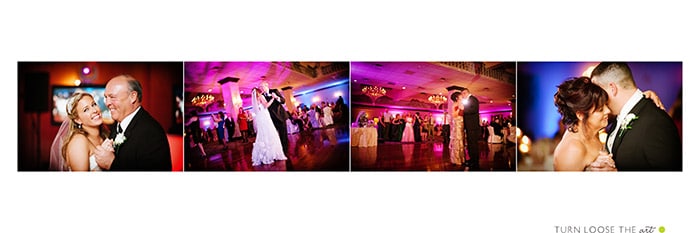
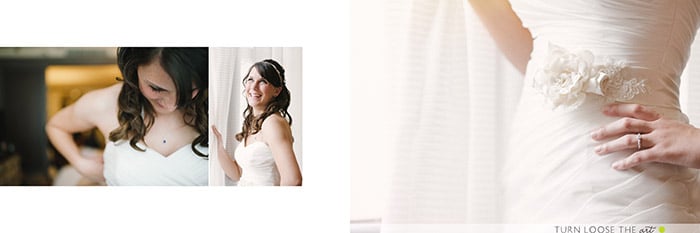
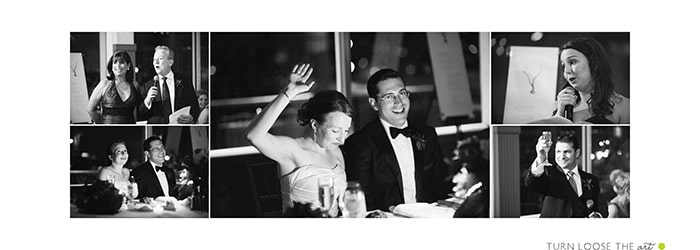
In the following few spreads, you'll note the toning of each image on the spread is consistent and all images are either black and white or natural looking color. While actions are fun to play around with on a few special images, it's important to keep similar images across a spread (and preferably an entire section of the book or the whole album).

Wedding Album Design by Willow Album Design

Wedding Album Design by Willow Album Design

Wedding Album Design by Willow Album Design

One of the easiest ways to help yourself become a more efficient wedding album designer is to keep it simple! The fewer images on a spread, the easier it is to find a good flow. The less going on in those images, the better. And when you do have a beautifully composed, layered image, feature it well!

2. Keep it Simple!

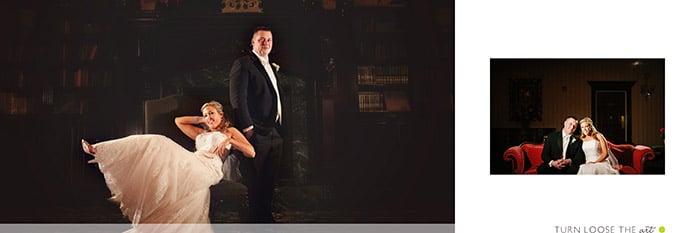
Our favorite image from Eric and Katie's wedding was indoors in a library to escape a dreary and rainy day. We couldn't go full bleed with the image due to size restrictions, so I chose a similar image to accent the main image.

Wedding Album Design by Willow Album Design

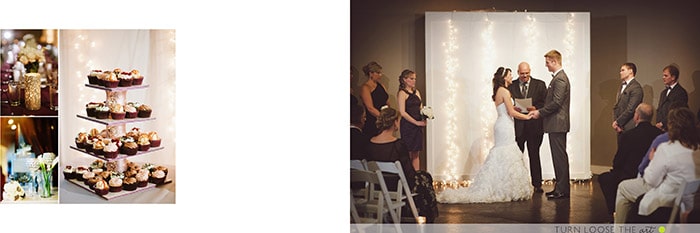
Another great example of keeping it simple, mix in a few details with a good scene setter. In this case, the details of the cake nearby lead your eye right to the main action of the ceremony. This was a wedding with very few visual distractions, so the album needed to follow suit.

Wedding Album Design by Willow Album Design

The third way to ensure your client will hold a memento from the wedding they want to share with everyone they know? Make sure they love it! If you pre-design as I do, consider allowing a full round of unlimited revisions so they get exactly the photos and album they want. If you design from a list your client submits, talk to them about filling in more images as needed to create a design with good flow. Doing either of these things will give your client the sense that the design is theirs.

3. Give the Client Ownership

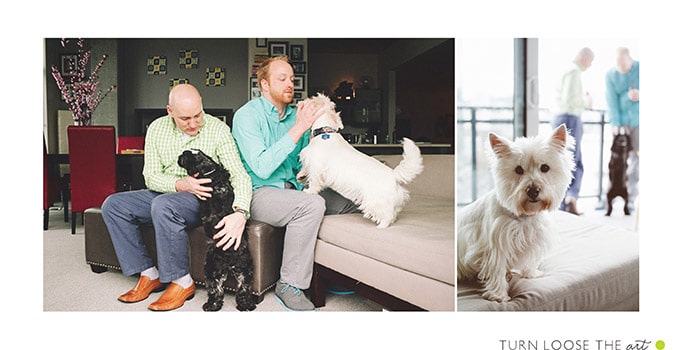
People love their pets, so what better way to make an album more meaningful than include their fur babies?

Wedding Album Design by Willow Album Design

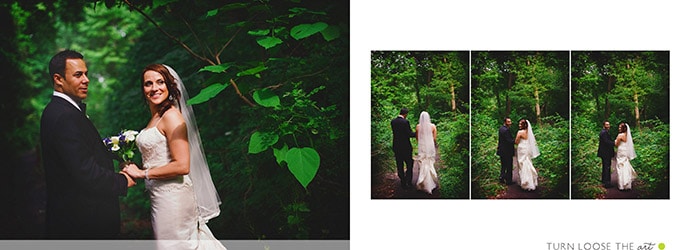
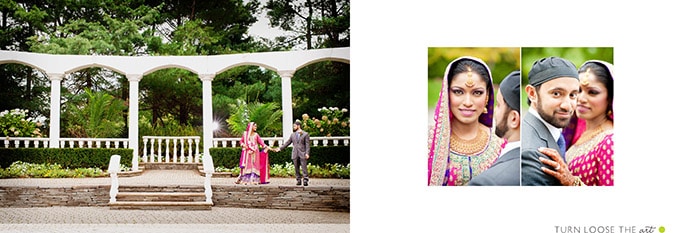
Photographers love establishing shots because we are visual storytellers. Sometimes, though, a client may wish to crowd in more face images. The best way to combat this and provide your client with a wellrounded product is to consider both while designing. Khalid and Priya's album provided an opportunity for just that during the portrait session of them outdoors. It makes me happy as the photographer and the client happy for getting in some closeups of them.

Wedding Album Design by Willow Album Design

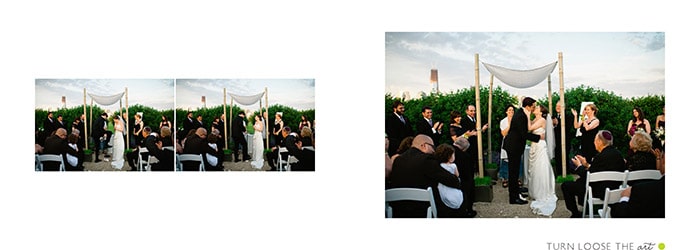
The following spreads also do a great job of showcasing images that we, as photographers, might make at any wedding. Since we see them all the time, we might not be as excited about them as the client. It's important to remember that to the client, a lot of thought went into the customs, traditions, details, and moments that make up their wedding day. These spreads show good examples of mixing in those personal touches to add to the story rather than retract.

Wedding Album Design by Willow Album Design

Wedding Album Design by Willow Album Design

Wedding Album Design by Willow Album Design

In all these things, the goal is to create a better wedding album design for your client. The end product is their record of their wedding. A timeless wedding album they can share with everyone they know is the best advertising you don’t have to buy.

Filed Under: Album Design, Home Middle Left, Photography Tagged With: 3 Easy, Album, Album Design, Britney Gardner, Easy Tips, wedding album design, Wedding Album Designer, wedding albums

A Candid Interview With Wedding Photographer, Laura Novak

June 11, 2013 by Seshu | Editor & Publisher

I watched a video recently by Laura Novak, a wedding photographer, about the one secret ingredient she uses in attracting the right wedding clients for her business.

So, watch that video first:

The video inspired a few questions in my mind and so I hopped on over to Twitter where I asked Laura for some clarification:

TB: In your recent video, you recommend e-sessions with wedding collections and offer it as a complimentary service. Do you then present those images from that session as part of your collection as well when it is time to send the files to the client (assuming you give files to clients)? Or, do you create products from the e-session that the client has to buy first to receive those files?

LN: I highly recommend creating products from the engagement session that you can sell to the client afterwards. Many of my clients purchase loose prints, save the dates, framed images for display at the wedding reception and albums. For example, how cute are these overlays from Design Aglow? All you need to do is take their favorite photo, place an overlay on top and add the wedding date. Done and done!

I always provide wedding and engagement files with the client's finished wedding album, so considering that is usually a year or more from the time of the engagement session they are pretty far away from receiving the files. Typically my clients are looking for products to purchase immediately after the engagement session to be part of their wedding.

Another great idea would be to show and sell a sign-in board. Brides and grooms love these! I really like the designs over at Design Aglow as well. 

TB: So what you are saying is, you would structure the collections to include a complimentary e-session, but the only way they can get the files is if they invest in $xxxx. I am worried some may see that as a bait and switch. Thoughts?

LN: Most of my wedding packages (the ones 10k or more) include all the engagement and wedding files with the finished wedding album. Because I state that up front, all of my clients know this and it is no surprise. Most people ask about files during the initial interview, so it gives us a chance to have a good conversation about it. In addition, that information is very clear right in the first page of my marketing materials.

Laura Novak | Wilmington, Delaware Wedding PhotographerTB: Not sure I am clear on what you mean by “they are years away.” Your e-sessions are years before their actual wedding date? I can see why people want their e-session images.

LN: Let's say that the e-session is six months before the wedding day. Then their wedding day comes and goes, and afterwards the client receives their proofs a few weeks later. Then it takes them a month or two to choose selections (best case scenario) and they have their album and finished files about 6-8 weeks after that.  Therefore, clients would typically get their files about a year or more after the engagement session.

TB: So, you let your clients make their final selections?  If they did (and I have) they pick images that just don't flow well. Thoughts?

LN: I do! It's their album, so the selections are completely up to them. I just do my best with what they chose and if they give me more creative freedom all the better! And if a year goes by and they don't choose their selections I create the album myself and ship it off (that part is in my contract).

Laura Novak has over 10 years of wedding photography experience, and her work has been featured on numerous national and international publications. Visit Laura's site, www.lauranovak.com, to download a sample album that Laura used to generate over $1.2 million dollars in wedding business. She lives in Wilmington, Delaware with her husband, John, and new baby, Andrew.

Filed Under: Interviews, Photography, Weddings Tagged With: Laura, Laura Novak, Secret Ingredient, wedding albums, Wedding And Engagement, wedding photographer

Make More Money With Album Pre-Designs?

December 28, 2011 by Eric OConnor

This guest blog post is written by Eric O'Connor, a Chicago wedding photographer, owner of Allori Photography and mylife-pages. Follow Eric on Twitter.

2012 will soon be here.

January is the perfect time to take a hard look at how to maximize profits in the upcoming year. These are a few recommendations that have helped me, follow all three and I know they'll work for you too.

1. What's in it for me?
2. Stay in Touch
3. Share the Love

What's In It For Me?

Your clients want information. They want to know every detail about their purchase. Give it to them! You are the expert. Share your knowledge and process with them. Whatever you do please don't wait until after the wedding to inform your client about the pre-design process. If you do they will feel cheated.  After they book with you make sure to take time or create a wedding album FAQ to walk them through the album process. This doesn't have to be complicated. Just a simple step by step from the day you shoot the wedding to the day you deliver their album. Set expectations and then deliver on them. It is important they understand you will be telling the story of their wedding day and you'll use as many pages as it takes to get it right. I always like to mention it gives them a great starting point. They can then customize the album to exactly what they want. Your clients will love this idea. Anytime they can take ownership in the process, you win!

Allori Photography FAQ

Stay in Touch

Take a minute and think about the excitement leading up to the wedding. Your clients are excited about their wedding and then … BAM! … the wedding is over. It doesn't take long and they are back to real life. Catch your bride and groom in that first 30 days and their wedding day excitement will do the selling for you. You likely only have a 30 day window to take advantage of the wedding high. If 30 to 90 days go by and your bride hasn't seen pictures or a draft of her album it is much harder to add pages or sell additional albums. I make it a point to have everything to my brides 7 days after their wedding. I used to deliver images 30 days after the wedding and routinely life got in the way and the brides wouldn't even think about their album for a few more months. There were always a lot of album edits and very little pages added. Now, 7 days after their wedding they can view their Animoto slideshow, image gallery, and album pre-design right on their wedding website. I make sure to give my clients a deadline. We want to have the album completed and ready to print in 3 to 4 weeks. This helps give them a target to have their changes complete. Extra albums page sales have gone from a few or none to five, ten or more from every wedding.

Allori Photography Album Site

Allori Photography Album Site

Share the Love

Quick turnaround time is essential but I find coupling that with excitement from friends has really helped additional album page sales. A few years ago I emailed PDFs to my brides and they would leave me comments for changes. This was pretty efficient but didn't help me much when it came to advertising or extra album pages. I don't pay for ads in magazines and only have one ad online that I tested out this year and will discontinue Jan 1.  Word of mouth, SEO, social media, and over the top customer service do the job for me. The next iteration of album sharing was a slideshow posted on YouTube. I found I was getting quite a few hits and at the same time album sales started to increase. Brides started telling me their friends loved watching their wedding album movies. This was one of those common sense moments when the light goes on in your head. Friends of the bride love the album and they start telling the bride about their favorite pages. This process makes it harder and harder for the bride to remove or change pages.

Album Views | Eric O'Connor

Finally I arrived at the perfect solution, Share the Love! Wedding album movies on a post wedding website are essential to higher album page sales. With a favorites gallery, Animoto slideshow, and movie of the album, my brides have a constant flow of compliments from their friends about how much they love the wedding images and album pages. As you can see in the graphic the album movie in this wedding was viewed over 200 times in 6 weeks. I have been completely removed from the album page sales process. Yes, I have to take images my clients love but my brides' friends do the rest of the work for me. I do not meet with my clients to sell or add pages. These days they all add pages without sitting down with me.

Album Views | Eric O'Connor | Allori Photography

Test out the three steps above. They are easy so don't cheat yourself and pick just one. Do all three. You will start to see a difference in sales. Click the image below to see how I display sample albums on post wedding websites.

Want to try a post wedding website? Your first site is FREE. Surprise one of your favorite clients with a wedding website with colors to match their wedding.

Filed Under: Marketing, Photography, Sales, Weddings Tagged With: Album, chicago wedding photographers, eric o'connor, Marketing, marriage, Photography, photography albums, pre designed, sales, Tips, Wedding, wedding album, wedding albums, wedding day, wedding industry in the united states, Wedding Photography, wedding website

  • 1
  • 2
  • Next Page »

Subscribe To Tiffibox Treats!

Looking for a well-curated email newsletter that will leave you inspired and motivated about your photography business? Sign up below!

About Seshu

Seshu creates relaxed portraits of families and high school seniors in Avon, Connecticut. He also leads a successful headshot photography studio in Connecticut, helping professionals from a variety of disciplines project the very best versions of themselves. He created Tiffinbox as a way of inspiring photographers, to create better images and successful businesses. [Read More]

Email Templates For Headshot Photographers

Email Templates for Headshot Photographers

Recent Posts

  • How Capture One Changed My Event Photography
  • 10 Steps To Stay Positive In Times Of Great Stress
  • Why You Need To Read “Personal Branding For Photographers” Now
  • How To Master Your Website Content Step By Step?
  • Tony Taafe’s TNT Method For Headshot Photographers

Recent Comments

  • Stephen Davison on Are You A Business Owner Who Is Smart, But Stuck?
  • Ben A. on Don Giannatti Clinches The 8th Annual Tiffinbox Award
  • Dan on Don Giannatti Clinches The 8th Annual Tiffinbox Award
  • Donald Giannatti on Don Giannatti Clinches The 8th Annual Tiffinbox Award
  • Stephen Davison on G.E. Masana’s 6 Strategies For Wedding Photography Success
  • Naveen Kumar on Weddings In India Are More Than Being At The Right Place And At The Right Time
  • kartick on Weddings In India Are More Than Being At The Right Place And At The Right Time
  • Leonid Farbman on 6 Uncommon Trends To Grow Your Photography Business
  • Willow and Finch Wedding Photography on 11 Reception Tips To Help Your Wedding Photography
  • Web Designer Malaysia on How To Optimize Your Squarespace Website For Search Engines
  • Creastan on An Interview With Photojournalist G.M.B. Akash
  • Cindy Brown | Atlanta on An Open Letter To A Local Photographer

Become a Patron!

Copyright © 2026 · Tiffinbox · Site Design by Heather Mackan Creative · Built on Genesis