• Photography
  • Interviews
  • Business
  • Reviews

Tiffinbox

Inspiring Photographers

  • Home
  • About
  • Blog
  • Contact

How Photographers Can Get A Grip On Their Expenses And Create A Profitable Business

June 25, 2013 by Jason Aten

Jason Aten is a photographer and the author of Starting Out Right: Building a Profitable and Sustainable Photography Business. In addition, he is the CEO of NinetyNine Beans, which provides Full-Service Accounting for Photographers. You can read more posts like this on his blog: www.startingoutright.net

Some of the most common questions asked by photographers are: how much should I charge? How do I set up packages? Should I do packages or a la Carte pricing? These are all great questions. They are important questions. Often, though, the problem is that this is the first question a photographer is asking – before they ask some other, very important questions.

Numbers

The first question I encourage people to ask themselves is this: how much does it cost you to be in business? I know it's not necessarily as sexy a question – and it's a hard one to answer – but it's impossible to really start figuring out things like pricing and packages, without a good grasp on the answer.

Do you know how much it costs you to be in business? Do you have a system in place to track your expenses? Surprisingly, even though they are running a small business, many photographers don't have a good system in place. In my business, I TRACK EVERYTHING. I want to know where my money is coming from, how I spend it, and whether or not it helps – or hinders – the business.

Start by tracking your expenses. Start with the expenses you have, whether you photograph anything or not. These Fixed Expenses include things like Administrative Expenses (insurance, supplies, training and education, etc), Capital Expenses (new gear, large purchases that you depreciate, real estate, etc), Advertising Expenses (website, business cards, marketing materials, bridal shows, etc), Overhead Expenses (utilities and expenses related to a physical space like electricity, gas, etc), and Employee Expenses (wages and benefits for all non-sales related employees).

Next, track all of the expenses that go into the products and services you offer. In addition to what the lab charges you for an 8×10, this includes all of the expenses that go into SELLING and PRODUCING a product. These are your Cost of Sales Expenses, and include things like the wholesale cost from your lab, design charges, editing and processing expenses, shipping, sales related labor, retouching and travel.

Understanding these two types of expenses will give you a good idea of what it will cost you to be in business – which gives you a good idea of where to start when thinking about pricing for a profit. It seems like a lot of work, and it is, but its worth it.

Second, develop a system to help you keep track of revenue and expenses on an ongoing basis. Even if it's just a simple spreadsheet – that's better than nothing. There are some great tools available, including Quickbooks (and their online version). My personal favorite is Kashoo, which makes it super easy to input transactions, track expenses and generate really useful reports you can use to make decisions about your business. Many of the photographer-specific Customer Relationship Management tools (like ShootQ and others) have features that make it easy to keep track of your revenue and expenses.

Whatever system you choose, using it will only be as useful as the effort you put in. Make a commitment to understanding the financial health of your business by getting a grip on your numbers. Understanding what it takes to be profitable and sustainable means that you can make decisions that help your business grow – and add value to your life.

By the way, once you're using a system to track your expenses, it becomes easier to measure your performance. The Professional Photographers of America publishes benchmarks to help you measure the financial health of your business. Those benchmarks are designed to help every photographer take home 35% of their gross revenue as owners compensation and profit, and can help you evaluate where you may need to make changes in your expenses.

Finally, it's worth it to hire a good accountant that understands your needs. Someone who knows small businesses and can help you set up a plan – and stick to it. Accountants aren't just for saving money at tax time! A good accountant can make you money all year long by helping you know exactly where you stand. Having an accountant can mean having a trusted financial advisor on your team, helping you make the right financial decisions for your business.

Want to know more? We're hosting a free webinar this Wednesday designed to help photographers “GET A GRIP ON THE NUMBERS: Bookkeeping Basics for Photographers.” Simply visit www.ninetyninebeans.com/webinars to sign up for FREE.

Filed Under: Business, Photography Tagged With: Administrative Expense, Capital Expense, Expense, Expense Insurance, Fixed Expenses, Overhead, Overhead Expense, Photographers, Pricing, Track Expenses

Supercharge Workshops For Photographers

May 27, 2013 by Seshu | Editor & Publisher

It's funny how things just seem to come together when one decides to pivot. I spoke about scuttling two of my websites and changing course. Part of my new adventure involves being absolutely sure what my future photography clients want and what they are looking for.

As I have stated before, just because you can photograph and publish images on the web does not guarantee you a following or more importantly a business. You have to define who want to do business with in the first place. Most people, including me, get stuck in the “how” – I don't know, for instance, how to use Google Analytics in a way that will give me a good idea of what information my clients are looking for online.

Who has helped me through this process, from time to time, is my friend Scott Wyden Kivovitz. He is a phone call or a Tweet away. If he has time and he is one very active guy, he helps me out. If he doesn't, he usually has a resource online that I can check out on my own. I can't tell you the number of times Scott has come to my rescue. He is incredibly web savvy and it came as no surprise when he was asked to join the Photocrati Media team.

Supercharge Workshops | Photocrati MediaScott asked me to let you all know about two web marketing workshops directed solely towards photographers. He is joined by Erick Danzer and Vanessa Joy. Erick owns Photocrati Media, a highly regarded company that produces among other things WordPress themes for photographers. Vanessa is a well-known teacher, author and photographer.

The workshops are in Denver, Colorado and Hamilton, New Jersey. Sign up before May 31st and save $100.

Specific topics include SEO, keyword selection, site optimization, link building, image SEO, social media and social signals, blogging, content marketing, email marketing and follow up, paid advertising, conversion rate optimization, social proof, and more.

Plus, you get a ton of bonuses:

– Free Access to the Sculpture Gardens & Red Rocks
– Lunch is Included
– Free Copy of the Photographer’s SEO eBook – $39 value
– One Year Membership for the Photographer’s SEO Community – $99 value
– Photocrati WordPress Theme + One Year of Support/Updates – $89 value
– The Laundry List eBook by Rachel Brenke – $9.99 value
– Chic Magazine for phone/iPad – $12 value

Get all the details here and register for either the Colorado or New Jersey Supercharge Workshops, before the prices get bumped up.

[Yes, I am an affiliate partner of Photocrati Media because they provide quality WordPress themes and great value through their various educational resources. I wholly support vendors who help photographers elevate their game!]

Filed Under: Marketing, Photography, Web/Tech Tagged With: Improve Traffic, Photocrati Media, Photographers, search engine optimization, traffic, Workshops

Portrait Photographers, Respect Thy Client’s Wishes … Or Not

May 24, 2013 by Rachel Brenke

Rachel Brenke is the lawyer & photographer owner of The Law Tog, a site is dedicated to providing legal, marketing and biz advice to photography businesses with maximum efficiency and results. Through business consulting services and her published book “The Laundry List: A Mother's Guide to Balancing Family and Business,” Rachel provides guidance in practical ways for photography business owners to succeed. Check out Rachel's Facebook page.

The phrase “the client is always right” just may be going out the window as more of society seeks to push the boundaries of what they can ‘get’ for their money. As business owners we have to balance customer service and standing-our-ground to protect our business.

This balancing act can be tiring and have detrimental results if not handled correctly. However, a major client concern that carries a legitimate argument revolves around the publication of minors on the Internet. In this digital age there is a very real worry for parents as photographs are placed on the World Wide Web with little to no control over who views or possesses these photographs. Despite photographers taking measures to watermark and right-click-disable their websites, intellectual property thieves and child predators possess tools to get around these precautions.

As a portrait photographer having a portfolio is a necessity but the question to ask is … at what cost? On the flipside, why shoot if you’re not going to be able to share that session and gain new clients? This situation puts photographers between a rock and a legal place.

Whenever a photography session takes place that is a private contractual relationship and the intention is to use the pictures on website, portfolio, studio samples or any other marketing avenues the photographer should obtain a signed model release. Unless it is otherwise written in the contract in similar language, if the photographer does not obtain a signed model release the photographer is unable to use the photographs for marketing or portfolio use until such release is obtained.

It is always best practice to get it before hand. In this case, with clients insisting on not publishing photographs of minor children on the Internet, it is important for the photographer to balance potential word of mouth against whether it is worth turning down the session due to the inability to use the photographs publicly.

#1 Eliminate Model Releases – No Questions Asked

Yes, photographers need portfolios, however, at what cost? This is a personal business decision each photographer will have to make. A good rule would be to err on the side of the client’s wishes, as they are legitimate concerns, honor the elimination of a model release to inspire future word of mouth clientele.

#2 Charge More For A Session Without A Model Release

An alternative would be too charge more for sessions that are not accompanied with a signed model release to compensate the photographer for potential lost marketing that could have occurred with the publication of the photographs.

#3 Written Agreement To Not Divulge Names, Faces Or A Combination Of Both Names & Faces

The last option is a middle-of-the-road that requires an amendment to the model release by agreeing in writing to not divulge identifiers such as names, faces, personal characteritistics or a combination of the above. This can be partnered with a discretionary fee to the client or not.

Bet you thought I’d give you the be-all and end-all answer, huh? Sorry.

This is something that each photography business owner has to weigh and determine what is best for their clients and business. These are just few of the options available to photographers that can respect the client’s wishes, photographer’s or both.

Feel free to leave in comments any other ways you have found to successfully navigate this precarious area of client management and the law!

“If the photographer does not obtain a signed model release the photographer is unable to use the photographs for marketing or portfolio use until such release is obtained.”

Learn more about the model releases Rachel offers on her website here.

Filed Under: Marketing, Photography Tagged With: clients, Marketing, Model Release, Photographers, portrait photographers

5 SEO Myths Photographers Should Debunk

May 7, 2013 by Feuza Reis

Feuza Reis is a wedding photographer, blogger and founder of SEO for Photographer’s Bootcamp “Get Found With Fuse”. This is Feuza's second guest blog post. Read her first one as well. Follow Feuza on Twitter.

In the last few weeks, some photographers in the community have imparted SEO advice that has made me want to cringe and hide. Not only were there some major mistakes taught, some things mentioned were irresponsible and can get photographers in trouble with Google.

Here are 5 SEO myths photographers should consider reviewing:

1) Wanting To Only Rank (meaning to be on the first page of Google) For A City and/or Kind Of Photography Service You Offer

For example: NY Wedding Photographer, Los Angeles Newborn photographer, Chicago kids Photographer and so forth.

You should be including the town you live in and the towns you serve in your SEO efforts but it should not be your main SEO or only SEO goal.

Why?

Number one is, I call this the gladiator arena, everyone is bidding on adwords for this term and paying big bucks for it, this in turn will make it harder to rank. This also indicates a high competition in the organic results realm because business owners don’t understand how people actually search or how Google works.

Google is smart enough to know where the person searching is actually located and it knows how to filter it’s results accordingly. Do brides who get married in NY, Chicago or LA really live in that town? Or, do they live in surrounding towns but want to get married in the big city? I don’t have an exact answer for this but I know you can use Google’s Keyword Tool to discover the search traffic results to find out. What I do know is that Google is wise and knows what it is doing so when I hear photographers say they don’t or should not list surrounding towns, it's comical and sad.

You are missing out on organic traffic because you are underestimating Google’s algorithms. Why fight where everyone is fighting instead of going after alternative keywords, venues, wedding types, surrounding cities, and actually words and phrases clients really use like pictures of engagement photos, kids, children and not words like lifestyle, portrait, and industry related words?

Competitive keywords don’t always mean more traffic so be very careful.

2) Use The Same 2-3 Keyword Phrase On Every Single Blog Post And On All Pages Of Your Website

Although SEO is all about text and yes you should have as much text as possible and even be repetitive, variety matters.

For an engagement photo session gallery page, your page titles and description should be related to engagement photography and variations of that and not have words like Family or San Diego Wedding Photographer.

Yes Google knows that those when two things are relatable like wedding and engagement but making the page as concise and specific as possible will help the search engines navigate better and know where to go within your website. This also matters when choosing what to name your links within your pages in your category dropdowns and sub categories. Don’t use cute names for sessions but use more day to day words clients will know.

The other problem with using the same keyword all over is that it will be considered duplicate content and your pages will compete with each other and you sure don’t want that because the Google bots will leave. Remember its not your over all domain url that gets ranked per say but it is your pages and one page can be much stronger than the other and get better results. So if a search engine comes into your website and all the pages are “Seattle Wedding Photographer” it will get stuck and not know how to navigate and this will cause higher bounce rates so change your page titles, change your descriptions. Being too repetitive is also called keyword stuffing which Google has been frowning upon over and over. It can get you short term results but the long term can get you banned from Google and most of us can’t risk grey hat practices because lets face it we don’t have the bucks to pay some technician to go fix the problem if we magically disappear from google one day.

How to know if you are keyword stuffing? Optimize for humans! Make it sound natural and if it looks odd then take it out. We can optimize for the search engines all day long but at the end of the day it is humans that book us so keep your clients in mind.

3) Clients Don’t Type More Than Two or Three Keyword Phrases In Their Search

(insert jaw drop)

Longer phrase words are called “long tail” and yes there may be less traffic but if you nail a long tail keyword, Google will love you and give you priority with ranking!

As Photographer's SEO put it:

“A great thing about knowing how to choose long tail keywords is that even though the search volume for that particular keyword phrase may be lower you’ll find that there is less competition for it there for you’ll have a much better chance of breaking higher for them very quickly.”

Statics state that 20% of what has been searched in Google in the last 90 days has NEVER which indicates we humans have a lot to say and alot has not been said yet. SEO MOZ’s long term graph shows:

“It's wonderful to deal with keywords that have 5,000 searches a day, or even 500 searches a day, but in reality, these “popular” search terms actually make up less than 30% of the searches performed on the web. The remaining 70% lie in what's called the “long tail” of search. The long tail contains hundreds of millions of unique searches that might be conducted a few times in any given day, but, when taken together, they comprise the majority of the world's demand for information through search engines.”

Long Tail GraphAnother point I want to state in regards to using long tail phrases is that for the most types of photography services offered, it is more women than men doing the actual search: think of brides, moms, secretaries, teens etc. Of course men search too. In fact, I have a lot of grooms calling me but I believe men do more the paying and showing up and women do more the searching online. So if it's women mostly searching for my service (of course this is my opinion and there are many exceptions) and women speak on average 10,000 words a day vs men who generally speak 3,000 words a day, do you really think women while searching will want to save on vocabulary? Is is true that we live in a fast paced society and people can save some words because they are in a rush but the words saved based on what you see on Google keyword tool result are prepositions. When searching for something new and an unfamiliar topic like hiring a photographer for an event, wedding, portrait session, we will use more words to describe what we are looking for because for most of our clients this is something new to them completely.
I had to recently search about pulling teeth since my eight year son’s teeth are growing in before falling out and they were very loose too. Do you think I searched 2 word phrases like tooth pulling or a full sentence? I actually searched something like: “how do you when to pull a child’s tooth? How to safely pull a tooth? Is it safe to pull your child’s teeth and so forth?”

Brides, moms and people for the most part when searching online for a topic they are not used to will elaborate using their words. Things like “where to find? what is? who is the best?,” and so forth.

So, don’t ignore longer keyword phrases especially when blogging.

4) Creating Dummy Pages

Cringe and cringe. How could I call creating content pages for my clients, the ones who book me, pay for my services dummy pages? Or worse, create fake urls to link back to my website? This can be done if you are an expert but you have to know what you are doing so just be aware of possible consequences in doing so.

So you ask: “Feuza, you have never purchased an url with keywords?” Of course I have and will in a heartbeat if a keyword is available. But I am a huge fan of creating content pages on your actual website and even blog because it can be huge for SEO. Perhaps do a redirect or forward the URL once but not a dozen times and create fake websites. And please don’t purchase any backlinks on fiverr!

At the end of the day, I don’t care if you are getting business from referrals only, from Facebook only or from online only the number one tip to book new clients is BE A RESOURCE. One of the things I teach for blogging is think of every customer service question you have ever had and do a blog post to answer it for present clients and future clients.

When you help someone find a place to buy something, to photograph at a venue, they will remember you and be your fan. That is the power of social media sometimes. You will get your return-on-investment, or ROI, later and it can be hard to tell the true source of that booking. But by providing valuable information to your end user, you will see results.

Be genuine about your content pages and optimize for humans especially since Google has been coming down on these kinds of methods more and more. You should try and have variety in content you do provide. You can also break down your frequently asked questions and have a page for each question. However, remember not to write the exact same thing on blog content page that you do on your website content page because it can be viewed as duplicate content.

5) “I Can’t Be In Google Places Because I Work From Home”

Some of you don’t want strangers to have your home address. I get that. But, as service providers many of us do work from home and some of our work, like boudoir photography, is more of a private service.

While you do indeed need to provide your real address, you can mask the address in your Google Places listing by providing many cities you do serve. Yelp does something similar.

As per Google’s guidelines:

“Address (required): The address should look exactly the way you'd write it on a standard mailing envelope. If you are a service-area business, you'll be able to hide your address in a few steps. We recommend listing suite numbers in Address Line 2.”

To view the rest of the guidelines visit HERE!

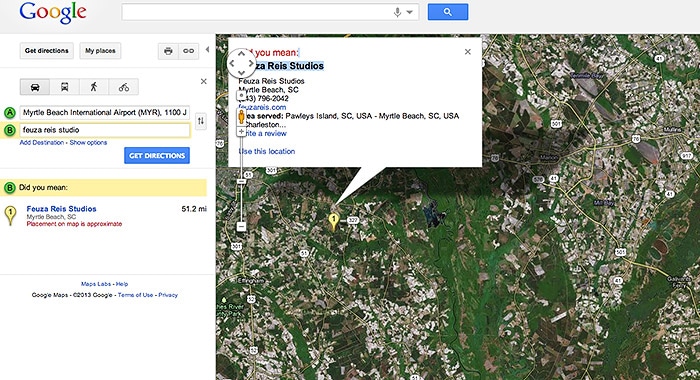
So don’t hesitate in getting your Google listings as local SEO gets more and more powerful. Another good tip is to Google yourself under Google Maps to see what comes up and to see if you are listed or Google has wrong information about your business.

As you can see my listing does not have my actual address but just the town I live in:

Google Map | Feuza Reis | South Carolina

In summary it is up to each business to do due diligence and be compliant. Some may disagree with my views on some things but there are some facts that can not be ignored. I suggest white hat practices especially if you don’t know what you are doing and don’t have an SEO support team to get found!

Filed Under: Marketing, Photography Business, Web/Tech Tagged With: google, Photographers, Photography Business, Search Engine Marketing, seo, Seo Myths

Why You Should Master Your Digital Channel

March 20, 2013 by Seshu | Editor & Publisher

Couple of days back, I published a guest post by Aaron Hockley about how photographers can or should choose their social media channels carefully.

Days after that post went live, I heard Jonathan Canlas (in a conversation with Todd Reichman of A Man To Fish fame and podcast) say rather bluntly that while it's all well and good to be on Facebook, Facebook “LIKES” don't pay bills. It made me think more about how I've been using social media, be it Twitter (nearly 8,300 followers) or Facebook.

The discussion in that podcast inspired me to also look at “why” I was using social media. Was it a source of real information? Or, was it entertainment? With a Twitter or Facebook presence, was I truly “marketing” to my target audience? I wanted to know how my posts measured. Ultimately, the question is: Am I able to convert visitors to actual paying photography clients.

Now, as a photographer, I am committed to doing one thing well – making images. Marketing, while exciting, comes in at a distant second, at the utter chagrin of both my accountant and my wife.

I know, as probably you have figured out for your own business, that being “out there online” is a vital part of your day. If you don't exist online these days, it's very difficult to sustain yourself as a business. Your clients are online, and so should you. But how to parse your day into useful chunks of time – time spent that can be measured and will bring in the results you want for your bottom line?

I didn't have an answer for that question until I ran into Chris Brogan‘s new offering called Mastering The Digital Channel [affiliate]. While I haven't taken this self-paced course yet, what I really like about Mastering The Digital Channel is that one has direct access to Chris Brogan!

As a photographer you may or may not have heard of Chris Brogan. He is the CEO of Human Business Works, a company that is dedicated to helping professionals understand and run relationship-based businesses. I've enjoyed his presence on Twitter and follow him there, but despite a large number of followers, he has always responded to my questions directly and promptly.

Chris, with Julien Smith, have written two books – Trust Agents: Using the Web to Build Influence, Improve Reputation and Earn Trust and The Impact Equation. Independently, Chris has also written Google+ for Business: How Google's Social Network Changes Everything and Social Media 101: Tactics and Tips to Develop Your Business Online. If you own a Kindle or an iPad with the Kindle application, consider buying It's Not About the Tights: An Owners Manual on Bravery.

Am I fan of Chris Brogan? You, betcha! I've always enjoyed his no-nonsense, fluff-free delivery of his blog posts, or when his podcasts. He comes across a genuine guy who loves to teach.

Right about now you are probably wondering why you should consider Mastering The Digital Channel by Chris Brogan. I hear you loud and clear.

It's only natural, easy and convenient to reach among those you already know in the photography industry. But I truly believe that if you want to shake things up, you should also be looking outside your bubble.

Now, let me be clear: Mastering The Digital Channel, isn't for everyone. However, if you've been spending your time online and seeing absolutely no return, right about now you probably think social media is a joke or you don't even try to dip your toes into it for long stretches of time. I hear it from a ton of people I meet at photography gatherings. But before you dismiss it completely, shouldn't you have the right frame of mind, the right tools and the right guidance to make a truly informed decision? That's where Mastering The Digital Channel comes in.

This course is just about to launch and yes, there is a launch special. In fact, if you use the code “special”, you save $200 off.

Being online isn't “the IN thing,” it's the “right thing” to do for your business.

Learn to master your digital channel from an attentive and qualified teacher. I know you won't go wrong if you follow the steps Chris Brogan outlines in his course.

Sign up for this course now and save $200.

Full Disclosure: Like all other programs or products I mention or promote here, I do make a small commission from each signup to support the running of this website.

Filed Under: Marketing, Photography Tagged With: Channel, Chris Brogan, Digital, facebook, Photographers, The Social Network

  • « Previous Page
  • 1
  • …
  • 11
  • 12
  • 13
  • 14
  • 15
  • …
  • 26
  • Next Page »

Subscribe To Tiffibox Treats!

Looking for a well-curated email newsletter that will leave you inspired and motivated about your photography business? Sign up below!

About Seshu

Seshu creates relaxed portraits of families and high school seniors in Avon, Connecticut. He also leads a successful headshot photography studio in Connecticut, helping professionals from a variety of disciplines project the very best versions of themselves. He created Tiffinbox as a way of inspiring photographers, to create better images and successful businesses. [Read More]

Email Templates For Headshot Photographers

Email Templates for Headshot Photographers

Recent Posts

  • How Capture One Changed My Event Photography
  • 10 Steps To Stay Positive In Times Of Great Stress
  • Why You Need To Read “Personal Branding For Photographers” Now
  • How To Master Your Website Content Step By Step?
  • Tony Taafe’s TNT Method For Headshot Photographers

Recent Comments

  • Stephen Davison on Are You A Business Owner Who Is Smart, But Stuck?
  • Ben A. on Don Giannatti Clinches The 8th Annual Tiffinbox Award
  • Dan on Don Giannatti Clinches The 8th Annual Tiffinbox Award
  • Donald Giannatti on Don Giannatti Clinches The 8th Annual Tiffinbox Award
  • Stephen Davison on G.E. Masana’s 6 Strategies For Wedding Photography Success
  • Naveen Kumar on Weddings In India Are More Than Being At The Right Place And At The Right Time
  • kartick on Weddings In India Are More Than Being At The Right Place And At The Right Time
  • Leonid Farbman on 6 Uncommon Trends To Grow Your Photography Business
  • Willow and Finch Wedding Photography on 11 Reception Tips To Help Your Wedding Photography
  • Web Designer Malaysia on How To Optimize Your Squarespace Website For Search Engines
  • Creastan on An Interview With Photojournalist G.M.B. Akash
  • Cindy Brown | Atlanta on An Open Letter To A Local Photographer

Become a Patron!

Copyright © 2026 · Tiffinbox · Site Design by Heather Mackan Creative · Built on Genesis