• Photography
  • Interviews
  • Business
  • Reviews

Tiffinbox

Inspiring Photographers

  • Home
  • About
  • Blog
  • Contact

3 Big Reasons To Use CoSchedule For Your Social Media Marketing

August 14, 2014 by Seshu | Editor & Publisher

Google+, Twitter, Tumblr, YouTube, Facebook, LinkedIn, Instagram, Pinterest, Orkut … oh, forget about Orkut, that doesn't exist anymore. Phew!

But still, can you imagine posting to every single social media platform out there? When do you find time to photograph? Or, spend time with your family? You can drive yourself batty trying to be everywhere all the time. (Here is Gary Vaynerchuk's advice to master the four big platforms)

It's true, my wife thinks I am also married to my iMac and I am always sitting in front of it posting to these social media platforms at all hours of the day and night. At some point I experienced burn out. And you will too. It's a sense that all of this “work” you are doing online is really a huge waste of time.

That's just your tired brain aching for a break. And you should step away from it all. Heck Zack Arias gives himself a whole month each year (I believe it is December) when he opts out of all social media circles. And good for him. As the new year approaches, he is ready to give it a big push and has the energy for it too.
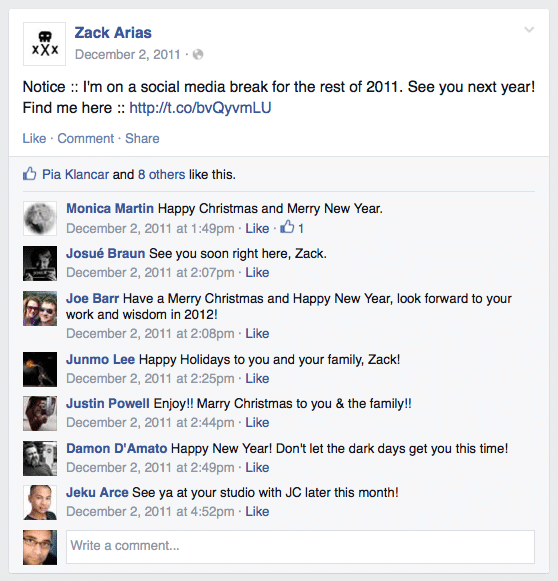
Zack Arias Announces His Annual Social Media Break

As I said, whenever I have done it, it has always felt great. But is it always necessary to give yourself a time-out? While I really haven't missed any of the platforms, there is still a very tiny portion of me that wonders if I could still be engaging with my audience and driving traffic to my site, while I am on that well-deserved break.

The easy way out when it comes to blogging, and several other well-known bloggers have already suggested it, is to simply schedule your new posts in WordPress ahead of time. This very post you are reading was written several days ago.

But that only takes care of the blogging side of the equation. What about social media? I use an application called Buffer with some success, but it requires you to load your articles and links up ahead of time and then have them appear at different times of the day on different platforms.

However, I really wanted a tool that would be in sync with my blog – posting blog posts to different platforms, at different times from the very same WordPress dashboard I was using to write and edit my content.

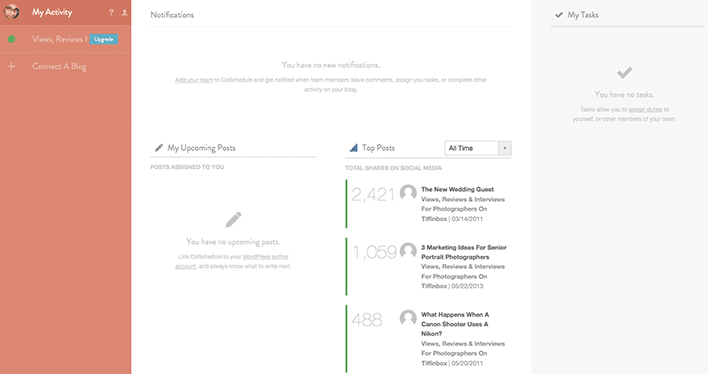
Thanks to Kim Doyal, I discovered that tool to be CoSchedule. I've now used it for over four weeks now and I can tell you the very reason I am posting this review is because I couldn't do without it. It's a plugin that sits below your content editing area (see screenshot below) and out of the way. It springs into action the minute you want to “Create Your First Message”. The tool is smart enough to pull in your blog post's url and set it up in a way that all you have to do is simply add your own out-going message. Interestingly, when I wrote a message that was longer than 140 characters, the system smartly told me that it couldn't send it to my Twitter feed because it was longer than Twitter allowed.

CoSchedule connects to Facebook, Twitter, LinkedIn, Pinterest and Tumblr. Once you register your account, you are able to create as many messages as you want and thereby schedule the same post to appear a day, three days, seven days or even a month after it publishes, so that your audience will always see it front-and-center.

So, what are the three big reasons why you should use CoSchedule for your social media marketing?

1) Being Consistent

In any business, appearing consistent adds to your credibility and speaks of your reliability. When your posts consistently and frequently appears on all the platforms, your audience (aka. your potential clients) are going to be reassured that doing business with you is going to be a-ok. In CoSchedule, you set it up once and you just move on to the next blog post. You really don't have to do much more than that.

2) Drive Traffic

I don't have to tell you how traffic from Facebook has dropped significantly. The only way more number of people are going to see your blog posts on Facebook is if you make it a point to share your links at different times of the day, allowing for a greater number of people to visit your site. CoSchedule makes this happen very easily.

3) Encourage Engagement

Whether is Twitter, Facebook or even Google+, if your audience only retweets, likes or 1+'s your posts, you aren't going to go very far. What you need is for your audience to engage with your content and in the end, engage directly with you. CoSchedule‘s interface allows you to add your own flavor to the posts, making it possible for you to ask questions or displaying a call-to-action that will help you see results.

Want to know more? Check out this two-minute video overview:

CoSchedule

CoSchedule Activity Screen

So, do you believe you will use an editorial calendar like CoSchedule for your blogging and social media marketing efforts? Sound-off below to share your opinions with me. I trust CoSchedule will save you time and make you more efficient. It does for me. That's a win-win in my book!
Filed Under: Blogging, Home Middle Right, Marketing Tagged With: blog, facebook, Kim Doyal, Marketing Efforts, Media Marketing, Media Platform, Photographers Blog, pinterest, social media, Twitter, Zack Arias

Doug Levy, Inspire Interviews: Episode 1

August 13, 2014 by Seshu | Editor & Publisher

Doug Levy is a New England wedding photographer and a good friend who knows his way around off-camera lighting. In fact, the first few times I ran into him were at the Inspire Photo Retreats where he taught a packed room of eager photographers the art of using off-camera lighting at wedding receptions. Subsequently, he conducted his own lighting workshop, which I attended.

Listen to our conversation about Doug's start in the business and what he looks forward to the most at Inspire Photo Retreats.

Doug will be back to teach at Inspire Photo Retreats, which will be held this time in Portland, Maine, from February 9th through February 11th.

Here is a sample of Doug‘s work:


Inspire Photo Retreats - February 9-11, 2015, Portland, Maine

Here is a list of other speakers who will also be presenting.

Register for this amazing conference here and now.

Filed Under: Conferences, Home Middle Right, Interviews, Photography Tagged With: doug, doug levy, levy, Lighting Workshop

The Youngrens Will Teach You About Blogging For Your Photography Business

August 6, 2014 by Seshu | Editor & Publisher

Erin and Jeff Youngren are photographers in San Diego who own two other brands – Clove & Kin and Bauman Photographers – in addition to their own wedding photography business. If anyone should have “no time to blog” it would be them. Yet they have made it work and in a way that makes them known among clients and in an industry they lead.

I spoke with them about the need to publish a blog, how they approach it, how they even personalize and of course find time to make it all happen.

The Youngrens, are presenting their ideas about blogging through a ShootDotEdit webinar on August 13th at 10 am PST.

I recommend you sign up for it right away. Like other ShootDotEdit webinars, I trust this one will also be extremely valuable to you and your business.

If you have any specific questions for The Youngrens, please use the comment section below to ask. I'll be happy to relay them to Erin and Jeff before the webinar begins.

Filed Under: Blogging, Home Middle Left, Photography Tagged With: Blog Posts, Business Bloggers, Erin Youngren, Jeff Youngren, Photography Businesses, Wedding Photography

Musea: Online Proofing, Lab & Gathering For Photographers

July 17, 2014 by Seshu | Editor & Publisher

Michael Howard, a wedding photographer based in Nashville, Tennessee founded Musea, an online proofing solution for busy photographers.

Instead of establishing the same old basic business model that tonline proofing systems have followed, where a photographer pays the host a monthly sum and also surrenders a portion of the sales profits as commission, Michael chose to dedicate 2% of the 16% commission he receives towards Water.org. Plus, he eliminated monthly fees!

Among the topics Michael and I covered when we recently spoke were his intentions to start Musea, the new offering called Musea Lab and lastly the intimate conference he calls Musea Gathering that will take place from February 22nd through February 25th in San Francisco.

Want to learn more about how Musea is serving serious photographers like you? Listen to the many podcast interviews Michael has conducted with industry leaders.

MUSEA Gatherings are for those photographers that want to bring more intimacy into their work. Weddings and portraiture photography trends currently put much of the focus on amazing locations and the people are often interchangeable. Gatherings take a different approach by encouraging photographers to find vulnerability, connection and humanity in those we document.

PLEASE NOTE: For the next 24 hours, you can apply to win a seat at the Musea Gathering. Enter the scholarship giveaway now!

Filed Under: Business, Home Middle Right, Interviews, Photography

Using Sexy Light On The Beach

July 14, 2014 by MP Singh

Behind The Scene Look: How I Got That Shot

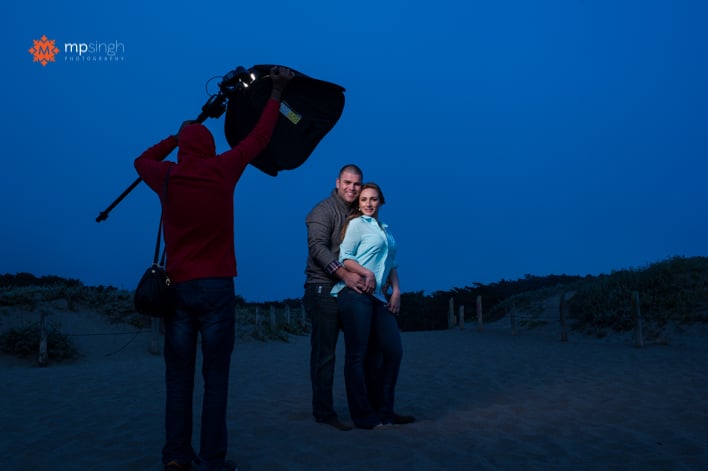
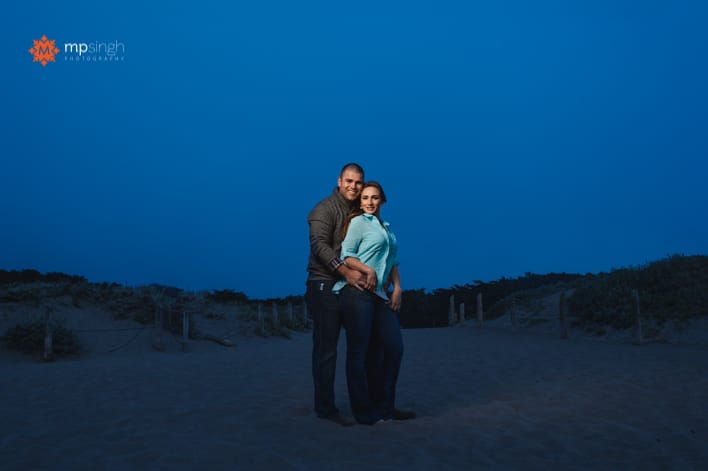
The image you see below was created as part of an engagement session. It was towards the end of shoot when we were at a beach and sun had already gone down. The park visiting hours were already over and there was a cop driving everyone out. And it was cold, the chill factor in the wind was sending shivers down our spines. We quickly grabbed couple of shots and drove out of the park.

MPSingh Photography - Couple On The Beach

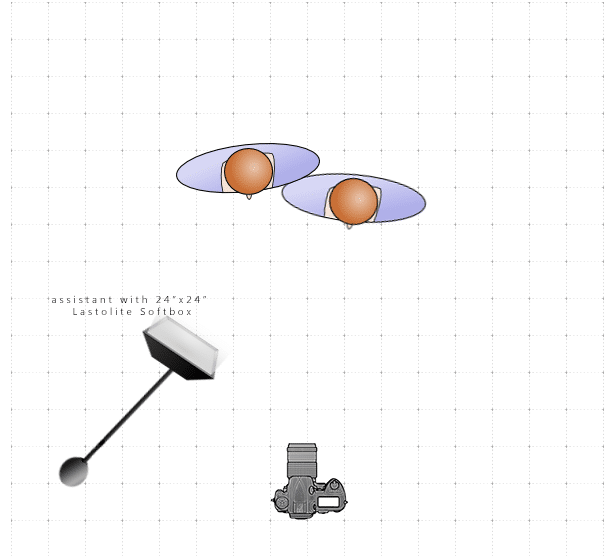
This shot was taken with the help of an off camera flash, Nikon SB900 inside a Lastolite 24″x24″ softbox, triggered with my trusted Pocket Wizards. The following is a lighting diagram showing the set up for this shoot.

MPSingh Photography - Couple On The Beach Lighting Diagram

The flash had a full cut CTO (color temperature orange) gel on it. I wanted to give the feel for the post dusk bluish night sky. So I turned my camera to tungsten white balance. This gives the blue tint to the whole image. To compensate the blue tone on the subjects and bring the skin color back to normal yellow/orange tones, the flash had the orange gel on it. The full cut CTO gel fully compensates for the tungsten white balance.

Another challenge was that we required the light to be very close to the couple and we wanted wide angle shot to include more of the background for context. So the assistant was in the picture.

MPSingh Photography - Couple On The Beach

The Photoshop Work

To fix that we took two shots, one with assistant lighting the couple and in the shot. Before the second shot, the assistant ran out of frame and switched off the light. So the second shot was taken with the couple without any light. Once we take these two shots it is very easy to do a composite in Photoshop:

1. Open both the images in Photoshop as layers, with the image with assistant as the top layer.

2. Auto align layers (Edit –> Auto-Align). When we don't use a tripod there is always a slight movement of the camera and the frame changes. To compensate for that, we have to align the layers.

3. Once the layers are aligned, select the top layer and use layer mask to mask out the assistant. Now we are using everything else from this layer except area where assistant was. That area is picked up from the layer beneath.

4. Make other changes as required.

And, voilá, we have our final image. Do you have any questions? Feel free to ask below!

Filed Under: Home Middle Right, Lighting, Photography Tagged With: adobe photoshop, camera flash, Color Gel, digital photography, Flash, image processing, Layers, off-camera flash, Orange Gel, photographic lighting

Working With Your Designer & Life After the Launch

July 9, 2014 by William Bay

This is the third guest post by William Bay, in a short series about customizing your website. Here are part 1 and part 2 of the series. You might want to read those first before jumping into this last part of the series. Thank you!

Even though developers and photographers get paid to do something artistic and technical, there can be communication pitfalls along the way. You can learn all about it in my new book entitled: Photographers are from Venus and Developers are from Mars. Just kidding. But in all seriousness, language-wise, photographers tend to be more on the artistic side of the spectrum, and developers tend to be on the technical end of things.

Photo by: Cory M. Grenier

Photo by: Cory M. Grenier

Another important aspect is that most designers and developers just want be in front of their computer coding, and not dealing with clients and business issues.

Does that sound familiar, photographers? Yep, you just want to do what makes you happy: photograph, and not deal with clients either.

The reason I’m telling you this is so you can remember these pointers when you feel some level of frustration coming on. All you need to remember is that you’re talking two different languages. The best way to communicate is to use a common language. So, be clear in your speaking and writing. Think before you send a set of instructions. A good thing to ask is “would a 10-year-old understand what I’m asking?” Use diagrams or screenshots if necessary.

Remember, this is your future website. It’s your responsibility to ensure that it turns out the way you want it to. A web developer is your facilitator to help make your dreams come into being, not your punching bag when you can’t understand each other. You’re on the same team.

Whatever you do, don’t “try” to speak the developer’s language. Mistakes will be made, and you’ll look silly. You know when Uncle Bob comes up to you at a wedding and tries to get into a technical conversation with you? Yeah, it’s kinda like that.

The Process

There are different phases to building your custom website. Below is a list of the phases that work for Flaunt Your Site. These are not hard-and-fast rules, and not every developer will go through all these steps. But I’ve found that, for me, utilizing these steps encourages more communication along the way, and minimizes the amount of errors that pop up.

* Wireframe: This is a very simple line drawing of the layout: what content will be on the page, and where it will go i.e. slideshows, content, videos, etc.

* Design Comp or Mock-up: An JPG or PNG image file of what the site will look like. This is usually done in Fireworks or Photoshop, so you can see what the site will look like before the building process starts.

* Scope: The mock up is then looked at very carefully and each element is examined to see if there is a function that it's supposed to perform, like what element links where, are pictures static or part of a slideshow, what things have rollover behaviors, etc.

* Development Site (the Building Process): Usually performed on the developer’s computer, offline. This is where the design comp is turned into an actual website. It’s best to build this offline so clients don’t see “how the sausage is made.” It’s not as disturbing as a slaughterhouse, but you don’t need to see the build process. It’s actually boring and slow.

* Staging Site: When the site is finished and you can actually see it up and running, we put it on a staging server. Many developers have their own server that they’ll use (e.g. client1.flauntyoursite.com). It’s online, so the owner can see the actual site in use. Final changes and bugs are found and fixed. This is also a good opportunity to import any existing content that you have on your site or blog.

* Soft Launch: I like to include what’s called a soft launch phase (not everyone does this, though). This is when the site is pushed onto your server in place of your old site. I know you’re really excited to have everyone come look at your new site, but before you invite the masses, it’s good to test everything in its final live environment. It’s a good practice to have just a couple friends with keen eyes look for mistakes, typos, and any final web gremlins that need to get squashed.

* Hard Launch: The pièce de résistance! All the hard work and months of waiting come to this point where you can blast the whole world, Facebook, and your email list that your new website is open for business. This is when you pop the bubbly.

A Word On When Design Happens, And When Design Changes

Design happens during the design phase. To drive the point home: Design does not happen during the build process or after the Soft Launch.

If you want to change the design that you’ve approved, we will charge you for going back and changing it (frequently called a Change Order). A small tweak might not be a problem, but don’t be surprised if we tell you that you’ll be billed for the change, or that you have to wait till after the site is completed and initiate a Phase 2 on the site. So if you’re on the fence about something in the design, get it resolved right away during the design phase. You can even ask for an extra week to sit with the design to see if you’re 100% happy with the design, or if additional tweaks need to be made.

Again, I’ll remind you that it’s your responsibility for the project turning out the way you want it. But if you’re looking for a quick way to make a developer go from an overweight nerd into a full-on, enormous green rage monster, just tell them that you’d like a design change while they’re in the middle of actually building the site.

Payments

What I’ve found that really works for my clients and myself is to base the payment structure on certain phases from the above list. This is how I typically work (again, all developers are different):

* Initial 1/3 payment: Upon signing contract. (This pays for my time to design a concept).

* Second 1/3 payment: Upon client approval of Design Comp. (This mean that the client likes what they see and they’re committing to building the site).

* Final 1/3 payment: Upon completion of website and prior to Soft-Launch. (This indicates that the developer has done his job and it’s ready to go live).

I do ask for final payment before launch. It’s just the preferred method of ensuring final payment for many developers. It’s our version of “delivery on payment.”

When Problems Arise

Yes, there will be problems. We’re not launching a rocket, but there are still a lot of things to juggle in launching a website. Web developers are people, and occasionally, we make mistakes, so try to be understanding. We’re on your side, and mistakes are just that: mistakes. We’re not intentionally trying to screw up your day.

If multiple mistakes are happening, and it becomes a competency issue, the developer isn’t willing to be open about the cause, or you’re just getting excuse after excuse, then you do have cause for concern. If you’re not sure what you’re dealing with, please feel free to call me. I have no problem helping disputes so feelings don’t get hurt, or people have to revert to legal actions (which is the absolute worst for both parties involved).

Photo by: Randy Merrill

Photo by: Randy Merrill

Life After Launch

This is not the time to make design changes! Okay, just checking to see if you were paying attention.

I say that tongue-in-cheek, but there is the occasional client that waits until after the launch to raise design issues or concerns they’ve had. And while it’s a rather frustrating phenomenon for developers, it’s really just going to end up being costly to you – not to mention, you’ll probably end up at the back of the line of the developer’s client list, since they have promises to other clients. So, again, get your design done during the design phase.

Once you’ve launched, your focus should be on the content – this usually means blog posts and/or photo galleries. If you have existing posts, you may think about going back and figuring out what the best keywords for each post are, and re-optimizing them for search engines. If you have questions on that, Flaunt Your Site offers one-on-one SEO training and we can teach you.

For new content, I would suggest a regular schedule. Every week or every other week depending on how much you shoot. Again, you’ll want to focus on the right keywords for your blog posts (And I guarantee you, it’s not “Your City Wedding Photographer”).

Here Are Some More Tips On How To Take Care Of Your Site:

* Keep WordPress and your plugins updated! Part of the reason WordPress releases updates is because they increase the security measures constantly. Don’t lose all that hard work because you’re running an old version of WordPress.

* Keep the plugins to a minimum. Plugins are really great, but too many will bog down your site. And the wrong ones will open up your site for vulnerabilities.

* Use Google Analytics to track the effectiveness of your site. This includes things like:

o How many visitors do you get?
o What content is the most popular?
o What is your bounce rate for important pages?
o Where are most of your visitors coming from?

* Use the information from Google Analytics to make decisions about the content on your site.

* Visit Google Webmaster Tools every two to three months to ensure that your website is in good standing, and that the Sitemaps are being submitted properly.

* If you have questions about the usage of your site, ask your developer. It’s a good practice to stay in communication about things. I can’t speak for others, but I’m fairly available to my clients afterwards.

Above all else, be proud that you have something custom and unique. You totally deserve to give yourself a high five when you get compliments on how easy to use, or how beautiful your new website is.

Filed Under: Home Middle Right, Photography, Web/Tech Tagged With: Custom Websites, Soft Launch, Web Designer, Web Developer, William Bay

What The Sharing Economy Means To The Wedding Industry

July 3, 2014 by J Sandifer

The sharing economy is disrupting industries throughout around the world! Companies like Airbnb, Relay Rides, Task Rabbit, Uber, Lyft and dozens more companies are changing the way people think and consume.

What is sharing economy?

The sharing economy is a consumer paradigm in which a person is willing to share his or her time or asset with another person. The paradigm enables people to maximally utilize the assets that they own or decide to use someone else’s assets. Airbnb helps people share apartments, Relay Rides helps people share cars, Task Rabbit helps people share their services.

Why does this matter to the wedding industry?

As a professional wedding photographer, you’re accumulating a trove of wedding images. Traditionally, the value of your wedding images has ended when you deliver them to a newlywed couple. Today, if this is all you’re doing with your wedding images, you’re leaving value on the table!

Other vendors need access to professional images of their work now more than ever. In the past other vendors could get by with a handful of nice images on a website. Today, in the age of Pinterest, Twitter, Facebook and Instagram, engaged couples have a heftier appetite for images. Today, vendors need to share a regular stream of fresh professional images on social media to stay relevant among engaged couples. You’re sitting on these images, and you can get something for them.

The current image share paths from photographers to other vendors are fragmented, cumbersome and, most unfortunately, do not enable the photographer to capture the full value of his or her images. I’m fixing this problem with LulaWed.com. Our new wedding directory helps photographers easily share wedding images with other vendors and capture real value from sharing.

How LulaWed helps photographers.

LulaWed allows photographers to upload albums of real wedding images and tag the venue and other vendors who participated. We find the contact info for vendors you tag in albums, email them a link to your album and encourage them to share your branded images of their work on social media.

LulaWed provides easy one click access for other vendors to share your wedding images to their Pinterest, Twitter and Facebook accounts. The images shared are branded with your logo or watermark and lead back to your listing on LulaWed. The end value to photographers is more exposure among unique social media networks and more referrals from other vendors. The end value to the other vendors is they get to share professional images of their work online.

Your marketing dream team.

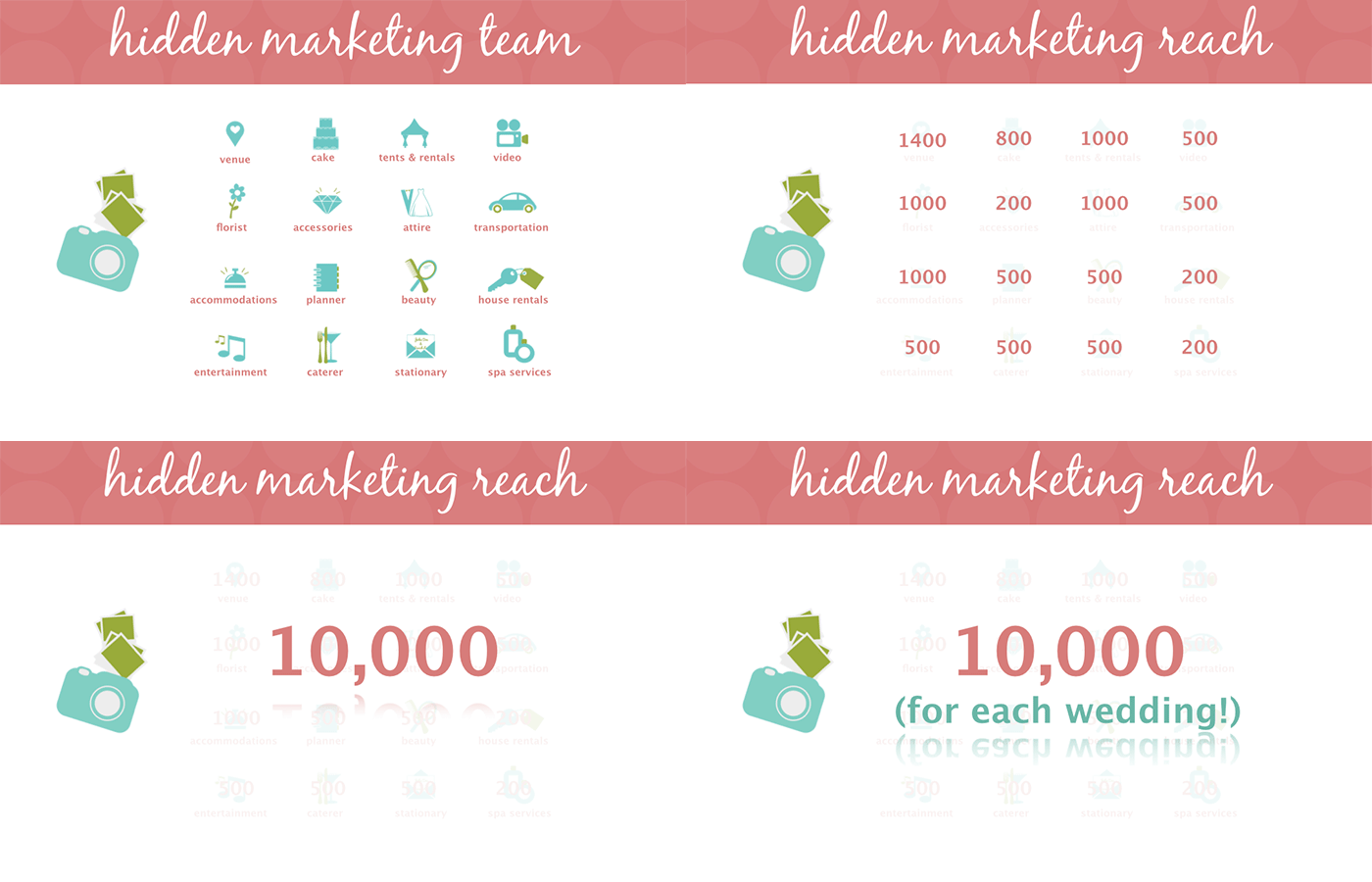
Imagine if you had a marketing team of 10, 20 or even 100 people working to promote your business to engaged couples. This would be amazing and really expensive! You don’t need a marketing team promoting your business, you need other wedding vendors promoting your business.

Today's social channels allow savvy wedding businesses to build successful online followings across multiple platforms. Sharing your images on LulaWed allows other wedding vendors to market their business and yours simultaneously to unique social media networks. For example, when a couple sees your image shared on Pinterest by another vendor, the couple can click on the image back to your LulaWed listing. You keep all the credit, and you get the referral.

You never know which vendor your tagging will have a huge following on Pinterest.

LulaWed Marketing Reach

By a photographer, for photographers

I worked as a professional wedding photographer for the past 12 years in California and Maine. I’ve shot over a hundred weddings and my wife’s current photography company shoots 60+ a year. I understand that brides come and go, but the industry will always be there. Take care of the individuals who can refer you and you will build a business that thrives!

Our platform is designed to require minimal effort by you to get your images shared by other vendors! We’re constantly adding new features and partnerships that make it easier for you to share images with other vendors. Recently we launched a new feature that allows you to skip the image upload process completely when you integrate your blog RSS feed. LulaWed can pull real wedding images right from your blog.

Free listing offer for Tiffinbox readers!

Tiffinbox has been a valued resource to me as a professional photographer, so I want to share the love with other readers. Right now, when you create an Enhanced listing on LulaWed, use promo TIFFINBOX to get 6 months free!

I hope LulaWed helps you get more value from your wedding images. Signup, upload weddings, tag vendors, and let me know how it goes!

Sign Up Today

Filed Under: Home Middle Right, Marketing, Photography, Weddings Tagged With: photographer, professional wedding photographer, Share Economy, Shooting Wedding, Wedding, Wedding Businesses, wedding images, Wedding Industry, wedding industry in the united states, Wedding Vendors

Win The Craft & Vision Grant At Inspire Photo Retreats

June 27, 2014 by Seshu | Editor & Publisher

I love winning contests, especially if money is involved. Money, that I can put towards my business in some way. I just got word that Inspire Photo Retreats and ShootDotEdit are working together in offering a special grant for photographers just like you.

So this is the email I received:

“We are happy to announce Inspire Photo Retreats is collaborating with one of our Community Sponsors, Shoot Dot Edit, to offer a business professional, Craft & Vision grant at our 2015 retreat!

Inspire Photo Retreats is committed to helping professional photographers at all levels, grow their business and master their craft. Shoot Dot Edit shares these same values and we couldn't be more excited to offer this unique opportunity with them!

We will be funding the grant by the amount of purchases of Shoot Dot Edit's “Unlimited Plan”. They will generously allocate a portion of the proceeds to funding the grant which will be given to one of our attendees in 2015. The grant will be awarded at Inspire Photo Retreats 2015 in Portland, ME, at The Westin Portland Harborview Hotel. Please feel free to share this with your colleagues. We hope you take advantage of this amazing opportunity. We look forward to seeing you in 2015.”

Inspire Photo Retreats - ShootDotEdit Grant

Please note that this special offer ends on June 30, 2014 … that's 3 days from now folks! To be eligible you must be an Inspire Photo Retreats? ticket holder and be present at the event in Portland.

To enter the drawing for this grant, click the graphic above and use the code “Inspire2014”. I hope to see you at Inspire, to congratulate you on your winning this grant!

Filed Under: Contests & Grants, Featured Post of the Day!, Photography Tagged With: Community Sponsorship, Shoot Dot Edit

How To Create Powerful Photo Essays And Personal Projects

June 26, 2014 by Seshu | Editor & Publisher

David H. Wells is more than a photojournalist. He is a teacher, an avid blogger and even after years of experience creating powerful photo essays or personal projects, he is still an enthusiastic student learning the medium of video to further his goals.

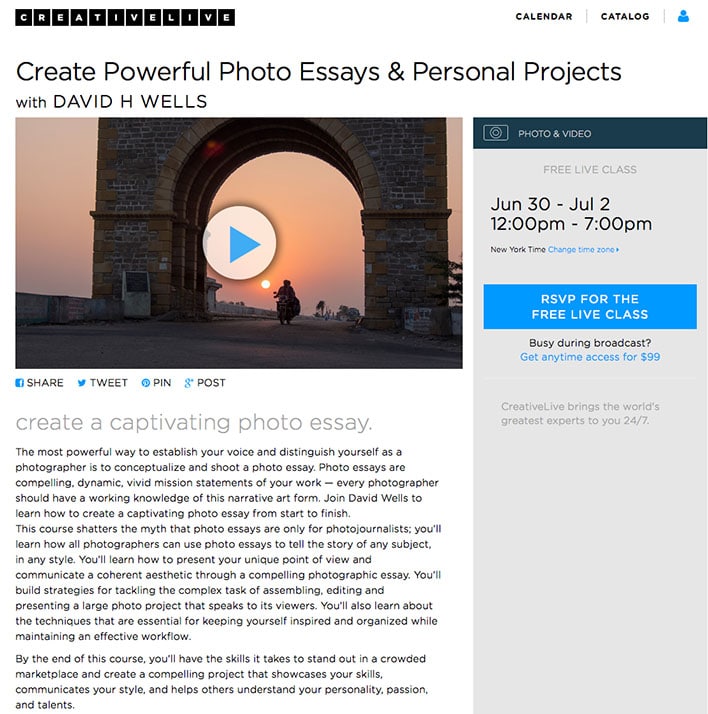
Over the years of running into him at conferences or workshops he is teaching, David and I have become friends. So, when I heard he was teaching a course called “Create Powerful Photo Essays and Personal Projects,” on CreativeLive, I wasted no time to contact him via Twitter and then email to set a date and time to chat about it.

Here is the link to the personal project David mentions in the video that he is currently pursuing in India.

Are you pursuing a personal photography project? Have you completed a photo essay you want published here on Tiffinbox? If so, I want to know about it. Comment below with a link or more information. I might choose to interview you.

Lastly, don't hesitate for even a second to take David's course on CreativeLive, if you are interested in creating a photo essay or a personal project. You get to watch for free while CreativeLive is broadcasting it live from Seattle. In the event you miss it, you can always buy the course, download it and watch it in its entirety whenever you want.

Create Powerful Photo Essays & Personal Projects, a course on CreativeLive.com

I have added this course to my calendar and I'll be watching and learning from a photojournalist who not only talks the talk, but walks the walk when it comes to producing a body of work that speaks of the larger issues humanity faces. I hope you will join me in checking out “Create Powerful Photo Essays and Personal Projects.”

Filed Under: Home Middle Right, Photo Projects, Photography Tagged With: David H. Wells, Personal Photography, personal projects, Photo Essay, photography projects, Powerful Photo

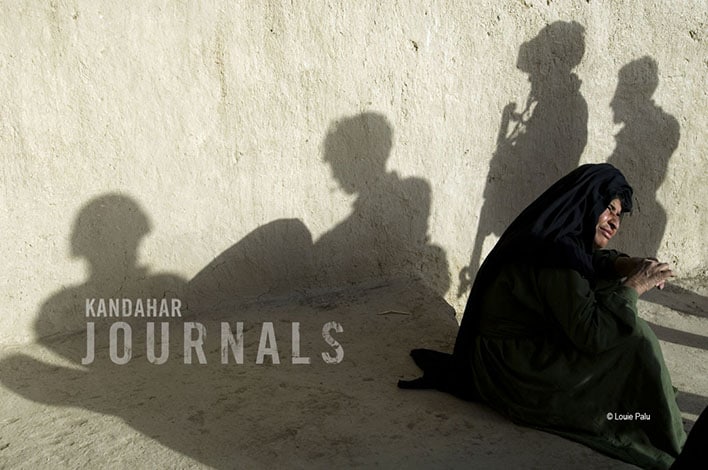
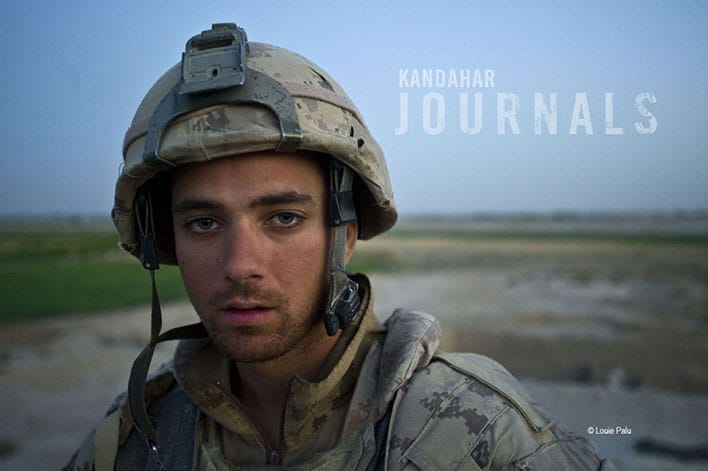
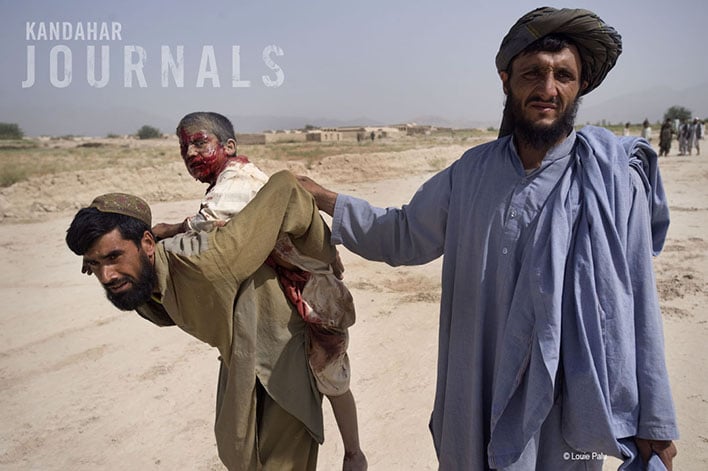
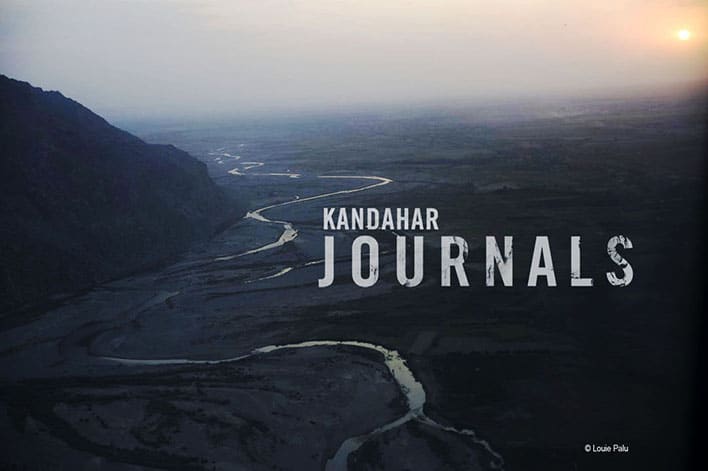
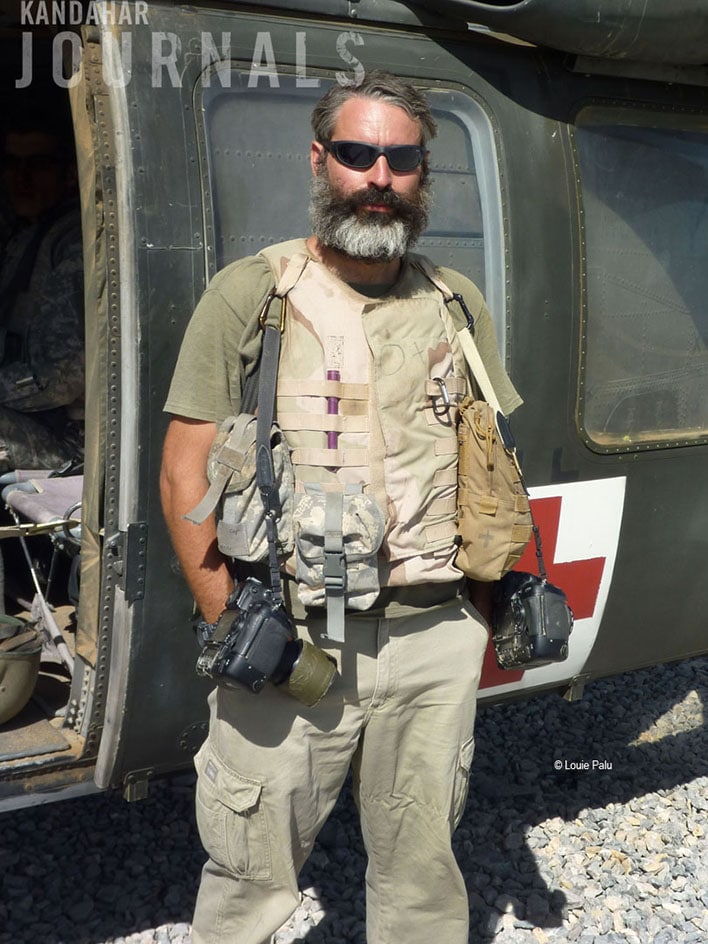
Louie Palu & Devin Gallagher’s Kandahar Journals

June 23, 2014 by Seshu | Editor & Publisher

When Canadian photojournalist Louie Palu and co-director Devin Gallagher launched a campaign on Kickstarter to fund their film Kandahar Journals, it was very quickly funded. Still, the duo are looking to raise even more money for their project.

To date, there are 290 backers who have donated $29,000+ for the completion and distribution of this film about Louie's experiences as a photojournalist in Afghanistan.

Louie and I sat down to chat about the project. Here is that conversation:

Now today more than ever, we need to examine conflict and the policies driving it.

Kandahar Journals Documentary Film

Kandahar Journals Documentary Film

Kandahar Journals Documentary Film

Kandahar Journals Documentary Film

Kandahar Journals Documentary Film

Kandahar Journals Documentary Film

With only 12 more days to go, the campaign could use your financial support to get this film distributed even more widely than originally planned. As I said and as I believe, it's only through dialogue and exploration of other cultures can we approach peace, reconciliation and perhaps even an end to the war in Asia.

Louie Palu, Devin Gallagher and a small crew of other collaborators have risked life and limb to unwaveringly bring home this poignant story. Now it is our turn to honor them by supporting Kandahar Journals, before the campaign ends.

Filed Under: Film, Home Middle Right, Photography Tagged With: asia, Devin Gallagher, Documentary Film, films, Journals, kickstarter, Louie Palu

  • « Previous Page
  • 1
  • …
  • 20
  • 21
  • 22
  • 23
  • 24
  • …
  • 198
  • Next Page »

Subscribe To Tiffibox Treats!

Looking for a well-curated email newsletter that will leave you inspired and motivated about your photography business? Sign up below!

About Seshu

Seshu creates relaxed portraits of families and high school seniors in Avon, Connecticut. He also leads a successful headshot photography studio in Connecticut, helping professionals from a variety of disciplines project the very best versions of themselves. He created Tiffinbox as a way of inspiring photographers, to create better images and successful businesses. [Read More]

Email Templates For Headshot Photographers

Email Templates for Headshot Photographers

Recent Posts

  • How Capture One Changed My Event Photography
  • 10 Steps To Stay Positive In Times Of Great Stress
  • Why You Need To Read “Personal Branding For Photographers” Now
  • How To Master Your Website Content Step By Step?
  • Tony Taafe’s TNT Method For Headshot Photographers

Recent Comments

  • Stephen Davison on Are You A Business Owner Who Is Smart, But Stuck?
  • Ben A. on Don Giannatti Clinches The 8th Annual Tiffinbox Award
  • Dan on Don Giannatti Clinches The 8th Annual Tiffinbox Award
  • Donald Giannatti on Don Giannatti Clinches The 8th Annual Tiffinbox Award
  • Stephen Davison on G.E. Masana’s 6 Strategies For Wedding Photography Success
  • Naveen Kumar on Weddings In India Are More Than Being At The Right Place And At The Right Time
  • kartick on Weddings In India Are More Than Being At The Right Place And At The Right Time
  • Leonid Farbman on 6 Uncommon Trends To Grow Your Photography Business
  • Willow and Finch Wedding Photography on 11 Reception Tips To Help Your Wedding Photography
  • Web Designer Malaysia on How To Optimize Your Squarespace Website For Search Engines
  • Creastan on An Interview With Photojournalist G.M.B. Akash
  • Cindy Brown | Atlanta on An Open Letter To A Local Photographer

Become a Patron!

Copyright © 2026 · Tiffinbox · Site Design by Heather Mackan Creative · Built on Genesis