• Photography
  • Interviews
  • Business
  • Reviews

Tiffinbox

Inspiring Photographers

  • Home
  • About
  • Blog
  • Contact

What is Bounce Rate, And Should Photographers Care?

November 12, 2013 by Zach Prez

If you have been using Google Analytics for any length of time to measure your photography website’s performance, then first of all, congratulations. Google Analytics is a free metrics tool and the industry standard for measuring how visitors use your website including how many people come, how often, and to what pages. You may have noticed a data point called bounce rate, and gently ignored it (no offense bounce rate).
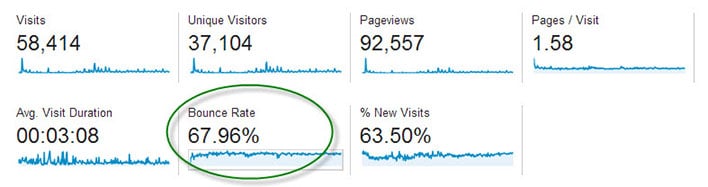
Bounce Rate

The main dashboard of Google Analytics shows the average bounce rate for your whole site.

Bounce Rate is the percentage of single-page visits (i.e. visits in which the person left your site from the entrance page without interacting with the page).

Should Bounce Rate Be High or Low?

Bounce rate should be as low as possible, indicating potential customers are viewing multiple pages of your site and therefore more likely to hire you.

It’s hard to quantify what is a high bounce rate since that depends on many factors including the type of page, how users came to that page, and what is on the page. If you’re only sharing your page with family and friends, you may have a low 25% bounce rate but are not really growing your business. You may have a high 90% bounce rate, but are getting nationwide press and converting a lot of sales from those visitors. Thus, it boils down to relative bounce rate. How does the bounce rate of your homepage compare to that of your pricing page or an individual blog post? What actions can you take to improve one page to increase the click through that your other pages are getting?

Bounce Rate for Individual Pages

Google Analytics displays bounce rate data for every page of your site. Find this report in the left navigation under Behavior > Site Content > All Pages.
Bounce Rate Pages

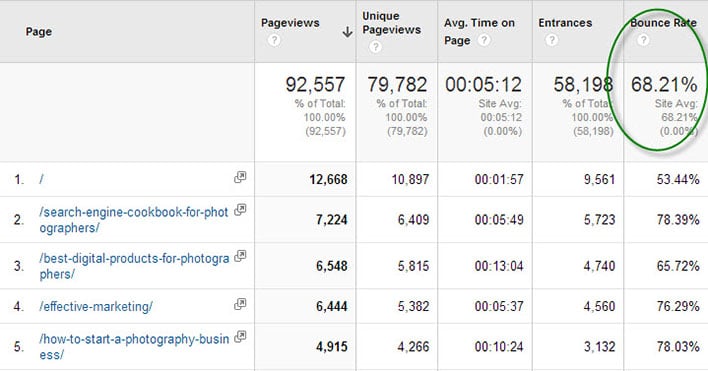
The Pages report in Google Analytics shows bounce rate data.

In the above report for my business articles blog we see that the homepage has a 53.44% bounce rate. That means over half of my audience reaches my homepage but does not click on an article. This bounce rate is lower that the site average of 68.21% bounce.

Item #2 in the above list is a product page and has a higher bounce rate than Item #3, an article containing lots of links. I may conclude that adding more links to my product page can help retain customers.

What Influences Bounce Rate?

Traffic comes to your website in three ways:

• Direct – 99% of direct traffic is from email, 1% is from bookmarks
• Referral – links from other sites on the Internet including social media
• Search Engines

Each of these ways can influence how visitors use your site, and if they will view multiple pages. If you have a large percentage of traffic from an email newsletter, then your bounce rate may be high. This is because people click on a link in your email, they see what they expected (like a recent photo session), then leave the page without clicking anything. This is not necessarily a bad thing.

Sites with a lot of traffic from Pinterest may have a high bounce rate since the user is simply browsing (perhaps for newborn poses) and might not even be in your target market or geographic location. I would not expect those people to click around to other pages of your site. Sites with a lot of blog posts ranking in search engines, the average visitor may check out the article they were searching for (like backyard wedding photo ideas) and then leave right away. Again, your webpage served its purpose.

How to Reduce Bounce Rate

Here’s the key to getting people to stick around your website, and click across multiple pages without bouncing off your site:

Give visitors additional links to click on every webpage

Here’s a little experiment to help you figure out what links to place across your site. Write down the top 3 pages of your site you want users to visit most. It may be a blog post you wrote exceptionally well, perhaps an important photo gallery that showcases your work wonderfully, and certainly it will be your contact and/or pricing page.

Now pick a random page from your website. How easy is it for users to get from that random page to one of your top 3 pages? Place links to these hot spots from the top, middle and bottom of the page.

Homepage – Many photography homepages have almost no text, and a single link to a gallery site or a blog site. That simply dumps users into a bunch of content, often times your most recent work and not necessarily your best work. Instead, display individual links to your most important blog posts right on the homepage. With this approach, users have a clear path to the best pages and are more likely to click.

Blog Post – Visitors find blog posts through many sources, especially search engines and social media. Since these potential clients didn’t navigate through the homepage, photographers need to reiterate important information like contact information and links to relevant pages. Orchard Cove Photography hired me to create a SEO-friendly blog post and you’ll see how I included tons of links at the end (and at the beginning) in order to keep interested customers from bouncing.
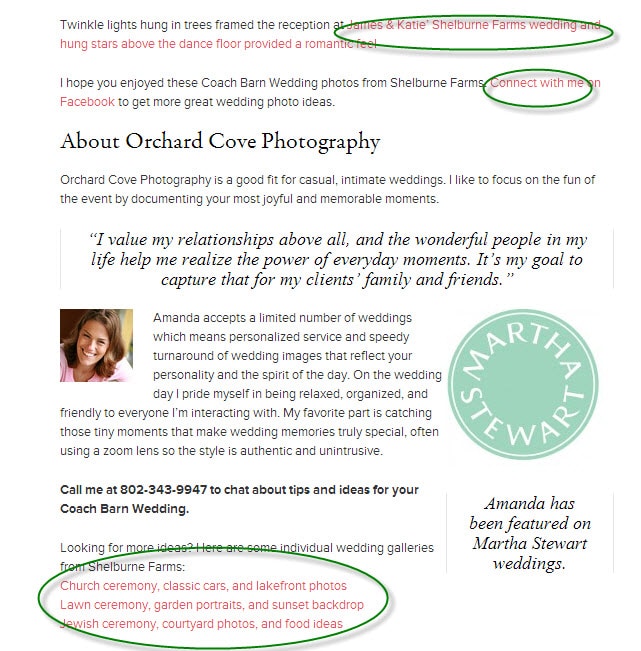
Sample Post

Does Bounce Rate Matter?

The very important question that comes out of all this is whether or not photographers should measure, monitor, and care about reducing bounce rate. I don’t ever look at my bounce rate.

The goal is to define clear customer paths from each and every page of your site. Start with your five top traffic pages. Pretend each page is the starting point for your potential customer because they came from Google or Facebook. Figure out what you want them to do next and make that a clear navigation point on the page. If you want them to hire you then add a big graphic that says “Book a Session Now” and link it to your contact page.

After making changes to your five top traffic pages, wait a week and see if the bounce rate declined. I hope you will be pleasantly surprised.

Filed Under: Home Middle Right, Photography, Web/Tech Tagged With: bounce rate, Business, google, google analytics, photography websites, search engine optimization, seo, web visitors

3 E-Books That Will Help You Master Lightroom, One Step At A Time

November 2, 2013 by Seshu | Editor & Publisher

All indications are you use either Photoshop or Lightroom. If you are editing one image at a time, they would both work, but I'll be you use Photoshop. But if being efficient is your goal, you will want to invest in Lightroom.

Like Photoshop, though, Lightroom is getting more and more complex to use. I have to admit I don't use all of its features, though I know I will be a whole lot more efficient if I did.

There are a few resources for you to learn how to use Lightroom to its fullest capacity:

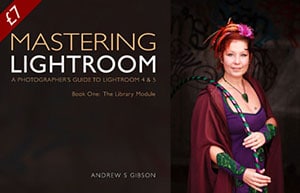
Mastering Lightroom: The Library Module

Mastering Lightroom Book One: The Library Module This is an e-book by fine art photographer and author Andrew Gibson. You can buy Mastering Lightroom: The Library Module from Andrew's website, or here at PhotoDough.com for the next few days for $7. Andrew is well-known for his concise writing and clear teaching style. Learn more about Mastering Lightroom here.

Lightroom 5 Unmasked

Lightroom 5 Unmaked by Piet Van den EyndeLightroom 5 Unmasked is an e-book by Piet Van den Eynde and distributed by Craft & Vision. It's 356 pages deep. If you are ready to go in for a deep dive, this might be the one you want to consider. If you are still using Lightroom 4, however, you may want to buy this e-book by Piet Van den Eynde instead. Also check out out other ebooks by Piet Van den Eynde here. Either version is $20 each. Both are well-researched, provide interesting case studies and are exquisitely designed with a wonderful array of visual examples.

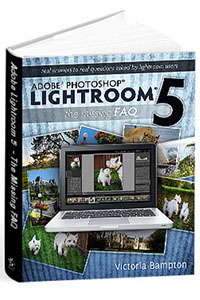
Adobe Lightroom 5 The Missing FAQ

Adobe Lightroom 5 - The Missing FAQ - by Victoria Bampton This tome by Victoria Bampton, an Adobe Community Professional & Certified Expert for Lightroom, is very well regarded in the industry because Victoria constantly finds ways to upgrade it and make it better as Adobe tinkers with the program. If you have a question about Lightroom, this is the go-to-guide for you. It's about $50 for both the e-book and paperback versions. I would get both if I were you. Also, get a flavor of her writing through this free Lightroom 5 Quick Start Guide.

There are obviously other fantastic resources available for learning Lightroom, but I wanted to get these three resources in front of you as they are likely to appeal to someone who wants to get their feet wet in Lightroom quickly.

If you are one of them and you buy any of these e-books, would you please come back here and tell me what you thought of them? Thank you!

Filed Under: Home Middle Left, Photography, Web/Tech Tagged With: adobe lightroom, adobe photoshop, Andrew Gibson, Craft & Vision, E-books, Learning, Piet Van den Eynde, Victoria Bampton

5 Tips For Photography Website Success

September 10, 2013 by Scott Wyden Kivowitz

As you might have guessed, having a website is essential to a photography business, so it is important to take necessary steps for photography website success. In this article, you are going to read five for photographers to achieve such a goal.

Hosting

The first step to achieve success, is to seek the best possible hosting for a photography business. There are many reason why WP Engine is a great choice for any photographer. First, is the expertise from every WP Engine employee. Another is their guaranteed uptime. At Photocrati, we pride ourselves on having the best possible support and understand how valuable it is to customers. So of course, I have to mention that their support is some of the best out there. Other awesome features from WP Engine are their time machine style backups, hack recovery and free migration services if you are transferring from another host.

I was originally hosted on Dreamhost, and then Liquid Web. Both were VPS servers which means that they're already more advanced and resourceful than shared hosting. However, my site kept going down when traffic spikes. Now on WP Engine my site really hasn't been down aside from a major power outage that was out of their control. With that said, WP Engine is my WordPress host of course.

If you're using a service that hosts your website for you, reach out to the company and find our about their downtime policy, website speeds and security measures.

Platform

The next thing to consider is the platform for which the website is built on. There are many content management systems available, but with over 16% percent of all websites on the Internet using WordPress, which is over 78 million WordPress installs, it is obvious what the best choice is. Now, some photographers do not want “the hassle” of managing a website host or WordPress application. Fortunately, WP Engine specializes in WordPress and customers do not have to worry about managing anything but three things:

  1. Update your WordPress theme
  2. Update your WordPress plugins
  3. Create your content

WordPress has its many advantages like having complete control over every aspect of your website. There is a massive community of other WordPress users willing to lend a hand and answer questions. There are tons of resources on the Internet to learn WordPress and find answers. WordPress is extremely flexible and can be a blog, a marketing page, a lead capturing tool, a full website, a CRM and many other things.

Theme

There are thousands of photo specific WordPress themes out there, and while we love our theme we also know that not everyone wants the same theme. With that, we have no problem recommending potential customers (or non customers) to theme's that are more of their personal taste. There are so many websites that list photo themes, so do so Google searching to find one that you like. Use keywords like full screen or grid layout.

Some things to consider for your photography WordPress theme are:

  • Gallery management
  • eCommerce
  • Image protection
  • Mobile friendly

The Photocrati theme is each of these and responsive capability is also coming in a future update.

Plugins

NextGEN Pro Plugin By Photocrati

Just like themes, there are thousands of plugins out there for photographers to use. They cover the full gamut of options, features and so on. Whether you are looking for an appointment plugin or a gallery plugin, there are many options. At Photocrati, we develop one of the most popular plugins called NextGEN Gallery (approaching 8 million downloads). We recently launched NextGEN Pro which includes enhanced gallery styles a Pro Lightbox with individual photo social sharing and commenting. Coming in future updates are eCommerce, proofing and lab integration. All of these amazing features can be used on any WordPress site running any WordPress theme.

However, we know some people prefer other gallery styles we currently do not offer. So with that, we have no problem recommending plugins like SlideDeck or FooBox which both integrate with NextGEN Gallery.

Also like themes, do Google searching for relevant keywords and WordPress listings will usually come up first. If you're looking for SEO or contact form plugins, check out WordPress SEO by Yoast and Gravity Forms.

Content

Of course, without content anything you do is practically useless. Content can be photographs, documents like a PDF guide for customers, blog articles or podcasts. Content is what attracts visits to your website. Spend some time and brainstorm ideas to create. If you are not a great writer, then hire someone who is. Make sure it is optimized for search engines, and see the traffic start to come in.

Don't be afraid to blog. Find your voice, be creative and write write write. Spend some time with your laptop or tablet outside or in a coffee shop. Different locations inspire creative writing. See what your competition is doing and then do it better.

Closing

Of course, there is much more to website success than this basic overview. Feel free to comment or contact me and I will do my best to answer your questions.

Filed Under: Featured Post of the Day!, Web/Tech Tagged With: content management systems, Photography Business, photography website, Photography Wordpress, Tips For Photography, Website Success, wordpress, Wp Engine

With Preveal, Photographers Can Now Show & Sell Images Easily

July 1, 2013 by Seshu | Editor & Publisher

If you are a regular reader of this blog, you are likely a semi-professional or professional photographer. That means you are either looking to make a living at photography or already are making a living at it one way or another.

If that's the case, you probably don't need to be told how crazy and competitive things are in the industry. You have two choices – continue going about your business and eke out a living or find a way to stand out so much that you can't be missed and you are the obvious choice for most people in your community.

How do you stand out in a crowded marketplace? Focus on these two words – customer service. A popular post here already discusses why giving away your images on a CD or DVD is terrible mistake. What's been forgotten by a lot of photographers is that we are in service of our clients – from the moment they call you on the phone till it's time to deliver their images to them.

It was when I spoke with Chris Scott of Preveal recently, that he hit home the idea that to truly serve your clients you need to be their guide all the way to that point where you even help them hang their images on their walls. Taking them through all of their options where they get to enjoy and experience their images every day should be your ultimate goal.

Here is more of my chat with Chris. He touches on the exciting new features that have been added to the next version of his iPad application, Preveal, that launches on July 8th. More importantly, he showed me how photographers can benefit by using Preveal in their own businesses, to show and sell images that their clients want for their homes.

Now, Preveal isn't inexpensive ($74.99), but I am going to take Chris' word that photographers like you and me can easily make double or triple what we are making by using this application in service of our customers. You see, that's an important point to highlight. It's not merely a tool to show of your work or to make selling easier. There are portfolio applications that do that just fine.

What Preveal does and does very well is it provides your clients a visual facsimile of what their own images can look like on their own walls. You will agree this is extremely powerful as it takes the guesswork out of the sale and ultimately reduces and eliminates the perceived risk your clients are likely to harbor when doing business with you.

When you know as plain as day what you can expect to receive from your photographer, what client isn't going to see it as a big win for them?

Use the application to show your client's images with frames or as canvas prints:

Preveal Version 3 | Guides & Frames

Here is an example of finished canvases in a bedroom:

Preveal Version 3 | Finished Canvases In Bedroom

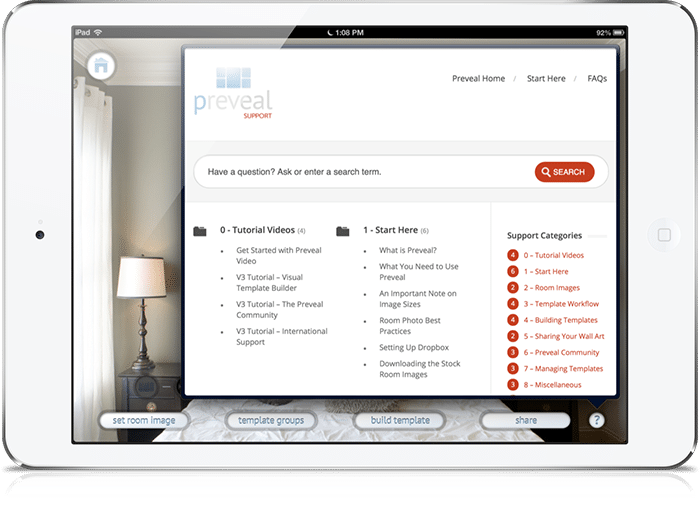
If you ever get stuck, help and support is built right into the application (yes, with links to videos showing you how to use the features):

Preveal Version 3 | Extensive Help & Support In Application

I twisted Chris' arm to give away two redemption codes for two lucky commenters below. Before you race off to type anything below, please first vote for Preveal on PPA Magazine‘s website.

Preveal Hot One Award

As a pioneer in this industry, I feel it is Preveal that totally deserves to win the Hot One Award for Best Mobile Business App. Voting ends on July 7th and you can vote daily.

Preveal LogoOnce you have voted, come back here and tell me a little bit about yourself and why winning one of two redemption codes will mean the world to you and your business. Please do not forget to include your email address as that's the only way we are going to be able to notify you. Good luck!

And do remember, version 3 of Preveal launches on July 8th. If you buy Preveal today, updates via iTunes are always included.

Filed Under: Business, Photography, Web/Tech Tagged With: Chris Scott, client, iPad, Photographers, Sell Images

Supercharge Workshops For Photographers

May 27, 2013 by Seshu | Editor & Publisher

It's funny how things just seem to come together when one decides to pivot. I spoke about scuttling two of my websites and changing course. Part of my new adventure involves being absolutely sure what my future photography clients want and what they are looking for.

As I have stated before, just because you can photograph and publish images on the web does not guarantee you a following or more importantly a business. You have to define who want to do business with in the first place. Most people, including me, get stuck in the “how” – I don't know, for instance, how to use Google Analytics in a way that will give me a good idea of what information my clients are looking for online.

Who has helped me through this process, from time to time, is my friend Scott Wyden Kivovitz. He is a phone call or a Tweet away. If he has time and he is one very active guy, he helps me out. If he doesn't, he usually has a resource online that I can check out on my own. I can't tell you the number of times Scott has come to my rescue. He is incredibly web savvy and it came as no surprise when he was asked to join the Photocrati Media team.

Supercharge Workshops | Photocrati MediaScott asked me to let you all know about two web marketing workshops directed solely towards photographers. He is joined by Erick Danzer and Vanessa Joy. Erick owns Photocrati Media, a highly regarded company that produces among other things WordPress themes for photographers. Vanessa is a well-known teacher, author and photographer.

The workshops are in Denver, Colorado and Hamilton, New Jersey. Sign up before May 31st and save $100.

Specific topics include SEO, keyword selection, site optimization, link building, image SEO, social media and social signals, blogging, content marketing, email marketing and follow up, paid advertising, conversion rate optimization, social proof, and more.

Plus, you get a ton of bonuses:

– Free Access to the Sculpture Gardens & Red Rocks
– Lunch is Included
– Free Copy of the Photographer’s SEO eBook – $39 value
– One Year Membership for the Photographer’s SEO Community – $99 value
– Photocrati WordPress Theme + One Year of Support/Updates – $89 value
– The Laundry List eBook by Rachel Brenke – $9.99 value
– Chic Magazine for phone/iPad – $12 value

Get all the details here and register for either the Colorado or New Jersey Supercharge Workshops, before the prices get bumped up.

[Yes, I am an affiliate partner of Photocrati Media because they provide quality WordPress themes and great value through their various educational resources. I wholly support vendors who help photographers elevate their game!]

Filed Under: Marketing, Photography, Web/Tech Tagged With: Improve Traffic, Photocrati Media, Photographers, search engine optimization, traffic, Workshops

  • « Previous Page
  • 1
  • …
  • 3
  • 4
  • 5
  • 6
  • 7
  • …
  • 20
  • Next Page »

Subscribe To Tiffibox Treats!

Looking for a well-curated email newsletter that will leave you inspired and motivated about your photography business? Sign up below!

About Seshu

Seshu creates relaxed portraits of families and high school seniors in Avon, Connecticut. He also leads a successful headshot photography studio in Connecticut, helping professionals from a variety of disciplines project the very best versions of themselves. He created Tiffinbox as a way of inspiring photographers, to create better images and successful businesses. [Read More]

Email Templates For Headshot Photographers

Email Templates for Headshot Photographers

Recent Posts

  • How Capture One Changed My Event Photography
  • 10 Steps To Stay Positive In Times Of Great Stress
  • Why You Need To Read “Personal Branding For Photographers” Now
  • How To Master Your Website Content Step By Step?
  • Tony Taafe’s TNT Method For Headshot Photographers

Recent Comments

  • Stephen Davison on Are You A Business Owner Who Is Smart, But Stuck?
  • Ben A. on Don Giannatti Clinches The 8th Annual Tiffinbox Award
  • Dan on Don Giannatti Clinches The 8th Annual Tiffinbox Award
  • Donald Giannatti on Don Giannatti Clinches The 8th Annual Tiffinbox Award
  • Stephen Davison on G.E. Masana’s 6 Strategies For Wedding Photography Success
  • Naveen Kumar on Weddings In India Are More Than Being At The Right Place And At The Right Time
  • kartick on Weddings In India Are More Than Being At The Right Place And At The Right Time
  • Leonid Farbman on 6 Uncommon Trends To Grow Your Photography Business
  • Willow and Finch Wedding Photography on 11 Reception Tips To Help Your Wedding Photography
  • Web Designer Malaysia on How To Optimize Your Squarespace Website For Search Engines
  • Creastan on An Interview With Photojournalist G.M.B. Akash
  • Cindy Brown | Atlanta on An Open Letter To A Local Photographer

Become a Patron!

Copyright © 2026 · Tiffinbox · Site Design by Heather Mackan Creative · Built on Genesis