• Photography
  • Interviews
  • Business
  • Reviews

Tiffinbox

Inspiring Photographers

  • Home
  • About
  • Blog
  • Contact

Effectively Automating Social Media Marketing

June 13, 2011 by Andrew Funderburg

Andrew “Fundy” Funderburg, is no stranger to Tiffinbox. Read his previous contribution about his album designing program for wedding and portrait photographers. In full disclosure I have to tell you that he and I are collaborating on SociRoll, the social media marketing tool he discusses briefly in this guest blog post.

I’d like to start off by saying that I am at the top of the list of haters of social media tools being used to spam people. Do not use social media to spam your followers.

So, the question is, why would I invent a program for automating Social Media marketing. The answer is simply that I have more things to share with my friends and followers than I have time in the day to share.

Social Media is all about making connections with people. For me it is about making deep connections. I’m not the type of person always tweeting and posting a ton of personal information. Sure, I’ll hop on Facebook and Twitter during the weekend and talk about the movie I’m going to see or whether my kids won their basketball games. But, during the week, I post a few personal things–mostly information about photography and the business of photography.

We strive to collect and provide some of the best content in the wedding and portrait industry. Content that we create and share today is still valuable in one or two months. If we manually update everything on Facebook and Twitter, all of this old content is lost. We constantly have new followers and friends and these new people will be just as interested in our old content as our new content.

Andrew Funderburg Blog Posts

Since August of 2010, we’ve written 150+ blog posts. More than 100 of these blog posts are related to the business of wedding and portrait photography. There are articles on everything from how to price wedding albums to how to sell portrait packages and everything in between. I want to make sure that our followers see this info.

It would be physically impossible for me to make sure that each one of these blog posts is featured in a tweet once a day. I would lose track of what I shared yesterday, probably miss some things, duplicate some things, etc. The point here is that if I have SociRoll auto post one of my blog posts every day, or even twice a day, we won’t repeat sharing a blog post for 3 months. And then we take into account the fact that if something doesn’t show up in your Twitter in the last five minutes, we won’t see it. The chances of someone seeing repeated Tweets is very low.
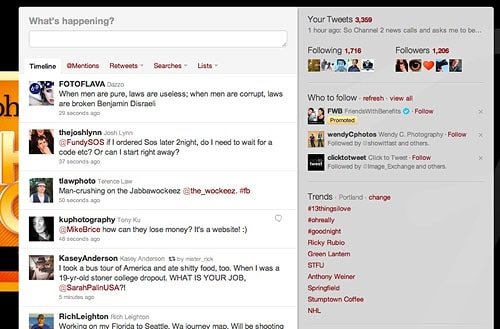
Andrew Funderburg Twitter Streams

Now, let’s take a professional photographer. Let’s say the average wedding photographer shoots 30 weddings and 40 portraits a year. That’s 70 blog posts a year. Then let’s say they have been in business for 3 years. That’s more than 200 blog posts. Sharing one of these (or even two of these) events on their Facebook fanpage every day will seriously add to their brand and their site traffic.

So, do we set it and forget it? No. We let SociRoll do the heavy lifting for us, and we work hard to respond to people, retweet our friends, add personal touches, etc. But we know that our content that we’ve worked extremely hard to create is being shared among our friends and followers. Here's how to get started with SociRoll.

Filed Under: Blogging, Business, Marketing Tagged With: automate, automating, blog, blog post, engaging with people online, facebook, human interest, Marketing, marketing tools, online social networking, portrait photographers, social information processing, social media, tools, Twitter, web 2.0, world wide web

Easy-To-Use WordPress Portfolio Websites

November 18, 2010 by Ellen Petty

This guest blog is by Ellen Petty, the Head Brandslinger at Identity Kitchen, a marketing and design studio specializing in photographers. She and her business partner Marty Thornley just launched a new line of affordable all-in-one WordPress portfolio sites designed specifically for professional photographers at PhotographyBlogSites.com.

Early in 2009, Marty Thornley and I sat down to discuss a more efficient way for photographers to display their work online. We had both, separately, been working with photographers, and discussed the idea of an all-in-one portfolio blogsite that looks and feels like a flash site, with all the SEO benefits of a WordPress blog. We made our wish list; social media integration, customization, easy-to-use backend, unlimited galleries, and integration of fantastic photography tools. After developing many, many custom blogsites for photographers, we saw our theories in action and set out to develop Photography Blogsites.

WE STARTED THINKING ABOUT WEB PRESENCE

Creating a web presence from scratch is simply too much work. You need a hosting account, a website, a blog, facebook, twitter, etc. etc… That's already 3 or 4 places to login and update. If you have a second or third branch of your business this could be multiplied over and over. Like any software, WordPress needs to be updated from time to time. While WordPress itself has become pretty easy to automatically upgrade, sometimes the theme and/or plugins you have been using are not up to date with the new version. So you go through the automatic upgrade and your site breaks. To do this correctly you would backup your database and all your files in case something goes wrong. The problem is, do you know how to backup a database and restore it when something goes wrong? And if you do, you know this process takes a while. Again multiply this by all of your sites. It's not fun.

Photography Blogsites Logo

We set out to make this faster, easier and less expensive, while still providing all the SEO benefits, the support, the security and backups, and the upgrades. All the difficult stuff becomes much easier because we are offering sites on a networked system. We can fix any problems, answer any questions and best of all, release exciting new features to everyone at once. You will always have the latest features immediately.

Photography Blogsites - Latte 2

Photography Blogsites - Espresso

Photography Blogsites - Cuppajoe

THEN WE PERFECTED THE FEATURES

a) EASE OF USE

Our system is a networked installation, called WordPress Multisite. We backup everything twice daily and upgrade all of our plugins and themes, as well as the core WordPress files ourselves to make sure they are up to date and will continue working without a hitch. The process is totally seamless to site owners, who will never see the upgrade messages or worry about backups or upgrades or broken sites.

There is no need for hosting. No need for installation of anything. Ever. You don't even need to check your email for a confirmation link. The signup process takes about thirty seconds and your site is ready to start using. From there, our free trial period lasts 7 days. You won't even be asked for any payment information from us unless you decide to activate a subscription plan.

b) ALL IN ONE SITE

One login gives you access to the portfolio site, the galleries, and the blog. Everything is all one. We offer unlimited galleries, unlimited informational pages, your blog, plus a hub for your social media marketing efforts. One address, one place to maintain so you can get back to taking photos, your passion, and the reason you got into this in the first place.

Photography Blogsite - Galleries

c) SEO

Search Engine Optimization (SEO) is a huge, often misunderstood, topic. What it comes down to is making sure that your site is as visible and findable as possible. While search engines like Google are a big part of this, you also need to be found on Twitter and/or Facebook. You need to be visible to iPhones and mobile devices. This means that your site should built 100% using HTML, and not Flash. There are varying arguments in the whole Flash vs. HTML debate. The only way for Flash sites to compete in the SEO world is to have secondary version called mirror sites for search engines, and a third site for mobile devices. Not only do visitors potentially see three different sites but these are three different pieces of code to maintain and worry about upgrading. Add to that a separate blog, sometimes on a different domain that opens in a different window.

One more argument for a Flash-free portfolio site, just last week Google announced a new feature called Instant Preview, which adds a snapshot of your site to the right of your search results. Unless, your site is Flash, which previews as a grey box. This will revolutionize how potential clients will do their searching. You can find out more information on our blog.

WordPress takes care of 90% of the on page SEO. We have put in some extra features to help take care of the rest. All of the standard SEO plugins are installed automatically: All in One SEO PAck, SEO Friendly Images, XML sitemaps are automatically generated and sent to Google, Yahoo and Bing. We have also developed a plugin in house specifically for photographers called SEO Image Galleries. The only WordPress gallery that uses 100% HTML (no Flash) and automatically adds valuable ALT attributes to every images.

d) EASY TO CUSTOMIZE

Out of the box, WordPress is not an automatic website/blog. You need to hire an outside programmer/designer to work a theme to your liking. That is where we come in. We created themes where just about every aspect can be easily customized by uploading patterns, logos, favicons, social media icons, blog post separators, your photos, or choosing from the options we have included in each theme. You can change the color or fonts on your menu, change the color the menu rollover the background. The possibilities are virtually endless.

Photography Blogsite - Font Options

Photography Blogsite - Backgrounds Latte

e) COST

These sites replace a portfolio site, a blog and any hosting you might need for both. Our lifetime plans are a one-time payment, nothing else to buy ever, no monthly fees ever. Our monthly or yearly plans include everything – your full site, built in blog and hosting. For anyone totally happy with their current website, we also have a blog only versions of all of our themes.

f) SUPPORT

We have put together a support site focused on our sites, but is also a great resource for anyone using WordPress. We have detailed documentation, tutorial videos and a forum. If you have a question or concern, we have a built in ticket system that can be accessed directly from your site.

g) SECURITY & BACKUPS

To help prevent problems, we have enlisted a number of plugins and settings to make sure spam is kept to a minimum and the security of the site is as solid as possible. In the worst-case scenario that something does happen, the best way to protect a site is to have a good backup plan. We backup our database twice a day and all of our content once a day. The backups are stored both locally on our server and remotely.

h) AND FINALLY WE LAUNCHED

We are proud to announce our first three themes in both blogsite and blog-only forms: Latte, Espresso and Cuppa Joe. Because we believe in our product so much, we offer a 7-day free trial. Take our sites for a spin. You can upload your work, writes some posts, link your Twitter and Facebook, and even seamlessly switch between all our themes.

We are offering an introductory lifetime membership for $499. That includes all our themes (now and forever), 4 GB of hosting on our screaming fast servers, our support, maintenance and much, much more. For a full list of features visit our features section. This offer will end on November 30, 2010.

We’d love to hear your thoughts as we will keep developing our sites to be the best they can be. As always, thank you so much for your support!

Win on BLACK FRIDAY 11/26/2010! Photography Blogsites is generously offering ONE LIFETIME MEMBERSHIP (Worth $499) to a Tiffinbox subscriber. Here is how you may be able to win:

1) Follow @photoblogsites on Twitter

2) Tweet the following:

“I just read about Affordable WordPress Portfolio Websites @Photoblogsites on @PicSeshu’s Tiffinbox. #photoblogsites Please RT!”

3) Comment below and tell me WHY you deserve to win. Don’t forget to mention your Twitter handle so that I can make sure you have done both. We need to see a minimum of 50 real, honest, entries before I can give this away on Black Friday 11/26/2010. So whatchawaitinfor?

Filed Under: Photography, Web/Tech, Weblogs Tagged With: blog, blog hosting services, blog software, content management systems, facebook, gallery, online social networking, photographer, Photographers, Photography, portfolio, portfolio site, portfolio website, professional photographers, search engine optimization, search engines, Twitter, websites, wordpress, wordpress blog, world wide web

Get Better Seo By Finding & Using Long Tail Keywords

August 31, 2010 by Guest

Zach Prez, Avatar

This is a guest post by Zach Prez who offers 1-on-1 coaching and SEO workshops. Follow him on Twitter and Facebook.

Everyone knows choosing the right keywords begins the SEO process (or at least you know now). After all, search engine optimization means optimizing keywords so you can rank for them. In this post I’ll refer to keywords as a phrase you want to rank for, and demonstrate how to find longer keywords where competition is less extreme. Even a new site or beginner can rank quickly.

Knowing Keywords is a Critical First Step

Without a keyword list it’s easy to optimize for the wrong words, repeat words, words nobody searches for, and words that don’t create new business. All of these take time away from your true talent (hint: not SEO) and are doomed for failure. Let me demonstrate some examples of what not to do. Feel free to bang your head against a desk for having fallen victim to one of SEO’s classic blunders such as:

1. Wrong words: optimizing for wedding binders won’t make you crazy cash like a successful rank for wedding albums. Go with words people actually use.

2. Repeat words: No need to put Los Angeles wedding photographer in all your blog titles and images. Do you really expect every one of them to rank for that phrase? A homepage will outrank a blog post for a main/primary phrase. Target one page per phrase please.

3. Words nobody searches for: Cool, you rank #1 for Arizona ocean photography but nobody has yet to search that in Google. Don’t waste time optimizing for that.

4. Words that don’t create new business: A #1 rank for celebrity photographer may build your online rep to Ashton Kutcher levels, but if you’re based in Minnesota and not willing to travel it probably won’t deliver new clients. Avoid the above by doing a little up front keyword research to find the most searched terms. We’ll put those terms into a list and map it to a content timeline.

How Longer Phrases Can Help SEO

Before you go picking the top 10 most difficult keywords in your niche, let me explain how Google works.
1. A user types a phrase into Google
2. Google looks for a page about that phrase
3. Google finds lots of pages about that phrase and ranks the page with the most authority at #1 (authority is mostly determined by the number of links pointing to the page or site)

Thus, Google looks for keywords on the page (in the title, then URL, then body copy and images). A phrase like Los Angeles wedding photographer appears on 3.5 million pages.

Los Angeles Wedding Photographer Google Results

Rather than try to compete on authority for that phrase (or in addition to), find phrases like Hollywood Indian wedding photography ideas. No pages exist with that phrase, so if you optimize a blog post then you will easily rank very high. Plus you might even rank for different keyword combinations such as Hollywood Indian wedding, Hollywood photography ideas, etc. Even if only a handful of people search for that every month, that blog post provides exactly what they are looking for. Specific phrase + little competition = new client. Multiply the number of posts optimized for specific phrases and the traffic becomes significant. Look at this Google Analytics snapshot from a Sacramento Photographer. The main phrase Sacramento photographer was just 1 of 3,868 keywords that she ranked for and contributed to less than 1% of total traffic. Most of the few thousand phrases are very specific searches you would never imagine people would type.

Jill Carmel Analytics

Long-tail SEO is a strategy to find and capture search presence for the thousands of long phrases users will type to find you. Here’s how to locate and organize them.

Keyword List Worksheet

Start with a 4 column list on paper or spreadsheet using the following column headings

Adjectives: Indian best
Locations: Los Angeles Hollywood
Niches:  wedding photography
Nouns:  ideas

As the columns fill out, use various keyword combinations to develop the best phrases for your business.
1. Indian Hollywood wedding ideas
2. Best Los Angeles Indian wedding photography

Put the most important phrase at the top of the list. Next time you write a page or a post, take a look at the list and see if you can incorporate one of the phrases into your post idea. Or you can proactively start writing posts about each of your phrases. This week write about item 1, next week item 2, etc. Cross them off your list so that you don’t optimize for the same phrase twice.

Idea! Create a “best-of” post using content you already have written elsewhere. Take a paragraph here, and image there, and using old posts you can quickly create a new and optimized post.

How to Find Great Keywords

Two of my favorite 10 SEO Tools for Photography Keywords are free Google Keyword Tool and Traffic Travis PC software. Most everyone knows about the Google Keyword Tool for keyword research, but may be confused on how to get great ideas. I searched Los Angeles wedding photographer has 170 broad searches per month, meaning those 3 words were somewhere in the search criteria. Notice other keywords that users type as a part of their search phrase: Indian, top, ideas, photography. Add these to the keyword list worksheet for future use.

Indian Wedding Photographer Ideas

Yes, it is that simple. Looking up Hollywood Indian wedding photography ideas would not show any search volume, but we can see that users do search with those words in different combinations. If people are searching top wedding photographers, then they would also search for top in local searches as well. You don’t need 1,000 visits to grow your business. Rank high for something that 5 people search for each month and you can snag all of those clients ASAP. Traffic Travis just offers a second opinion. Another search uncovers more great keywords. I add the following keywords to my list: tips, best, destination, beach.

Hollywood Wedding Photographer Travis Results

My next post might be something like “10 Photographer Tips for the Best Beach Wedding in Los Angeles” and capture users searching for beach wedding tips, best photographer tips, Los Angeles beach wedding, etc. The power of long-tail SEO gains a little traffic from a number of phrases.

Compare Two Keywords

The other time a keyword tool comes in handy is when comparing the search volume of two or more keyword phrases. If I’m a wedding photographer in Southern California it would help to know which cities have the most searches. After typing a few phrases (at the same time) into the Google Keyword Tool I find that Orange County is very highly searched. Optimizing for that location has a lot more potential than Beverly Hills, while Hollywood and Burbank have very few searches. The keyword list should reflect this priority with the majority of phrases going after Orange County and maybe only 1 or 2 for the other locations.

Compare Two Keywords

For the creative and visual learners out there this video speaks to some of the tactics above.

Take Keywords to the Next Level

”Blog

Keywords are a small portion of search engine optimization strategy. My Photographers SEO Book and Blog SEO Zen ebook are quickly becoming the standard do-it-yourself guides for ranking photo and wedding businesses. Learn about site structure, link strategy, and tools with no technical knowledge needed.

Filed Under: Marketing, Photo Biz Tagged With: celebrity photographers, google, google search, index term, information retrieval, internet search engines, keyword, keyword list, keyword optimization, keyword research, keyword tracking, keywords, long tail, los angeles, los angeles wedding photographers, Marketing, optimize keyword, people search, Photographers, search engine optimization, seo, web search engine, wedding albums, world wide web

Photographers – Don’t Use Email Marketing To Market!

August 30, 2010 by Guest

Dean Levitt, AvatarThis is a guest post by Dean Levitt, Mad Mimi‘s Chief of Culture. Based in Brooklyn, Dean spends altogether too much time thinking about email, people, music and hanging out in the park.

I've always been a huge fan of poetry, especially the sonnets of Edna St. Vincent Millay. I think that the “aha!” moment with poetry came to me at the Boston Museum of Fine Art while strolling through a photography exhibit. I saw some line somewhere about photography capturing a moment in emotion (or the other way around depending on your outlook) and it kinda hit me how similar the two arts are. Poetry (at least the kind of poetry I enjoy) is a wordy photograph.

No one understands better how one medium can be two things than photographers. There's a world of difference between a “photograph” and a snapshot, miles between prose and poetry and a gulf between an email that “markets” and an email that reaches out and connects. That's what we do! We connect… Think of your email marketing service as a way to share, touch, explore and exhibit. Whether your art form is expressed professionally as a portrait or wedding photographer or in purely aesthetic shots for the joy of it, you can utilize the available tools to stay visible and grow (as a business and as an artist).

Poetry is a wordy photograph.

Our entire culture has moved into a system of immediate sharing. Via Flickr, Facebook, Twitter and email, we're constantly sharing and updating. This only gets annoying when we're bombarded by advertising, marketing and spam. Anyone still use MySpace? It's like trying to add a slogan into a rhyming couplet! Take a step back and think about the beauty inherent in the social mediums rather than the possible benefit to yourself.

Building an email with Mad Mimi provides an easy way to share with hundreds (or thousands) of people in moments but it's only really sharing when it's personal and sincere. Take advantage of these tools in our lives to give a moment of your time to tell your friends, clients, customers and potential customers what's on your mind, what you're thinking and what is coming up professionally and personally. It makes receiving an email more like a coffee break with a good friend.

Mad Mimi Email Marketing

Emails provide a lovely way to exhibit your latest works by embedding images directly into the email accompanied by the story with it; whether is the story of a lifetime captured in a portrait, or the love shared at a wedding. Your email becomes a gallery. It's like a wormhole really – an gorgeous powerful email received at a desk whips the reader into a gallery where the photographs transport the viewers out of their moments into the moment captured by you.

So stop marketing and be a photographer, even when you're being an email marketer.

Please do email me and I'd be happy to help you with the boring technical bits of building lovely emails!

Dean and Mad Mimi have been instrumental in my launching MANTRA, a monthly e-newsletter about my wedding photography. While an in-depth review of the service and my experiences will be published soon here, I went ahead and became an affiliate of Mad Mimi. If you were to click the links or the image in this post, I do get a small commission. Thank you and thanks to Mad Mimi.

Filed Under: Marketing, Photo Biz, Photography Tagged With: Business, dean levitt, e mail, email marketing, fine art, mad mimi, Marketing, newsletters, photographer, Photographers, photography exhibit, poetry, Wedding Photography, world wide web

  • « Previous Page
  • 1
  • 2

Subscribe To Tiffibox Treats!

Looking for a well-curated email newsletter that will leave you inspired and motivated about your photography business? Sign up below!

About Seshu

Seshu creates relaxed portraits of families and high school seniors in Avon, Connecticut. He also leads a successful headshot photography studio in Connecticut, helping professionals from a variety of disciplines project the very best versions of themselves. He created Tiffinbox as a way of inspiring photographers, to create better images and successful businesses. [Read More]

Email Templates For Headshot Photographers

Email Templates for Headshot Photographers

Recent Posts

  • How Capture One Changed My Event Photography
  • 10 Steps To Stay Positive In Times Of Great Stress
  • Why You Need To Read “Personal Branding For Photographers” Now
  • How To Master Your Website Content Step By Step?
  • Tony Taafe’s TNT Method For Headshot Photographers

Recent Comments

  • Stephen Davison on Are You A Business Owner Who Is Smart, But Stuck?
  • Ben A. on Don Giannatti Clinches The 8th Annual Tiffinbox Award
  • Dan on Don Giannatti Clinches The 8th Annual Tiffinbox Award
  • Donald Giannatti on Don Giannatti Clinches The 8th Annual Tiffinbox Award
  • Stephen Davison on G.E. Masana’s 6 Strategies For Wedding Photography Success
  • Naveen Kumar on Weddings In India Are More Than Being At The Right Place And At The Right Time
  • kartick on Weddings In India Are More Than Being At The Right Place And At The Right Time
  • Leonid Farbman on 6 Uncommon Trends To Grow Your Photography Business
  • Willow and Finch Wedding Photography on 11 Reception Tips To Help Your Wedding Photography
  • Web Designer Malaysia on How To Optimize Your Squarespace Website For Search Engines
  • Creastan on An Interview With Photojournalist G.M.B. Akash
  • Cindy Brown | Atlanta on An Open Letter To A Local Photographer

Become a Patron!

Copyright © 2026 · Tiffinbox · Site Design by Heather Mackan Creative · Built on Genesis